Category Archives: Audio & Multimedia

Audio Encoders/Decoders, Audio File Players, Audio File Recorders, CD Burners, CD Players, Multimedia Creation Tools, Music Composers, Other, Presentation Tools, Rippers & Converters, Speech, Video Tools

AnyMP4 Mac Blu-ray Player 6.3.22

Type: Shareware
Cost: $18.75
Size: 37.57 MB
Release date: Apr 27 2021
Platform: Mac OS X,
Publisher’s Site:  https://www.anymp4.com
Publisher’s Product Page:  https://www.anymp4.com/mac-blu-ray-player/
Country: China
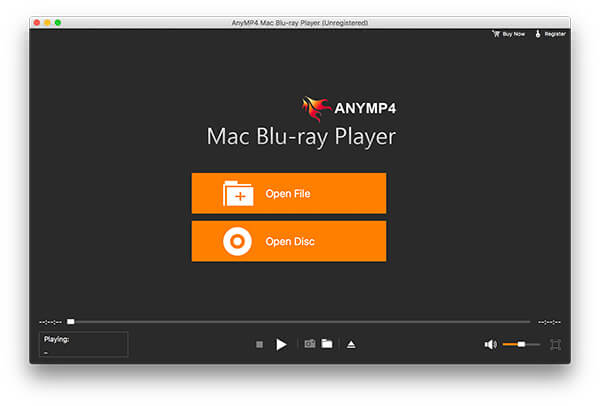

AnyMP4 Mac Blu-ray Player

AnyMP4 Mac Blu-ray Player can play any Blu-ray disc and Blu-ray movies, Blu-ray folder/ISO image on your Mac. Moreover, you are able to play 4K videos like 4K H.265 MP4, 4K H.264 TS, XviD 4K, 4K MKV and more, and 1080p HD video like TS, HD MP4, HD AVI, HD MOV, HD H.264/MPEG-4 AVC, as well as the general video formats like MP4, MOV, M4V, MKV, AVI, WMV, etc.


Key Features:

1. Play any Blu-ray disc/folder/ISO image file on your Mac
This Blu-ray Player for Mac software can help you play Blu-ray disc, Blu-ray folder and Blu-ray ISO image file on your Mac, so you can enjoy the wonderful Blu-ray movie at any time.

2. Play any video on Mac
With Blu-ray Player for Mac you can play 4K H.265 MP4, 4K H.264 TS, XviD 4K, 4K MKV and more, and 1080p HD video including TS, MTS, HD MP4, HD AVI, HD MOV, HD H.264/MPEG-4 AVC and more.

3. Choose your needed audio track and subtitle track
This AnyMP4 Mac Blu-ray Player software allows you to choose your needed audio track and subtitle track. For example, your Blu-ray disc owns English, Spanish, French, and Chinese track, you can choose English subtitle track and French audio track. All the choice depends on your favor.

4. Easy to operate
With this Mac Blu-ray Player software, you can operate the whole process easily. For example, you can switch the screen size and view the guidance. Besides, you can choose your preferred Blu-ray title/chapter, capture your liked snapshot while you play the video. Then you can share the exciting movies with your friends and families at home easily.

Graphcat<

Apeaksoft Video Converter Ultimate 2.2.10

Type: Shareware
Cost: $55.20
Size: 1.68 MB
Release date: Jul 07 2021
Platform: Win2000,WinXP,Win7 x32,Win7 x64,Windows 8,Windows 10,WinServer,WinOther,WinVista,WinVista x64
Publisher’s Site:  https://www.apeaksoft.com/
Publisher’s Product Page:  https://www.apeaksoft.com/video-converter-ultimate/
Country: China


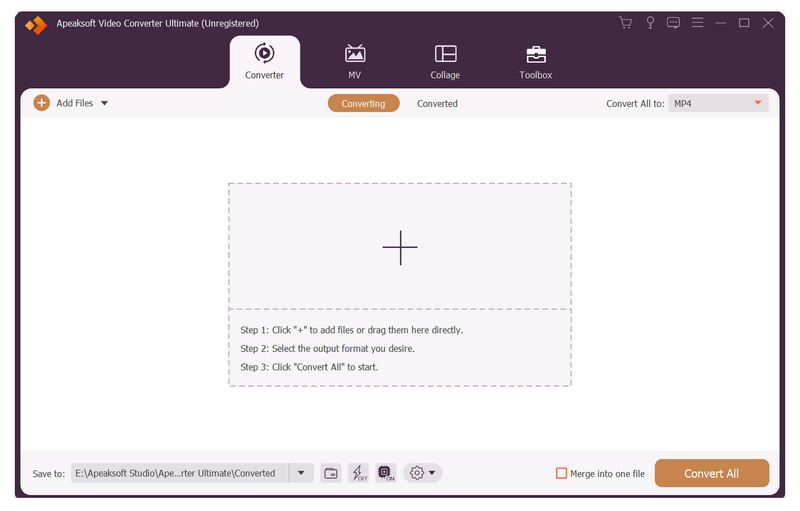
Apeaksoft Video Converter Ultimate

Apeaksoft Video Converter Ultimate is able to convert any media files to other formats so that you can enjoy them on more devices. Before conversion, you could edit video effects according to your need.

Key functions:

1. Convert all kinds of media files
Apeaksoft Video Converter Ultimate is skilled at converting any video/audio files to various formats such as MP4/AVI/WMV/FLAC/WMA/MP3, etc. In addition, it supports different devices, like Samsung, iPhone, PSP, Avid, etc.

2. Convert DVD and 3D videos
With this excellent software, you could edit and convert your DVD disc/ISO files/folder at ease. It could not only convert DVD to main videos, but also convert the selected DVD titles to other file formats. It could also convert common videos to 3D videos so that you could view it with 3D glasses freely.

3. Make GIF, MV and collage, edit ID3 tag, compress large files
With Apeaksoft Video Converter Ultimate, you are able to create many interesting GIF images. Moreover, you could make your own beautiful MV with various themes via it. It also allows you to make different collages as you like. In addition, you could use the metadata editor to edit ID3 tag of your music files. Usually, it is difficult to send large files to others, Apeaksoft Video Converter Ultimate could compress the large files to smaller size.

4. Powerful editing and video enhancement function
You can enhance the video by upscaling resolution, optimizing brightness/contrast, removing video noise and reducing video shaking. You are also able to edit your video such as crop the video area size, clip/rotate your videos or add watermark to your files, etc.

WinX HD Video Converter Deluxe 5.16.5

Type: Shareware
Cost: $29.95
Size: 45.06 MB
Release date: Aug 25 2021
Platform: Win2000,WinXP,Win7 x32,Win7 x64,Windows 8,Windows 10,WinServer,WinOther,WinVista,WinVista x64
Publisher’s Site:  http://www.macxdvd.com/
Publisher’s Product Page:  http://winxdvd.com/hd-video-converter-deluxe/
Country: China


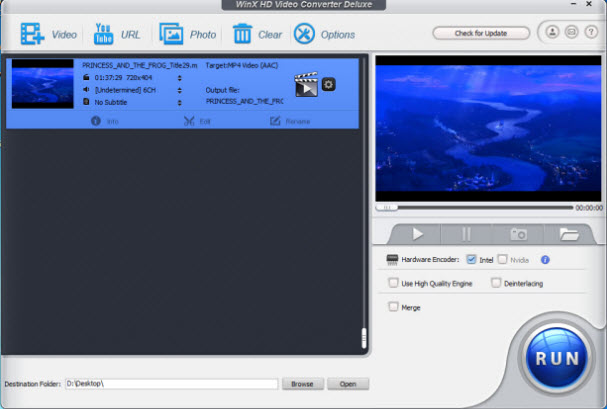
WinX HD Video Converter Deluxe

WinX HD Video Converter Deluxe is the best GPU-accelerated 4K/HD video converter for Windows 11/10. It can convert any 4K/HD video to MP4, MOV, AVI, MP3, and iPhone or Android, resize large videos for faster uploading, trim/crop/merge video clips to create new stories and download 4K/HD videos to MP4 MP3 flawlessly. With unique GPU acceleration tech and High Quality Engine, it can convert video at 47X real-time fast speed with intact quality.

Key Features:
1) Convert 4K HD/SD videos from/to over 200 formats, like MKV to MP4, MKV to AVI, M2TS, HEVC/H.265, H.264, MOV, M4V, MPEG4, AVI, FLV, WMV, MP3, AAC, etc.
2) With 420+ preset profiles, transfer any video to iPhone, iPad, iPod, Apple TV, Android Samsung, Huawei, Sony, Surface, and more devices for watching anytime.
3) Compress large video size by up to 90% for easy storage and faster uploading.
4) Save online video and music from 1000+ video sites and convert to MP4/MP3 for offline playback.
5) Edit, cut, crop, merge videos, add subtitles and adjust parameters, etc.
6) Make photos into slideshow video with music for sharing with friends.

How to Convert 4K MKV to MP4 with High Quality?
Step 1, Import video into this MKV converter by clicking the ‘+ video’ button.
Step 2, Select the output profile. You can choose converting MKV to MP4, MKV to iPhone, MOV to MP4 and more upon your personal demand.
Step 3, Press ‘RUN’ to start the conversion.

How to download Facebook/Dailymotion/Yahoo, etc video with Fast Speed?
Step 1, Copy the video link from Facebook/Dailymotion/Yahoo and then paste it into this 4K/HD video downloader via the ‘RUL’ pop-up window.
Step 2, Click ‘Analyze’. It will auto detect all the information, such as resolution, format, size and code.
Step 3, Select your desired one and click ‘ok’.