Type: Freeware
Cost: $0.00
Size: 44.36 MB
Release date: Feb 05 2021
Platform: Win2000,WinXP,Win7 x32,Win7 x64,Windows 8,Windows 10,WinServer,WinOther,WinVista,WinVista x64
Publisher’s Site: http://www.windows10codecpack.com
Publisher’s Product Page: https://www.windows10codecpack.com/
Country: Great Britain
Cost: $0.00
Size: 44.36 MB
Release date: Feb 05 2021
Platform: Win2000,WinXP,Win7 x32,Win7 x64,Windows 8,Windows 10,WinServer,WinOther,WinVista,WinVista x64
Publisher’s Site: http://www.windows10codecpack.com
Publisher’s Product Page: https://www.windows10codecpack.com/
Country: Great Britain
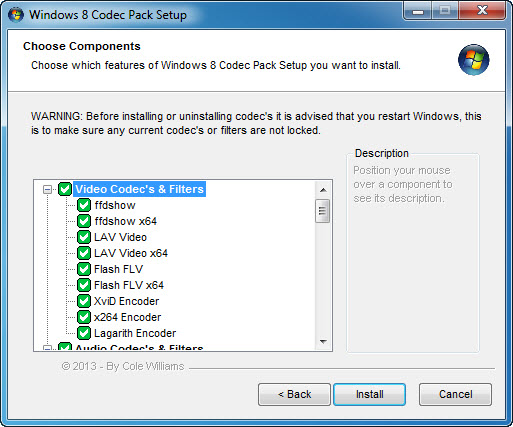

The Windows 10 Codec Pack is a free easy to install bundle of codecs/filters/splitters used for playing back movie and music files. After installation you will be able to play 99.9% of files through your media player, along with VCDs, SVCDs, and DVDs.
Additional file associations are applied to make Windows Media Player play BDMV (unencrypted BluRay/AVCHD), EVO (unencrypted HD-DVD), MKV, M2TS, MP4, VOB, OGM, WEBM, FLV, and NUV movie files, as well as AC3, DTS, FLAC, APE, OGG, WV, TTA, OFR, SHN music files, and finally MO3, IT, XM, S3M, MTM, MOD, and UMX tracker audio files. Compression types supported include AVC, H.264, x264, H.263, H.261, DivX, XviD, Flash Video, MJPEG, MPEG4, MPEG2, along with many more.
The package detects the best proof tested settings with additional options for CPU, GPU, and DXVA compatibility. Audio options during install allow users to set output from basic 2.0 channel stereo, right up to 7.1 channel output. Digital audio S/PDIF / HDMI passthrough for home theatre systems can be set by the user to output Dolby Digital AC3, Dolby Digital Plus E-AC3, Dolby TrueHD, DTS, DTS-HD, even multichannel non-AC3/DTS audio (for example 5.1 channel FLAC) can be set to encode as AC3 and output to digital S/PDIF / HDMI.
Included in the package are a number of encoder codec’s, allowing you to encode files in formats such as DivX and XviD in your favourite encoding application.
Please note that protected formats may require a specific player. 32-bit and 64-bit version of Windows Media Player are supported as well as most other players. The package supports 32-bit and 64-bit versions of Windows.
Additional file associations are applied to make Windows Media Player play BDMV (unencrypted BluRay/AVCHD), EVO (unencrypted HD-DVD), MKV, M2TS, MP4, VOB, OGM, WEBM, FLV, and NUV movie files, as well as AC3, DTS, FLAC, APE, OGG, WV, TTA, OFR, SHN music files, and finally MO3, IT, XM, S3M, MTM, MOD, and UMX tracker audio files. Compression types supported include AVC, H.264, x264, H.263, H.261, DivX, XviD, Flash Video, MJPEG, MPEG4, MPEG2, along with many more.
The package detects the best proof tested settings with additional options for CPU, GPU, and DXVA compatibility. Audio options during install allow users to set output from basic 2.0 channel stereo, right up to 7.1 channel output. Digital audio S/PDIF / HDMI passthrough for home theatre systems can be set by the user to output Dolby Digital AC3, Dolby Digital Plus E-AC3, Dolby TrueHD, DTS, DTS-HD, even multichannel non-AC3/DTS audio (for example 5.1 channel FLAC) can be set to encode as AC3 and output to digital S/PDIF / HDMI.
Included in the package are a number of encoder codec’s, allowing you to encode files in formats such as DivX and XviD in your favourite encoding application.
Please note that protected formats may require a specific player. 32-bit and 64-bit version of Windows Media Player are supported as well as most other players. The package supports 32-bit and 64-bit versions of Windows.
 <
<