Category Archives: Audio & Multimedia

Audio Encoders/Decoders, Audio File Players, Audio File Recorders, CD Burners, CD Players, Multimedia Creation Tools, Music Composers, Other, Presentation Tools, Rippers & Converters, Speech, Video Tools

Vidmore Screen Recorder for Mac 1.0.22

Type: Shareware
Cost: $29.95
Size: 19.91 MB
Release date: Jan 27 2021
Platform: Mac OS X,
Publisher’s Site:  https://www.vidmore.com/
Publisher’s Product Page:  https://www.vidmore.com/screen-recorder/
Country: China
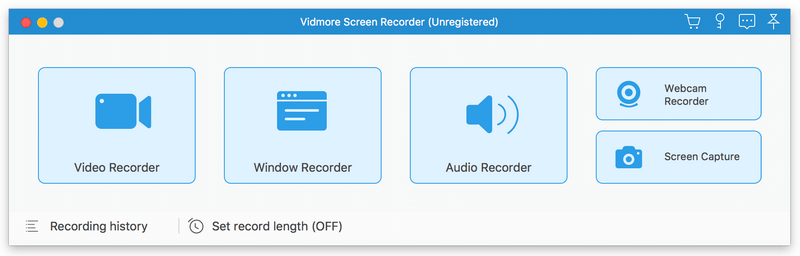

Vidmore Screen Recorder for Mac

Vidmore Screen Recorder for Mac is an easy-to-use screen recording program, with it, you could record online videos that you could not download, record the audio files you want to save and so on. In addition, recording the system and microphone sound is also possible.


Key functions:

1. Record video and audio files
With Vidmore Screen Recorder for Mac, you could save any precious media files you want to use in the future. It is able to record all kinds of media files without any hassle. And it also allows you to record the system and microphone sound. In addition, you could record the full screen or select the area you want to record as you like.

2. Trim Recordings and schedule recording task
If you just want to save a part of your recordings and you do not want to record it again, please do not worry, Vidmore Screen Recorder for Mac could help you solve this easily. You just need to choose the start and end time for your clip after recording, then you could save the part you want. If you want Vidmore Screen Recorder for Mac to record the files later automatically, you could schedule the recording task by setting the task name, the starting and ending time and the duration, then it will record at the time you want.

3. Record GIF
Do you want to save media files as GIF? With Vidmore Screen Recorder for Mac, the output video or screenshot format could be saved as GIF files.

4. Powerful editing functions
You could set the output video format, video codec and video quality according to your need. Moreover, you are able to add text, arrows and shapes to your recording files. If you want to set hotkeys for start and pause recording or screen capture, all of this could be achieved with Vidmore Screen Recorder for Mac easily.

Graphcat<

AnyMP4 Video Converter 7.2.36

Type: Shareware
Cost: $33.75
Size: 38.34 MB
Release date: Apr 27 2021
Platform: Win2000,WinXP,Win7 x32,Win7 x64,Windows 8,Windows 10,WinServer,WinOther,WinVista,WinVista x64
Publisher’s Site:  https://www.anymp4.com
Publisher’s Product Page:  https://www.anymp4.com/video-converter/
Country: China


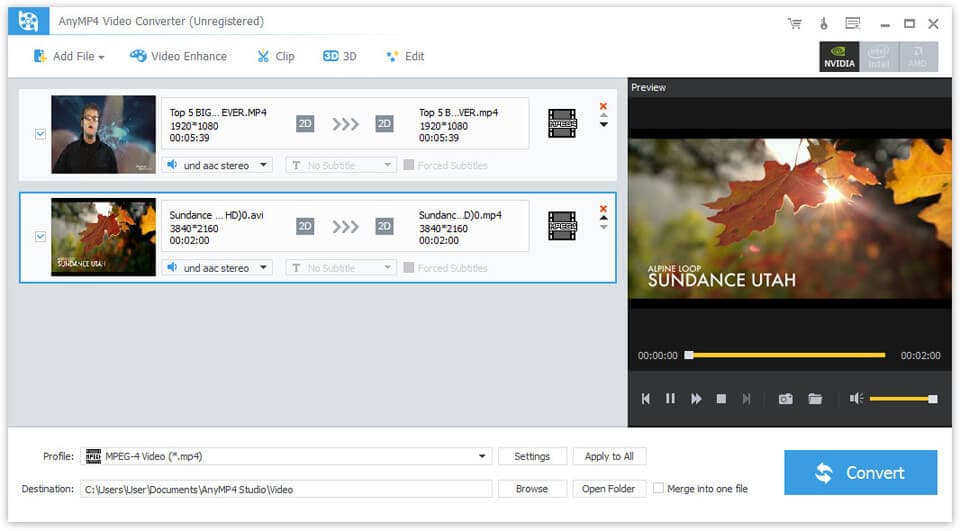
AnyMP4 Video Converter

AnyMP4 Video Converter is used to help users convert any video to popular video (MKV, MOV, MTV, VOB, WMV, AVI, etc.) and audio (AAC, AIFF, AMR, etc.) formats on computer with fast conversion speed and excellent output video/audio quality.

Key Features:

1. Convert any video/audio file including 4K video.
AnyMP4 Video Converter is able to help users convert any video/audio file, including 3GP, 3G2, AVI, DV, DIF, FLV, SWF, F4V, MOD, MJPG, MJPEG, MKV, VOB, DAT, MP4, M4V, MPV, QT, MOV, RM, RMVB, TOD, TS, TRP, TP, WMV, ASF, MPEG-2 HD, MPEG-4 HD, QuickTime HD, WMV HD, HD TS, HD MTS, HD M2TS, HD TRP video and AAC, AIF, AIFF, APE, OGG, etc. audio.

2. Edit your video with the powerful editing function.
With this program, you can clip a video to your desired time length segments by setting the start and end time. What’s more, it can upscale video resolution, optimize the brightness and remove video noise to make your video more energetic. You are also allowed to rotate and flip your video to the right angle and edit your video with the image or text watermarks, etc. at your disposal.

3. Define video or audio effect.
AnyMP4 Video Converter enables you to define the output video or audio parameters, such as Video Encoder, Frame Rate, Video Bitrate, Resolution, and Audio Encoder, Sample Rate, Channels, Audio Bitrate. Also, you can adjust the video brightness, contrast, saturation, hue and volume.

4. Convert video for various devices.
AnyMP4 Video Converter supports all popular devices like
iPhone 12/11 Pro Max/11 Pro/11/XS/XS Max, iPhone 8/8 Plus, iPhone 7/7 Plus, iPad Pro/mini, iPod, Samsung, LG, HTC, HUAWEI and more.
&uip=117.89.13.15

Media Player Codec Pack 4.5.7.117

Type: Freeware
Cost: $0.00
Size: 44.24 MB
Release date: Feb 02 2021
Platform: Win2000,WinXP,Win7 x32,Win7 x64,Windows 8,Windows 10,WinServer,WinOther,WinVista,WinVista x64
Publisher’s Site:  https://www.mediaplayercodecpack.com
Publisher’s Product Page:  https://www.mediaplayercodecpack.com/
Country: Great Britain


Media Player Codec Pack

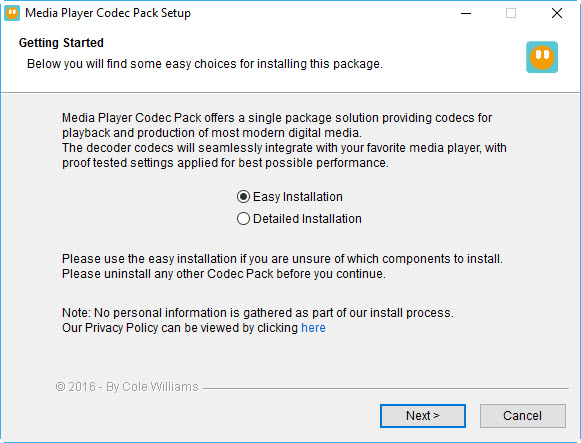
The Media Player Codec Pack is a free simple to install package of codecs/filters/splitters used for playing back movie and music files. After installation you will be able to play 99.9% of files through your media player, along with XCDs, VCDs, SVCDs, and DVDs.
Additional file associations are applied to make Windows Media Player play BDMV (unencrypted BluRay/AVCHD), EVO (unencrypted HD-DVD), MKV, M2TS, MP4, VOB, OGM, WEBM, FLV, and NUV movie files, as well as AC3, DTS, FLAC, APE, OGG, WV, TTA, OFR, SHN music files, and finally MO3, IT, XM, S3M, MTM, MOD, and UMX tracker audio files. Compression types supported include AVC, H.264, x264, H.263, H.261, DivX, XviD, Flash Video, VP3-8, Morgan JPEG, MJPEG, MPEG4, MPEG2, along with many more.
The package detects the best proof tested settings with additional options for CPU, GPU, and DXVA compatibility. Audio options during install allow users to set output from basic 2.0 channel stereo, right up to 7.1 channel output. Digital audio S/PDIF / HDMI passthrough for home theatre systems can be set by the user to output Dolby Digital AC3, Dolby Digital Plus E-AC3, Dolby TrueHD, DTS, DTS-HD, even multichannel non-AC3/DTS audio (for example 5.1 channel FLAC) can be set to encode as AC3 and output to digital S/PDIF / HDMI.
Included in the package are a number of encoder codec’s, allowing you to encode files in formats such as DivX and XviD in your favourite encoding application.
Please note that protected formats may require a specific player. 32-bit and 64-bit version of Windows Media Player are supported as well as most other players. The package supports 32-bit and 64-bit versions of Windows.