Category Archives: Audio & Multimedia

Audio Encoders/Decoders, Audio File Players, Audio File Recorders, CD Burners, CD Players, Multimedia Creation Tools, Music Composers, Other, Presentation Tools, Rippers & Converters, Speech, Video Tools

Apeaksoft Blu-ray Player for Mac 1.1.36

Type: Shareware
Cost: $39.20
Size: 35.48 MB
Release date: Jan 06 2021
Platform: Mac OS X,
Publisher’s Site:  https://www.apeaksoft.com/
Publisher’s Product Page:  https://www.apeaksoft.com/blu-ray-player/
Country: China

Apeaksoft Blu-ray Player for Mac

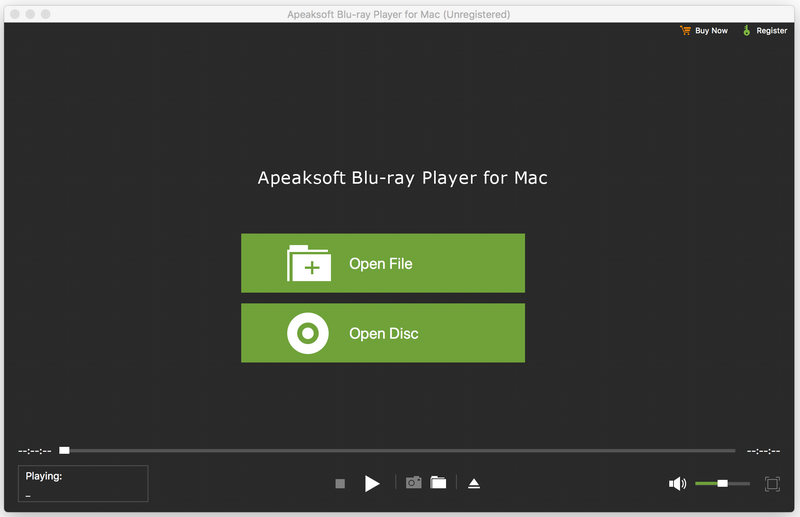
Apeaksoft Blu-ray Player for Mac allows you to enjoy Blu-ray disc/folder/ISO files with lossless quality on Mac. Apart from that, it enables you to play 4K UHD, 1080p/720p HD and SD videos including HD MPG, HD MPEG, HD MPEG2, HD MPEG4, HD MP4, QuickTime HD MOV and common video files like MP4, MTS, MKV, AVI, FLV, MOV and more. Moreover, it enables you to choose your needed video and audio track. You can also choose your needed language as you like.


Key functions:

1. Play any Blu-ray disc/folder/ISO files on Mac
This Blu-ray Player enables you to play any 2D/3D Blu-ray disc, Blu-ray folder/ISO image files with high quality of video and audio. So you can enjoy your videos with perfect image quality.

2. Play any video like 4K UHD, 1080p/720p HD and SD, MP4, MOV, etc.
This professional Mac Blu-ray Player can also play 4K UHD, 1080p/720p HD and SD videos for better watching experience. You can enjoy any HD videos like HD AVI, HD H.264/MPEG-4 AVC, HD MKV, etc. Meanwhile, you can play common videos like MP4, MOV, M4V, MKV, AVI, WMV, TS, etc. on Mac.

3. Choose your needed video and audio track
With this Blu-ray Player for Mac, you can set the most suitable subtitle track through clicking video, and then clicking video track. You can also click audio, and then choose your needed audio track, audio channel and audio device.

4. Wonderful user experience
Apeaksoft Blu-ray Player for Mac is an easy-to-use media player program. Its simple operation steps let you use it easily without any confusion.

Graphcat<

WinX HD Video Converter Deluxe 5.16.2

Type: Shareware
Cost: $29.95
Size: 45.06 MB
Release date: Dec 01 2020
Platform: Win2000,WinXP,Win7 x32,Win7 x64,Windows 8,Windows 10,WinServer,WinOther,WinVista,WinVista x64
Publisher’s Site:  http://www.macxdvd.com/
Publisher’s Product Page:  http://winxdvd.com/hd-video-converter-deluxe/
Country: China


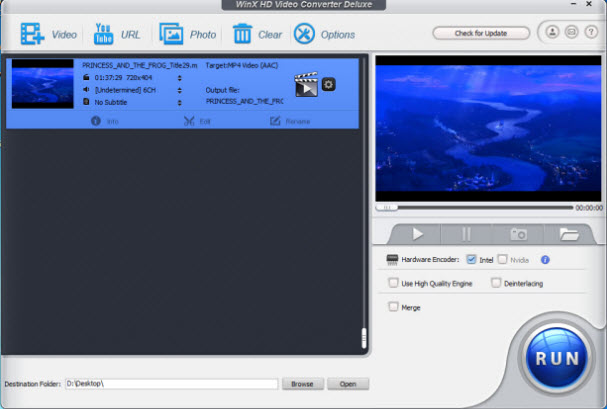
WinX HD Video Converter Deluxe

Get World’s No.1 fast HD video converter for Windows (10) and 4K/1080p video downloader with level-3 hardware acceleration tech.

WinX HD Video Converter Deluxe is all-in-one HD video converter, 4K/HD video downloader and editor.It perfectly supports SD, 1080p multi-track HD and 4K UHD videos HEVC, Blu-ray videos, content filmed by various camcorders / drones, MP4, AVI, WMV, etc.; has 420+ preset profiles to convert SD/HD/UHD movies and videos for playing on Apple and Android;auto detect and download video from Facebook, Dailymotion, Yahoo and other 300+ sites in any resolutions.

How to Convert MKV,AVCHD,MP4,AVI,FLV videos to iPhone iPad Android with High Quality?
Step 1, Import video into this MKV converter by clicking the ‘+ video’ button.
Step 2, Select the output profile. You can choose converting MKV to iPhone, MKV to Android, MP4 to iPhone.
Step 3, Press ‘RUN’ to strat the conversion.
How to download Facebook/Dailymotion/Yahoo, etc video with Fast Speed?
Step 1, Copy the video link from Facebook/Dailymotion/Yahoo and then paste it into this 4K/HD video downloader via the ‘RUL’ pop-up window.
Step 2, Click ‘Analyze’. It will auto detect all the information, such as resolution, format, size and code.
Step 3, Select your desired one and click ‘ok’.

Key Features:
Support hardware accelerated video encoding and decoding technology to quicken the HD video convert and download speed.
Convert between HD Videos and Regular Videos such as MKV to AVI, MKV to MP4, MPEG, WMV, MOV, 3GP.
Support HD-camcorder videos like Canon JVC MOD video to AVI/MPEG, Sony M2TS/MTS to AVI/MP4, etc.
Achieve mutual video conversion among AVI, MP4, MPEG, WMV, MOV, FLV, 3GP, Google TV, WebM, etc.
Convert videos for playback on Apple iPhone X/8/7/Plus, 6/6 Plus, iPod/5, iPad/Air 2/Mini 3, Galaxy S7/edge/Note 7, Xperia XZ , Android, etc.
Support 1080p HD/ 4K UHD/ 3D videos downloading and keeps original audio video effect.

DarkWave Studio 5.9.4

Type: Freeware
Cost: $0
Size: 2.13 MB
Release date: Nov 16 2020
Platform: Win2000,WinXP,Win7 x32,Win7 x64,Windows 8,Windows 10,WinServer,WinOther,WinVista,WinVista x64
Publisher’s Site:  https://www.experimentalscene.com/
Publisher’s Product Page:  https://www.experimentalscene.com/software/darkwave-studio/
Country: Australia


DarkWave Studio

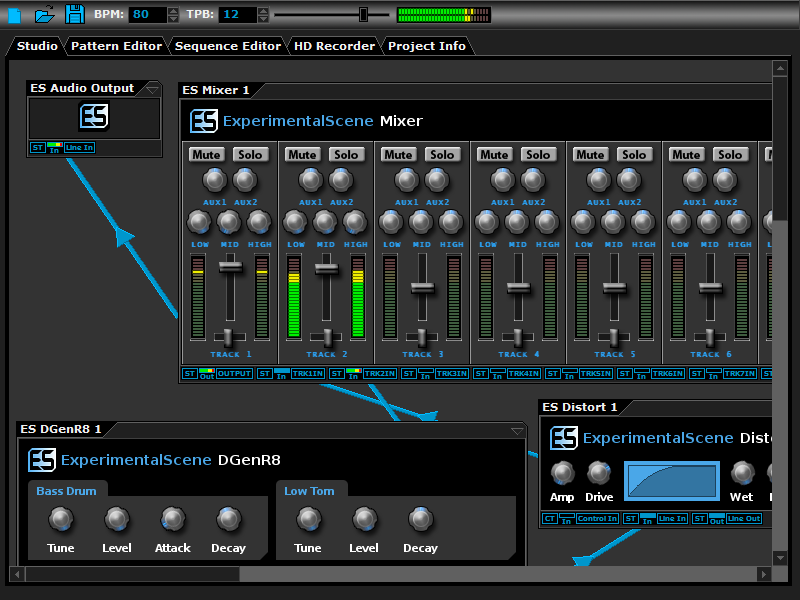
DarkWave Studio is a free Digital Audio Workstation (DAW) / modular virtual music studio for Windows. You can easily use the built in sequencer, bundled DarkPlug machines and third-party VST effects and VSTi instruments to create music. DarkWave Studio allows the connection of machines in an ad-hoc fashion. The installer ships with both a 32-bit and 64-bit version.

DarkWave consists of the following main parts:

Studio (Work With Machines)
Pattern Editor (Create Pieces Of Music)
Sequencer (Arrange Patterns Into A Song)
Multi-track Hard Disk Recorder (Master Your Music)

The following plugins are included with DarkWave:

ES Audio Input (Allows For Input From Sound Card)
ES Arpeggiator (Play Arpeggios With A MIDI Keyboard)
ES ControlChange Mapper (Map Control Change Events From One Index To Another)
ES MIDI Input (Use MIDI Keyboards With DarkWave Instruments)
ES MIDI Output (Sequence External MIDI Synthesizers)
ES AntiAlias (32x Digital Oversampling)
ES SpatialVerb (Room Modelling Reverb Unit)
ES Stomp (Rave Kick Generator)
ES BassHead (Subtractive Virtual Analog Synthesizer)
ES DGenR8 (Virtual Analog Drum Machine)
ES QuadDelay (Echo And Chorus Effect)
ES Mixer (8 Track Mixer With 2 Auxillary Tracks)
ES Distort (Basic Overdrive Distortion Effect)
ES Crunch (Limit Bits Per Sample Anywhere From 16 To 1 Bits)
ES StereoSplitter (Split An Input Stereo Signal Into Left And Right Output Mono Signals)
ES StereoJoiner (Combine Left And Right Input Mono Signals Into A Single Output Stereo Signal)
ES Scope (View Generated Waveforms In Realtime)
ES Control Monitor (View Control Messages)
ES DownStepper (Sample Rate Reduction Filter)

Features:

Highly Optimized 64-bit Double Precision Precision Audio Processing
Very Small Download
Low Latency ASIO And DirectSound Audio Output Support
SSE2 (Streaming Single Instruction Multiple Data Extensions) Optimizations.

A portable ZIP archive version is available from www.experimentalscene.com.