Category Archives: Audio & Multimedia

Audio Encoders/Decoders, Audio File Players, Audio File Recorders, CD Burners, CD Players, Multimedia Creation Tools, Music Composers, Other, Presentation Tools, Rippers & Converters, Speech, Video Tools

AnyMP4 Video Converter Ultimate 8.0.20

Type: Shareware
Cost: $41.25
Size: 1.56 MB
Release date: Aug 31 2020
Platform: Win2000,WinXP,Win7 x32,Win7 x64,Windows 8,Windows 10,WinServer,WinOther,WinVista,WinVista x64
Publisher’s Site:  https://www.anymp4.com/
Publisher’s Product Page:  https://www.anymp4.com/video-converter-ultimate/
Country: China

AnyMP4 Video Converter Ultimate

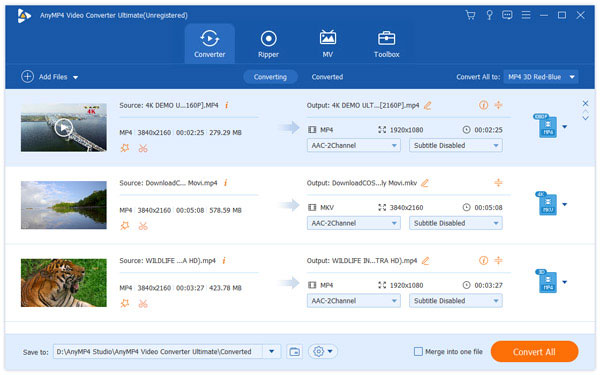
AnyMP4 Video Converter Ultimate is used to help users convert any video and DVD to popular videos (MKV, MOV, MTV, VOB, WMV, AVI, etc.) and audio (AAC, AIFF, AMR, etc.) formats with fast conversion speed and excellent output video/audio quality. What’s more, it is highly compatible with iPad mini 5, iPad Pro, iPhone 11/11 Pro/11 Pro Max, iPhone XS, iPhone XS Max, iPhone XR, Samsung series now.


Key Features:

1. Convert any video/audio files and home-made DVD including 4K video.
This Video Converter Ultimate is able to help users convert any video/audio file, including 3GP, 3G2, AVI, DV, DIF, FLV, F4V, MOD, MJPG, MJPEG, MKV, VOB, DAT, MP4, M4V, MPV, QT, MOV, RM, RMVB, TOD, TS, TRP, TP, WMV, ASF, MPEG-2 HD, MPEG-4 HD video and AAC, AIF, AIFF, APE, OGG, etc. audio. It also enables users to select multiple output formats for the source video/audio.

2. Enhance video quality.
Upscale video resolution, optimize the brightness and remove video noise to make your video more energetic. What’s more, you can rotate and flip your video to the right angle according to your needs, clip a video to your desired time length segments by setting the starting and ending time and personalize your video with the image or text watermarks, and adjust its position, transparency, etc.

3. Define video or audio effect.
This software enables you to define the output video or audio parameters, such as Video Encoder, Frame Rate, Video Bitrate, Resolution, and Audio Encoder, Sample Rate, Channels, Audio Bitrate. Also you can adjust the video brightness, contrast, saturation, hue and volume.

4. New features.
With AnyMP4 Video Converter Ultimate, you can enjoy more with your videos now. For example, you can compress large HD/SD videos to smaller size videos, play 4K/1080p HD video and DVDs, making GIF images with videos, and so on. It also allows you to edit metadata information. With it, you can easily edit ID3 information for your MP3 files.

Graphcat<

AnyMP4 DVD Copy for Mac 3.1.22

Type: Shareware
Cost: $26.25
Size: 21.46 MB
Release date: Jul 22 2020
Platform: Mac OS X,
Publisher’s Site:  https://www.anymp4.com
Publisher’s Product Page:  https://www.anymp4.com/dvd-copy-for-mac/
Country: China


AnyMP4 DVD Copy for Mac

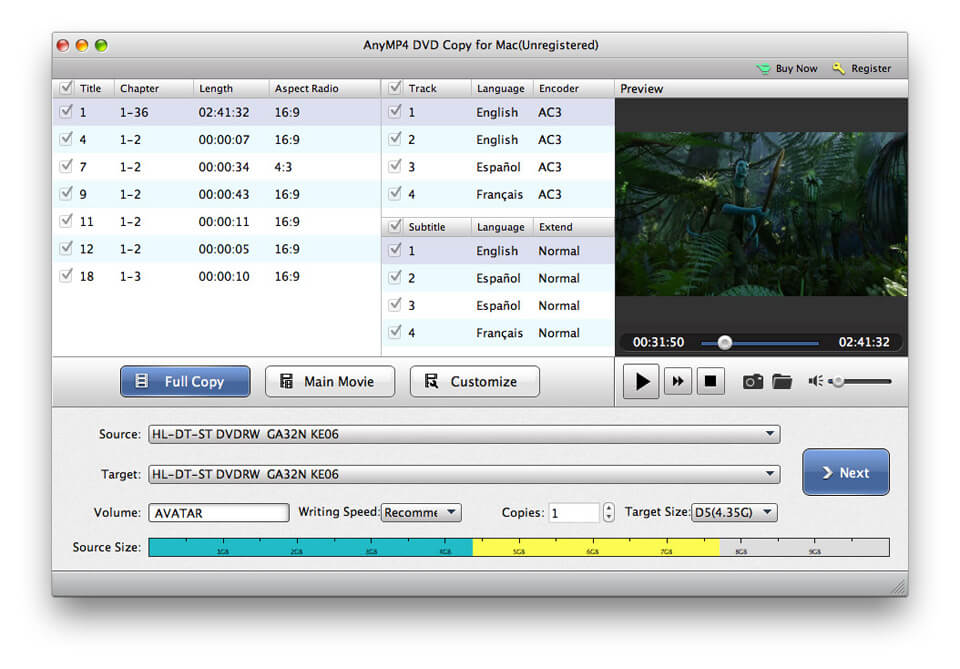
AnyMP4 DVD Copy for Mac helps you copy your DVD disc to DVD folder, ISO files and other DVDs like DVD-5 and DVD-9 with high quality and fast speed, it also clones DVD folder and ISO image files to DVD disc as your proposal. Moreover, you are able to customize the DVD disc from audio track and subtitle selection aspects. What’s more, there are different modes such as Full Copy, Main Movie and Customized.

Key Features:

1. Copy DVD disc to DVD disc/folder and ISO image on Mac.
AnyMP4 DVD Copy for Mac allows you to copy DVD disc to DVD disc, such as cloning DVD-5 to DVD-5 disc, DVD-9 to DVD-9 disc in 1:1 ratio, it also enables you to compress DVD-9 to DVD-5 disc with excellent quality. In addition, this software can help you copy DVD movie to DVD folder and ISO image files on Mac.

2. Copy DVD folder and ISO image file to DVD disc on Mac.
With this Mac DVD backup software, you are able to copy DVD folder and ISO image file to the DVD disc with perfect quality. You can back it up forever as your loved movie. Whenever you want to enjoy it, just find the DVD disc, and play it in your devices. Besides, AnyMP4 DVD Copy for Mac is compatible with DVD+-R/RW and DVD-RAM.

3. Choose suitable copy mode as your personal preference.
This Mac DVD Cloner provides three copy modes such as ‘Full Copy’, ‘Main Movie’ and ‘Customized’. So you can selectively choose copy mode according to your need. As for the unnecessary parts, it will not appear in your DVD to occupy space. Besides, it can help you select your preferred audio track and add downloaded subtitles to the video file.

4. Easy to use and fast copy speed.
This Mac DVD backup software can copy your DVD in a fast speed. Hence, you will not wait for the copy anxiously. Besides, you can easily master its tutorials. You never worry that you have no idea about how to use it.

Aiseesoft Free video Editor for Mac 1.1.12

Type: Freeware
Cost: $0.00
Size: 52.92 MB
Release date: Jun 17 2020
Platform: Mac OS X,
Publisher’s Site:  https://www.aiseesoft.com
Publisher’s Product Page:  https://www.aiseesoft.com/video-editor/
Country: China


Aiseesoft Free video Editor for Mac

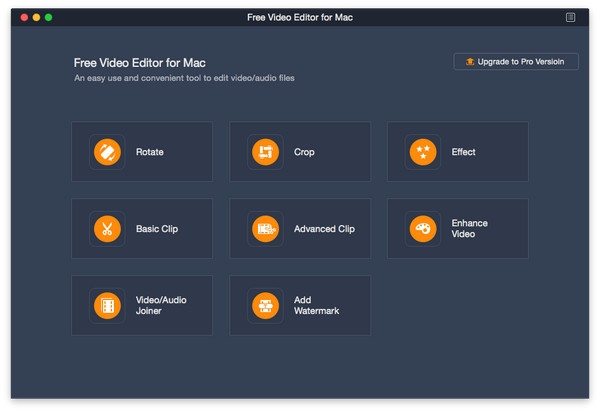
Want to remove black bars around your videos? Want to clip your videos? Want to rotate your videos? Aiseesoft Free Video Editor for Mac could help you.

Key functions:

1. Rotate and flip videos
With Aiseesoft Free Video Editor for Mac, you could rotate the video 90 clockwise or 90 counterclockwise. In addition, you could also flip video vertically or horizontally according to your need.

2. Crop, clip/join videos
Aiseesoft Free Video Editor for Mac is able to remove the unnecessary black bars around your videos with its crop function. It provides four modes: Pan&Scan, Letterbox, Medium and Full for users, so you could choose the one as you like. If you want to cut off the unwanted part of your media files, you could use the clip function of Aiseesoft Free Video Editor for Mac to remove the part you do not want. Moreover, you can use the video/audio joiner feature to make the video or music collections.

3. Convert video/audio files
Aiseesoft Free Video Editor for Mac could also be a free video converter, it could convert various media files to other formats like MP4, M4V, AVI, FLV, MP3, FLAC, AIFF, OGG, and more.

4. Edit video effects
Aiseesoft Free Video Editor for Mac also provides video editing feature for you to adjust the brightness, contrast, saturation, hue, and audio volume of your video files. Adding watermark to your videos is also possible.