Category Archives: Audio & Multimedia

Audio Encoders/Decoders, Audio File Players, Audio File Recorders, CD Burners, CD Players, Multimedia Creation Tools, Music Composers, Other, Presentation Tools, Rippers & Converters, Speech, Video Tools

Apeaksoft DVD Creator for Mac 1.0.28

Type: Shareware
Cost: $31.20
Size: 36.14 MB
Release date: Aug 20 2020
Platform: Mac OS X,
Publisher’s Site:  https://www.apeaksoft.com/
Publisher’s Product Page:  https://www.apeaksoft.com/dvd-creator/
Country: China
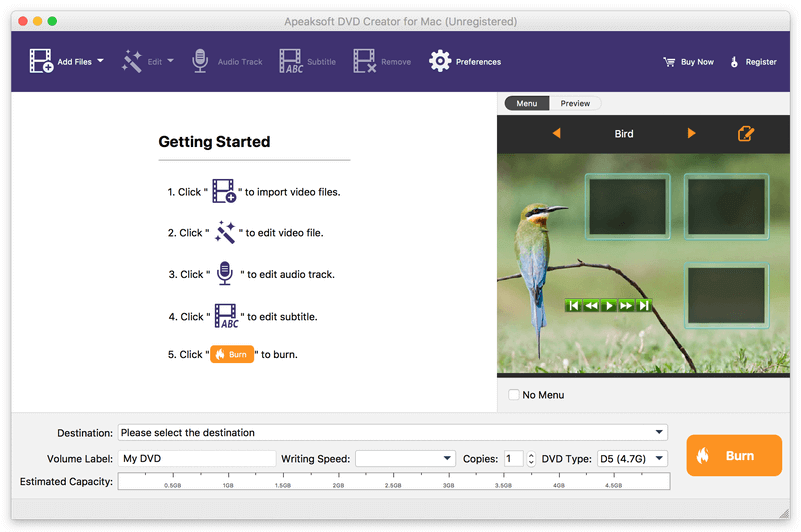

Apeaksoft  DVD Creator for Mac

Apeaksoft DVD Creator for Mac can create DVD/Blu-ray disc/folder/ISO files with all kinds of popular videos. Therefore, you can convert MP4 to DVD/Blu-ray, AVI to DVD/Blu-ray and other videos to DVD/Blu-ray. Moreover, it can help you add the audio track and subtitle. In addition, you can choose your preferred menu templates, frames and button styles and add the background music. Furthermore, you can trim the video length, crop the video frame and add watermark to the videos as you like.


Key functions:

1.Create DVD/Blu-ray with any video formats
Apeaksoft DVD Creator for Mac can help you burn DVD/Blu-ray disc/folder/ISO files with any video formats including MP4, AVI, WMV, MKV, MOV, M4V, MTS, etc.

2.Edit your DVD/Blu-ray
It is able to help you edit the video effect, such as trimming the video length, cropping the video frame, adding watermark to the video, adjusting the video effect.

3.Customize the DVD/Blu-ray menu
With this software, you can choose your favorite DVD/Blu-ray menu like frame/button/text style. Moreover, you can add background music, add background picture and browse opening film according to your needs.

4.Add audio track and subtitle
This software allows you to add the audio track including language, volume, latency, encoder, bit rates, and channels. Meanwhile, your preferred subtitles can also be added to the videos and you can choose its language, change its position, and set the delay, font size, its name and colors.

5. Fast speed and high quality Apeaksoft DVD Creator for Mac can provide fast burning speed and high quality for you. You never need to wait for long time for the creation. Just a few minutes, you can enjoy your DVD/Blu-ray in your DVD/Blu-ray player.

Graphcat<

Apeaksoft Screen Recorder for Mac 2.0.30

Type: Shareware
Cost: $19.96
Size: 20.36 MB
Release date: Sep 17 2020
Platform: Mac OS X,
Publisher’s Site:  https://www.apeaksoft.com/
Publisher’s Product Page:  https://www.apeaksoft.com/screen-recorder/
Country: China


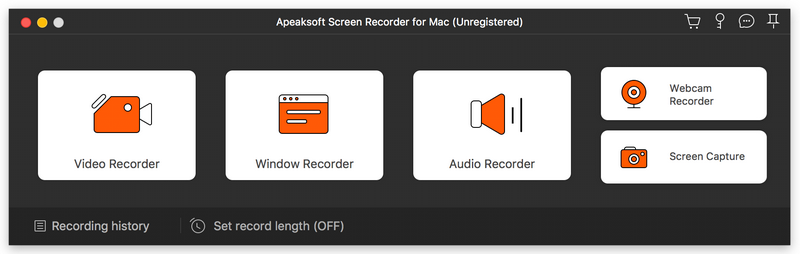
Apeaksoft Screen Recorder for Mac

Apeaksoft Screen Recorder for Mac makes it easy to record videos and audio played on Mac. The powerful video recording function allows you to save almost all videos to your Mac, such as online streaming videos you cannot download, video tutorials you want to capture and video meetings you want to save. You could also record the microphone voice and capture the screenshot on Mac.

Key functions:

1. Record videos freely
Having trouble in downloading some videos you want? Apeaksoft Screen Recorder for Mac is your best choice. With it, you could record the videos which you could not download without any hassle. And you could change the output format before recording as you like. In addition, it also has various editing functions.

2. Record audio files easily
Apeaksoft Screen Recorder for Mac enables you to record various music, radio or online audio instead of downloading them. You can save the recorded audio in MP3, WMA, AAC, M4A for future playback. Moreover, it can record microphone voice easily, you just need to choose microphone audio and turn off system audio to easily record the voice you need. Recording system sound could also be realized with it.

3. Take snapshots easily
Apeaksoft Screen Recorder for Mac enables you to take screen capture, and you could add watermark to your screen capture. Moreover, you are able to annotate the snapshots with a text box, arrow, highlight and more.

4. Highlight the mouse cursor as you wish
This is especially useful when you make video presentations. You can highlight the mouse cursor to make your act easier to be tracked on screen. Also you can define the color and the shape of the highlight.

UkeySoft Apple Music Converter 6.6.7

Type: Shareware
Cost: $39.95
Size: 18.53 MB
Release date: Jan 01 2019
Platform: Win2000,WinXP,Win7 x32,Win7 x64,Windows 8,Windows 10,WinServer,WinOther,WinVista,WinVista x64
Publisher’s Site:  https://www.ukeysoft.com
Publisher’s Product Page:  https://www.ukeysoft.com/apple-music-converter/
Country: China


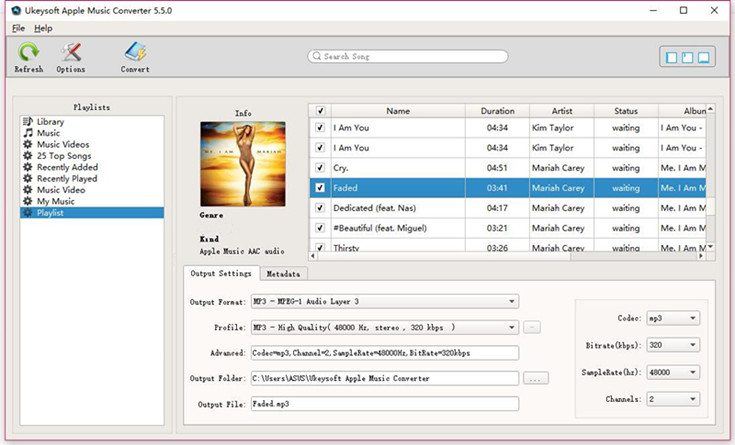
UkeySoft Apple Music Converter

The Apple Music tracks comes with DRM (Digital Rights Management) protection, so we can’t transfer and play Apple Music on unauthorized device such as MP3 player, iPod, PSP, Zune, MP3 player, mobile phones, Xbox, PSP, etc. You will find that you can’t listen to Apple Music on your MP3 Player, MP4 player, PSP, car media play, in additional, if you cancel the Apple Music subscription, you can’t play the Apple Music tracks, even you have downloaded before. Because Apple Music is streaming music, you dont actually own the songs even you have download through Apple Music. To solve these problems, you can get help from UkeySoft Apple Music Converter.

UkeySoft Apple Music Converter is a powerful Apple Music DRM Removal and iTunes audio converter, it can convert Apple Music songs, iTunes M4P music, iTunes M4A/M4B audibooks to MP3, M4A, WAV, AC3, AIFF, AU, FLAC, M4R or MKA and save them on local storage, so that users can transfer and play them on portable devices like iPhone, iPad, iPod, Android mobile phones, MP3 players, PSP, Xbox and any other devices. Unlike other Audio Converters, UkeySoft Apple Music Converter also is an Apple Music DRM Removal, iTunes Audiobook Converter and M4P Converter, it can convert Apple Music songs, audiobooks and M4P music at up to 16X speed. What’s more, you can convert Apple Music songs to plain MP3/AAC/FLAC with all ID tags and metadata kept.

1.Convert Apple Music to MP3/WAV/M4A/FLAC.
After converting Apple Music to common audio file formats, you can enjoy Apple Music songs on any MP3 player, iPod Nano, iPod Classic, iPod Shuffle, Apple Watch, MP3 player, Android phones/tablets, iPhone/iPad, Windows phones, PSP/PS3/PS4, car audio, Xbox and more.
2.Convert iTunes M4P songs to MP3/WAV/M4A/FLAC.
3.Convert iTunes M4B and Audible AA/AAX Audiobooks to MP3/M4A.
4.Extract Audio from iTunes M4V Video.
5.Intelligently Recognize and Keep ID3 Tags.
6.Supported Windows 7, 8, 8.1, 10 (32-bit & 64-bit) and the latest iTunes.