Category Archives: Audio & Multimedia

Audio Encoders/Decoders, Audio File Players, Audio File Recorders, CD Burners, CD Players, Multimedia Creation Tools, Music Composers, Other, Presentation Tools, Rippers & Converters, Speech, Video Tools

Aiseesoft Total Video Converter 9.2.52

Type: Shareware
Cost: $36
Size: 46.69 MB
Release date: Jun 17 2020
Platform: Win2000,WinXP,Win7 x32,Win7 x64,Windows 8,Windows 10,WinServer,WinOther,WinVista,WinVista x64
Publisher’s Site:  http://www.aiseesoft.com
Publisher’s Product Page:  https://www.aiseesoft.com/total-video-converter.html
Country: China
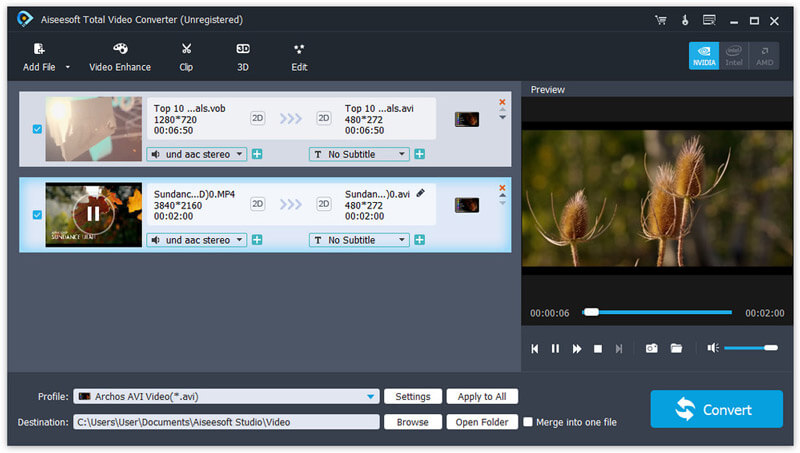

Aiseesoft Total Video Converter

Aiseesoft Total Video Converter works well in converting any video/audio to popular video and audio formats, even HD/4K UHD and 3D videos are highly supported. Its strong editing function allows you to make the output video perfect on your own way. You can also enhance the video quality and rotate video to the right angle with the new-added functions. Besides, it supports iPhone 11 Pro Max/11 Pro/11/XS/XS Max/ XR/X/8/6s/6s Plus/6/6 Plus/5s/5c, and other new released portable devices.


Key Features

1. Convert any video/audio to another format
Any video/audio you have can be converted to the video format you want such as MKV, MOV, MPEG-1 Video, MPEG Video, Music Television, VOB MPEG2 PS Format, WMV, XviD, AVI, DivX Video, Flash H264 Video, FLV, etc. and audio formats of MP3, OGG, WAV, WMA and so on. This video converter can also fully support 4K videos.

2. Edit video effects
You can trim a clip from your original video source, adjust video playing area and merge several videos into one. If you like, you can add a watermark of a text or image to your video.

3. Enhance and rotate video before converting
With the video enhancing function, you are able to enhance video quality with only one click. What’s more, you can also rotate/flip your video angle for a better output effect.

4. Compatible with numerous devices
The output video/audio files are highly compatible with the most popular devices including iPhone 11 Pro Max/11 Pro/11/XS/XS Max/ XR/X, iPad mini 4/3/2, iPad Air 2, iPad Air, Samsung Galaxy S6/S6 edge and other popular portable devices.

Graphcat<

Aiseesoft DVD Creator for Mac 5.2.16

Type: Shareware
Cost: $15
Size: 41.93 MB
Release date: Apr 14 2020
Platform: Mac OS X,
Publisher’s Site:  https://www.aiseesoft.com
Publisher’s Product Page:  https://www.aiseesoft.com/dvd-creator-for-mac/
Country: China


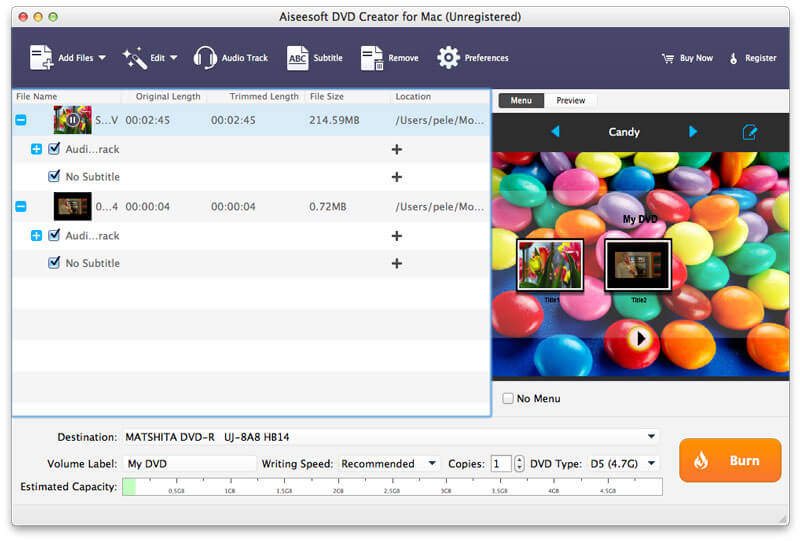
Aiseesoft DVD Creator for Mac

Aiseesoft DVD Creator for Mac lets you create DVDs easily on Mac (latest macOS Catalina and macOS Mojave supported) from all kinds of popular video formats, such as MP4, AVI, MKV, VOB, FLV, MXF, MOV, etc.

Features:
1. Create DVD from any video
With DVD Creator for Mac, you can easily merge multiple video files in different formats and burn them into a single DVD or a DVD folder or into ISO image files.

2. Customize DVD menu
There are dozens of DVD menu templates built in this Mac DVD burning software, such as Animal, City, Festival, Plant, Scenery and more. You can personalize your own DVD menu by defining the menu frame and button, editing the menu text, defining its font, size and color, adding a background picture, and more.

3. Add audio tracks and subtitles
You are able to add multiple audio tracks as well as subtitles into your video files before burning DVD. You can even adjust the subtitle’s position, font, size or color and the audio track volume, and select the audio encoder/bitrate/channels as you like. Moreover, if the audio track doesn’t match the video scenes, this DVD burner for Mac allows you to adjust the audio latency, so do the subtitles.

4. Edit video effects before creating DVD
You can adjust the brightness, hue, saturation, contrast and the output volume, cut, crop, add watermark to your source videos to enhance the video quality. After that, you can burn the videos to most types of DVD+-R/RW/R DL, DVD-RAM, DVD-5(4.5G) and DVD-9(8.5GB) discs.

AnyMP4 MTS Converter for Mac 8.2.18

Type: Shareware
Cost: $26.25
Size: 48.32 MB
Release date: Jun 03 2020
Platform: Mac OS X,
Publisher’s Site:  https://www.anymp4.com
Publisher’s Product Page:  https://www.anymp4.com/mts-converter-for-mac/
Country: China


AnyMP4 MTS Converter for Mac

AnyMP4 MTS Converter for Mac is the best solution for you to convert MTS to any other video formats, including the HD videos on Mac. It can convert MTS to AVI, MTS to MP4, MTS to VOB, MTS to iPod/iPhone and others. Besides, you can easily extract the audio files from any MTS video and convert them to AAC, OGG, WAV, WMA audio format. Then you can enjoy video/audio with your family and friends on any portable players.

Key Features:

1. Convert MTS to other video/audio formats.
AnyMP4 MTS Converter for Mac can convert MTS and other video/audio files to the video format of AMV, ASF, AVI, DivX, Flash H264, FLV, SWF, H.264 AVI, H.264/MPEG-4 AVC, M4V MPEG-4, DV, MKV, MOV, MPEG-1, MPEG-2, MPEG-4, MTV, VOB, WMV, XviD, VCD, WebM or audio format of AAC, AC3, AIFF, AMR, AU, FLAC, M4A, MKA, MP2, MP3, OGG, WAV, WMA.

2. Adjust output video effect.
With AnyMP4 MTS Converter for Mac, you are allowed to define output video and audio parameters, such as Video Resolution, Video Bitrate, Frame Rate, Encoder and Audio Channels, Sample Rate, Encoder, Audio Bitrate as well as video Brightness, Contrast, Saturation, Hue, and Volume. Personalizing your video with the image or text watermarks can be realized as well.

3. Versatile editing functions.
AnyMP4 MTS Converter for Mac can provide powerful editing functions. It can totally optimize the output video by adjusting video effect, trimming video length, cropping video frame, merging video chapters and adding video watermark.

4. Easy to use and batch conversion function.
AnyMP4 MTS Converter for Mac is easy to use. The whole process of conversion can be finished just in clicks. In addition, it can save the time of conversion greatly with batch conversion. Then, you can enjoy your audio/video files freely.