Category Archives: Audio & Multimedia

Audio Encoders/Decoders, Audio File Players, Audio File Recorders, CD Burners, CD Players, Multimedia Creation Tools, Music Composers, Other, Presentation Tools, Rippers & Converters, Speech, Video Tools

AnyMP4 Mac Blu-ray Player 6.3.16

Type: Shareware
Cost: $29.25
Size: 36.27 MB
Release date: Jul 15 2020
Platform: Mac OS X,
Publisher’s Site:  https://www.anymp4.com
Publisher’s Product Page:  https://www.anymp4.com/mac-blu-ray-player/
Country: China

AnyMP4 Mac Blu-ray Player

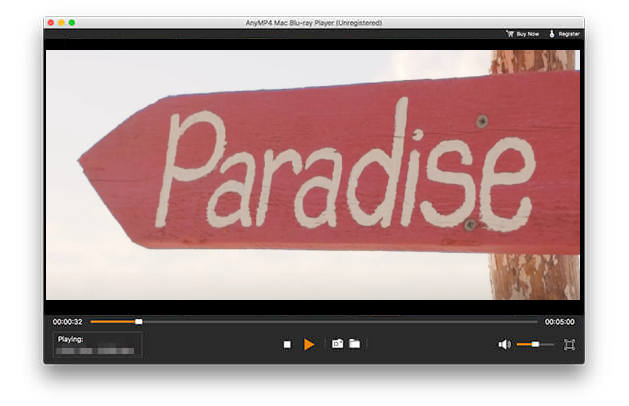
AnyMP4 Mac Blu-ray Player can play any Blu-ray disc and Blu-ray movies, Blu-ray folder/ISO image on your Mac. Moreover, you are able to play 4K videos like 4K H.265 MP4, 4K H.264 TS, XviD 4K, 4K MKV and more, and 1080p HD video like TS, HD MP4, HD AVI, HD MOV, HD H.264/MPEG-4 AVC, as well as the general video formats like MP4, MOV, M4V, MKV, AVI, WMV, etc.


Key Features:

1. Play any Blu-ray disc/folder/ISO image file on your Mac
This Blu-ray Player for Mac software can help you play Blu-ray disc, Blu-ray folder and Blu-ray ISO image file on your Mac, so you can enjoy the wonderful Blu-ray movie at any time.

2. Play any video on Mac
With Blu-ray Player for Mac you can play 4K H.265 MP4, 4K H.264 TS, XviD 4K, 4K MKV and more, and 1080p HD video including TS, MTS, HD MP4, HD AVI, HD MOV, HD H.264/MPEG-4 AVC and more.

3. Choose your needed audio track and subtitle track
This Mac Blu-ray Player software allows you to choose your needed audio track and subtitle track. For example, your Blu-ray disc owns English, Spanish, French, and Chinese track, you can choose English subtitle track and French audio track. All the choice depends on your favor.

4. Easy to operate
With this Mac Blu-ray Player software, you can operate the whole process easily. For example, you can switch the screen size and view the guidance. Besides, you can choose your preferred Blu-ray Title/Chapter, capture your liked snapshot while you play the video. So you can share the exciting movies with your friends and families at home comfortably.

Graphcat<

Vidmore Video Converter for Mac 1.0.16

Type: Shareware
Cost: $19.95
Size: 47.04 MB
Release date: Apr 07 2020
Platform: Mac OS X,
Publisher’s Site:  https://www.vidmore.com/
Publisher’s Product Page:  https://www.vidmore.com/video-converter/
Country: China


Vidmore Video Converter for Mac

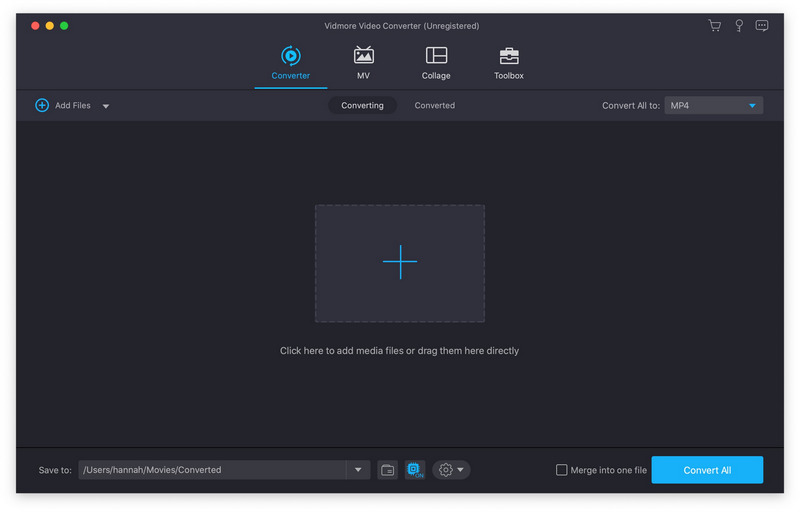
Vidmore Video Converter for Mac is powerful software which could help you convert your video and audio files to any other formats. You can easily choose an output format and convert your video without hassle. In addition, you could also rotate, crop, clip your videos freely.

Key Functions

1. Convert video for any device
Vidmore Video Converter for Mac supports many kinds of devices, including the latest models of iPhone, iPad, Samsung Galaxy, Sony PlayStation and more, such as Xperia 10, Xperia XZ3, Xperia XZ2, Pixel 3, Pixel 3 XL, Mi 9, Mi 8, Mi MIX 3, LG G8, LG G7, HTC U12 life, Moto G7, etc.

2. Various video editing functions
If you want to edit your videos before conversion, with it, you could trim, rotate, crop, enhance, add watermark, change the brightness/contrast/saturation and hue of your videos.

3. High quality of the output files
Perhaps you are worrying that after conversion, the quality of the converted files is not the same as the original files, with Vidmore Video Converter for Mac, you wont have this problem. It could keep the original quality of your videos, including 1080p HD and 4K Ultra HD videos.

4. Fast conversion speed
With advanced hardware acceleration of NVIDIA CUDA, NVENC, Intel QSV and AMD APP, Vidmore Video Converter for Mac is recognized as one of the fastest video conversion tools. It could provide fast conversion speed for you, so you do not need to wait long for the conversion process.

Apeaksoft Screen Recorder for Mac 2.0.26

Type: Shareware
Cost: $19.96
Size: 18.96 MB
Release date: Apr 13 2020
Platform: Mac OS X,
Publisher’s Site:  https://www.apeaksoft.com/
Publisher’s Product Page:  https://www.apeaksoft.com/screen-recorder/
Country: China


Apeaksoft Screen Recorder for Mac

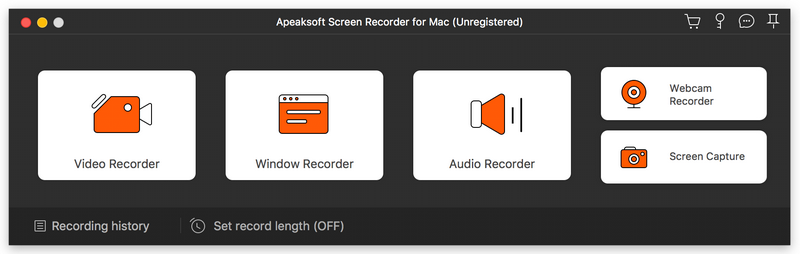
Apeaksoft Screen Recorder for Mac makes it easy to record videos and audio played on Mac. The powerful video recording function allows you to save almost all videos to your Mac, such as online streaming videos you cannot download, video tutorials you want to capture and video meetings you want to save. You could also record the microphone voice and capture the screenshot on Mac.

Key functions

1. Record videos freely
Having trouble in downloading some videos you want? Apeaksoft Screen Recorder for Mac is your best choice. With it, you could record the videos which you could not download without any hassle. And you could change the output format before recording as you like. In addition, it also has various editing functions.

2. Record audio files easily
Apeaksoft Screen Recorder for Mac enables you to record various music, radio or online audio instead of downloading them. You can save the recorded audio in MP3, WMA, AAC, M4A for future playback. Moreover, it can record microphone voice easily, you just need to choose microphone audio and turn off system audio to easily record the voice you need. Recording system sound also could be realized with it.

3. Take snapshots easily
Apeaksoft Screen Recorder for Mac enables you to take screen capture, and you could add watermark to your screen capture. Moreover, you are able to annotate the snapshots with a text box, arrow, highlight and more.

4. Highlight the mouse cursor as you wish
This is especially useful when you make video presentations. You can highlight the mouse cursor to make your act easier to be tracked on screen. Also you can define the color and the shape of the highlight.