Category Archives: Audio & Multimedia

Audio Encoders/Decoders, Audio File Players, Audio File Recorders, CD Burners, CD Players, Multimedia Creation Tools, Music Composers, Other, Presentation Tools, Rippers & Converters, Speech, Video Tools

Icecream Video Editor 2.05

Type: Shareware
Cost: $29.95
Size: 61.98 MB
Release date: May 14 2020
Platform: Win2000,WinXP,Win7 x32,Win7 x64,Windows 8,Windows 10,WinServer,WinOther,WinVista,WinVista x64
Publisher’s Site:  http://icecreamapps.com/
Publisher’s Product Page:  https://icecreamapps.com/Video-Editor/
Country: Cyprus

Icecream Video Editor

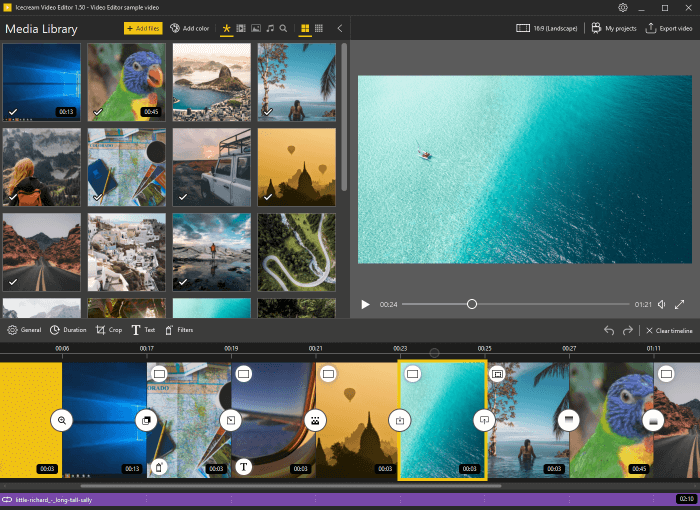
Icecream Video Editor is a free video editing software offers the advanced features to create video projects. Add video files, images and audio files to the program and place the files to timeline. Add blank color scenes to timeline if needed. Apply the transition effects between the scenes and add text. Crop, rotate and flip videos and images. Trim video and audio files. Add visual effects for every scene, set saturation, brightness, hue. Set the video format, resolution and quality for the created videos. Upload the video projects to YouTube, Google Drive and Dropbox. Resume old project from the history.

Graphcat<

Apeaksoft Free HEIC Converter for Mac 1.1.12

Type: Freeware
Cost: $0.00
Size: 15.03 MB
Release date: Mar 09 2020
Platform: Mac OS X,
Publisher’s Site:  https://www.apeaksoft.com/
Publisher’s Product Page:  https://www.apeaksoft.com/heic-converter/
Country: China


Apeaksoft Free HEIC Converter for Mac

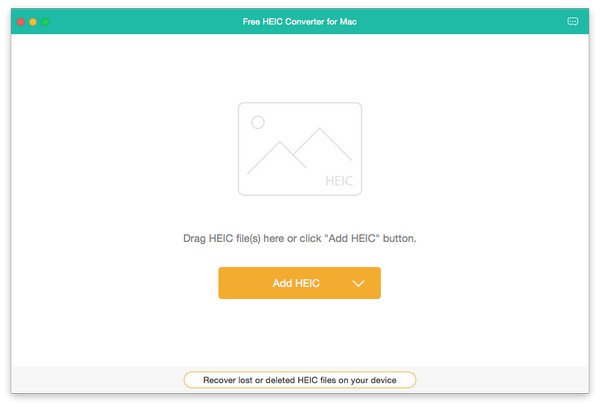
Apeaksoft Free HEIC Converter for Mac can convert all your HEIC (.heif) photos to JPG/JPEG or PNG without any hassle. This software supports nearly all Mac operating system such as Mac OS X 10.6 or above (including macOS 10.15 Catalina). With simple interface, you could use this software conveniently.


Key functions

1. Convert HEIC pictures to JPG/JPEG/PNG for free
Even though you are a novice, with this powerful converter software, you could convert the HEIC pictures to JPG/JPEG/PNG without any problem. It is easy to use for every customer. The most important thing is that it is free without any additional expense.

2. Adjust the quality of the output image files and batch convert HEIC Files
With this software you could edit the quality of the converted pictures as you like. And it is really time-saving because you could batch convert your files at one time.

3. Keep the EXIF metadata of source HEIC files after conversion
Are you worried about that after conversion, you will lose the EXIF metadata of your HEIC files? With this convenient software, you could choose to maintain the EXIF metadata without any troubles.

4. Fast conversion speed and super-high quality
With advanced technology, Apeaksoft Free HEIC Converter for Mac has amazing fast conversion speed, the conversion process will be completed when you enjoy a song. The most important thing is it has the ability to convert HEIC pictures with high output quality.

Vidmore Blu-ray Monster 1.0.56

Type: Shareware
Cost: $29.95
Size: 1.61 MB
Release date: Apr 20 2020
Platform: Win2000,WinXP,Win7 x32,Win7 x64,Windows 8,Windows 10,WinServer,WinOther,WinVista,WinVista x64
Publisher’s Site:  https://www.vidmore.com/
Publisher’s Product Page:  https://www.vidmore.com/blu-ray-ripper/
Country: China


Vidmore Blu-ray Monster

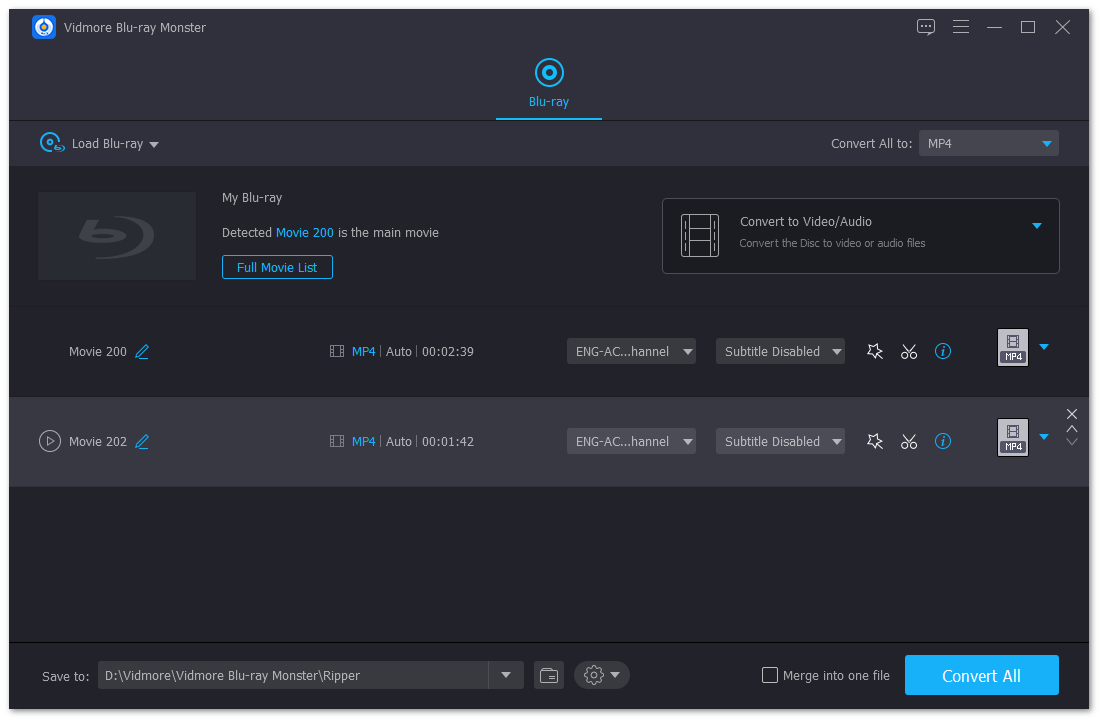
If you want to convert your Blu-ray files completely, Vidmore Blu-ray Monster could do you a favor greatly. It could convert your Blu-ray files to various devices and output formats. More over, you could rotate and crop your videos as you like.

Key functions:

1.Convert your Blu-ray without any hassle
Vidmore Blu-ray Monster could help you convert the Blu-ray movies to any devices you want to save to. You could also convert it to MPG files, ISO files, Blu-ray folders as you like.

2.Support various output formats and devices
If you could not find the output format you want with other software, Vidmore Blu-ray Monster could solve this problem for you. It could convert the completed Blu-ray files to many kinds of popular formats such as MP4, AVI, MOV, WMV, FLV, M4V M4A, FLAC and so on. And you could also choose to convert your files to iPhone 11/11 Pro/11 Pro Max, Apple TV 4K, Apple TV, Xperia 10/XZ3, Pixel 3/3 XL, Xbox One/One S, LG G8/G7/G6/G5,etc.

3.Powerful edit functions
With Vidmore Blu-ray Monster, you could cut any clip of your videos according to your need. In addition, you are able to merge more than one titles of Blu-ray movies into one video file. Adjusting brightness, contrast, saturation and hue also could be realized with it. If you want to add watermark to your output videos, Vidmore Blu-ray Monster could also help you.

4.Fast conversion speed
With advanced technology, Vidmore Blu-ray Monster provides a much faster conversion speed for users. The most important thing is it could also keep the original file quality after conversion. So please do not worry that you will lose the quality of your files after conversion.