Type: Freeware
Cost: $0
Size: 47.66 MB
Release date: Sep 18 2019
Platform: Win2000,WinXP,Win7 x32,Win7 x64,Windows 8,Windows 10,WinServer,WinOther,WinVista,WinVista x64
Publisher’s Site: http://www.5kplayer.com/
Publisher’s Product Page: http://www.5kplayer.com
Country: China
Cost: $0
Size: 47.66 MB
Release date: Sep 18 2019
Platform: Win2000,WinXP,Win7 x32,Win7 x64,Windows 8,Windows 10,WinServer,WinOther,WinVista,WinVista x64
Publisher’s Site: http://www.5kplayer.com/
Publisher’s Product Page: http://www.5kplayer.com
Country: China
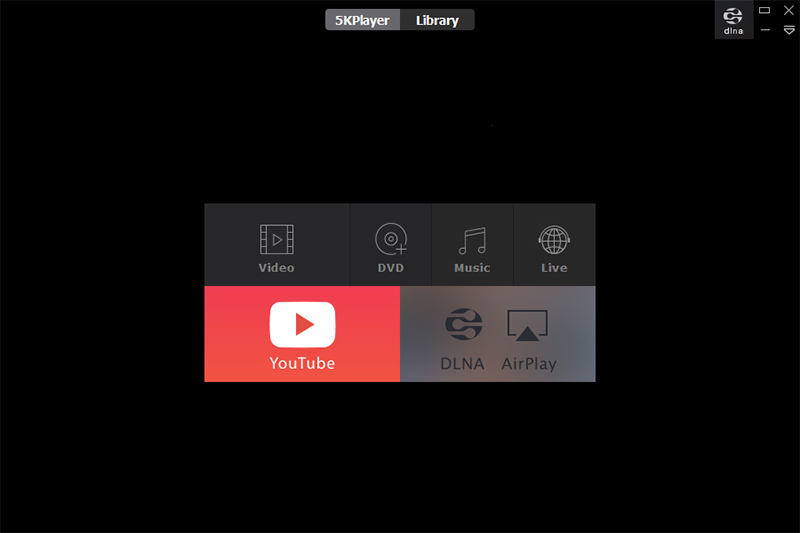

5KPlayer is an all-in-one free media player for Windows (10) that works as HD video/music player, AirPlay/DLAN streamer,video cutter and free online video/music downloader. It plays 4K/5K, 360, MKV, MP4, AVI, WMV, MP3 music, radio & DVD flawlessly. 5KPlayer also supports Apple’s AirPlay tech which allows you to stream media from iPad, iPhone to PC or from PC to Apple TV. DLNA enabled 5KPlayer allows you to share media between PC & DLNA-compatible devices like Android, TV, PS4, Xbox, etc.
Moreover, 5KPlayer is your one-stop tool to download any online video music and watch offline. With these advanced features, 5KPlayer can easily fulfill all of your music video playback demands. Just feel free to download this unique media player and enjoy a brand-new audiovisual experience.
Key features:
1. Play any media formats in Windows PC, including 4K/5K/360 degree videos, MKV, M2TS, AVCHD, AVI, MP4, WMV, DVD movies, MP3 music, etc;
2. With built-in AirPlay sender/receiver, free stream music/videos from iPhone, iPad to PC, or from PC to Apple TV or Airplay-enabled speakers;
3. Wirelessly stream video music between PC & Android, Smart TV, Xbox, PS4, etc. Other DLNA-compatible devices can access and play media in 5KPlayer’s DLNA Share List.
4. Cut, rotate video clips in several clicks and adjust the playback speed and color balance etc.
5. As a powerful online video/music downloader supporting over 300 sites, download video/music free from FaceBook, Dailymotion, Vimeo and so on;
6. Screen mirroring from iPhone/iPad/iPod to Windows PC;
7. Record iPhone/iPad screen with high quality by AirPlay mirroring;
8. Have embedded radio player to play radio from BBC, Heart, XFM, Kiss, Magic and other internet radio stations;
9. Work as an excellent file manager, easily organizing your video & music files;
10. Easy to use. Completely free and safe. No virus, malware or spyware.
Moreover, 5KPlayer is your one-stop tool to download any online video music and watch offline. With these advanced features, 5KPlayer can easily fulfill all of your music video playback demands. Just feel free to download this unique media player and enjoy a brand-new audiovisual experience.
Key features:
1. Play any media formats in Windows PC, including 4K/5K/360 degree videos, MKV, M2TS, AVCHD, AVI, MP4, WMV, DVD movies, MP3 music, etc;
2. With built-in AirPlay sender/receiver, free stream music/videos from iPhone, iPad to PC, or from PC to Apple TV or Airplay-enabled speakers;
3. Wirelessly stream video music between PC & Android, Smart TV, Xbox, PS4, etc. Other DLNA-compatible devices can access and play media in 5KPlayer’s DLNA Share List.
4. Cut, rotate video clips in several clicks and adjust the playback speed and color balance etc.
5. As a powerful online video/music downloader supporting over 300 sites, download video/music free from FaceBook, Dailymotion, Vimeo and so on;
6. Screen mirroring from iPhone/iPad/iPod to Windows PC;
7. Record iPhone/iPad screen with high quality by AirPlay mirroring;
8. Have embedded radio player to play radio from BBC, Heart, XFM, Kiss, Magic and other internet radio stations;
9. Work as an excellent file manager, easily organizing your video & music files;
10. Easy to use. Completely free and safe. No virus, malware or spyware.
 <
<