Category Archives: Audio & Multimedia

Audio Encoders/Decoders, Audio File Players, Audio File Recorders, CD Burners, CD Players, Multimedia Creation Tools, Music Composers, Other, Presentation Tools, Rippers & Converters, Speech, Video Tools

Apeaksoft Video Editor 1.0.22

Type: Shareware
Cost: $28.76
Size: 36.38 MB
Release date: Mar 04 2020
Platform: Win2000,WinXP,Win7 x32,Win7 x64,Windows 8,Windows 10,WinServer,WinOther,WinVista,WinVista x64
Publisher’s Site:  https://www.apeaksoft.com/
Publisher’s Product Page:  https://www.apeaksoft.com/video-editor/
Country: China

Apeaksoft Video Editor

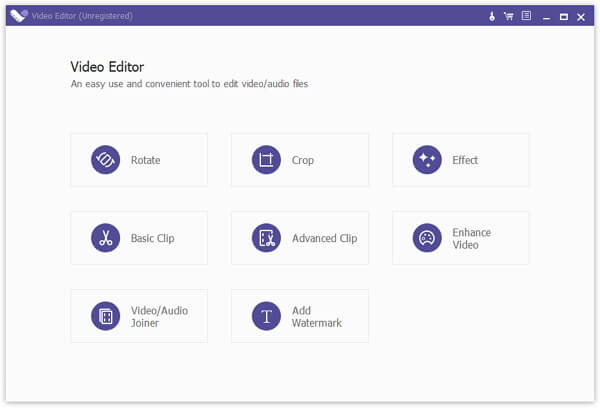
Apeaksoft Video Editor is powerful video conversion and edition software, with it, you could convert your favourite videos to other formats as you like and you could also edit your videos such as adjusting resolution/brightness/contrast, reducing video shaking, rotating/cropping videos, adding watermark to videos, removing video noise. This program provides Basic Clip and Advanced Clip function for you. So you can clip one more video or audio files, and merge the video or audio files into one.


Key functions

1. Convert your videos to various formats
With Apeaksoft Video Editor, you could convert your video and audio files to all kinds of formats, such as H.264/MPEG-4 AVC, AVI, WMV, ASF, WebM, AAC, AC3, AIFF, AMR, AU, FLAC and so on.

2. Enhance video quality
Apeaksoft Video Editor has powerful editing function, with it, you could adjust resolution/brightness/contrast of your videos, reduce video shaking, rotate/crop/clip videos, add watermark to videos, remove video noise and so on without any hassle. So even you are not familiar with it, you could use it easily.

3. Support various devices
Apeaksoft Video Editor could support various devices, for example, iPhone 11/11 Pro/11 Pro Max/XS/XS Max/X/XR, 8/8 Plus, etc. Samsung Galaxy, Motorola, Google, LG, Sony, HTC, etc. Wii, PS4, PS3, PSP, NDS and so on.

4. Fast conversion speed
The most important thing is Apeaksoft Video Editor could provide fast conversion speed for you, so you don’t need to wait long for the process. You could convert and edit your videos quickly and conveniently.

Graphcat<

DarkWave Studio 5.9.2

Type: Freeware
Cost: $0
Size: 4.01 MB
Release date: Mar 17 2020
Platform: Win2000,WinXP,Win7 x32,Win7 x64,Windows 8,Windows 10,WinServer,WinOther,WinVista,WinVista x64
Publisher’s Site:  https://www.experimentalscene.com/
Publisher’s Product Page:  https://www.experimentalscene.com/software/darkwave-studio/
Country: Australia


DarkWave Studio

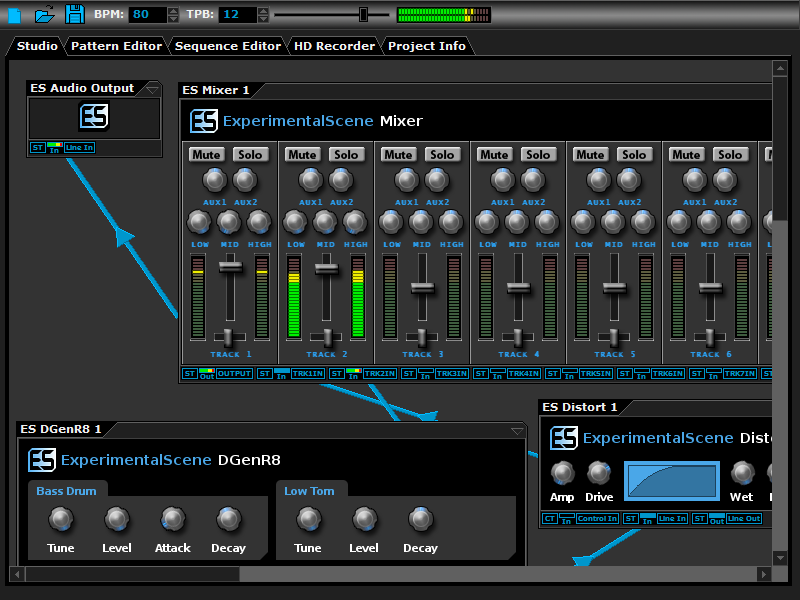
DarkWave Studio is a free Digital Audio Workstation (DAW) / modular virtual music studio for Windows. You can easily use the built in sequencer, bundled DarkPlug machines and third-party VST effects and VSTi instruments to create music. DarkWave Studio allows the connection of machines in an ad-hoc fashion. The installer ships with both a 32-bit and 64-bit version.

DarkWave consists of the following main parts:

Studio (Work With Machines)
Pattern Editor (Create Pieces Of Music)
Sequencer (Arrange Patterns Into A Song)
Multi-track Hard Disk Recorder (Master Your Music)

The following plugins are included with DarkWave:

ES Audio Input (Allows For Input From Sound Card)
ES Arpeggiator (Play Arpeggios With A MIDI Keyboard)
ES ControlChange Mapper (Map Control Change Events From One Index To Another)
ES MIDI Input (Use MIDI Keyboards With DarkWave Instruments)
ES MIDI Output (Sequence External MIDI Synthesizers)
ES AntiAlias (32x Digital Oversampling)
ES SpatialVerb (Room Modelling Reverb Unit)
ES Stomp (Rave Kick Generator)
ES BassHead (Subtractive Virtual Analog Synthesizer)
ES DGenR8 (Virtual Analog Drum Machine)
ES QuadDelay (Echo And Chorus Effect)
ES Mixer (8 Track Mixer With 2 Auxillary Tracks)
ES Distort (Basic Overdrive Distortion Effect)
ES Crunch (Limit Bits Per Sample Anywhere From 16 To 1 Bits)
ES StereoSplitter (Split An Input Stereo Signal Into Left And Right Output Mono Signals)
ES StereoJoiner (Combine Left And Right Input Mono Signals Into A Single Output Stereo Signal)
ES Scope (View Generated Waveforms In Realtime)
ES Control Monitor (View Control Messages)
ES DownStepper (Sample Rate Reduction Filter)

Features:

Highly Optimized 64-bit Double Precision Precision Audio Processing
Incredibly Fast And Small Download
Low Latency ASIO And DirectSound Audio Output Support
SSE2 (Streaming Single Instruction Multiple Data Extensions) Optimizations.

Vidmore Screen Recorder for Mac 1.0.10

Type: Shareware
Cost: $29.95
Size: 18.01 MB
Release date: Apr 21 2020
Platform: Mac OS X,
Publisher’s Site:  https://www.vidmore.com/
Publisher’s Product Page:  https://www.vidmore.com/screen-recorder/
Country: China


Vidmore Screen Recorder for Mac

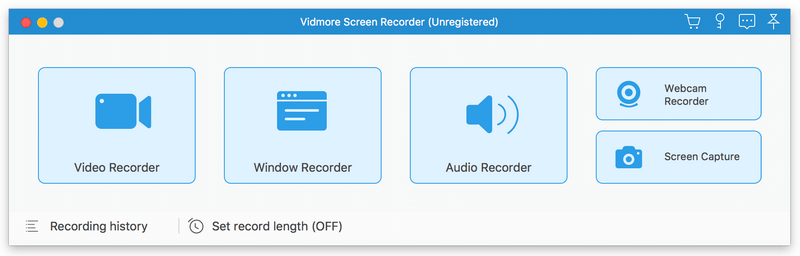
Vidmore Screen Recorder for Mac is an easy-to-use screen recording program, with it, you could record online videos that you could not download, record the audio files you want to save and so on. In addition, recording the system and microphone sound is also possible.

Key functions:

1. Record video and audio files
With Vidmore Screen Recorder for Mac, you could save any precious media files you want to use in the future. It is able to record all kinds of media files without any hassle. And it also allows you to record the the system and microphone sound. In addition, you could record the full screen or select the area you want to record as you like.

2. Trim Recordings and schedule recording task
If you just want to save a part of your recordings and you do not want to record it again, please do not worry, Vidmore Screen Recorder for Mac could help you solve this easily. You just need to choose the start and end time for your clip after recording, then you could save the part you want. If you want Vidmore Screen Recorder for Mac to record the files later automatically, you could schedule the recording task by setting the task name, the starting and ending time and the duration, and then it will record at the time you want.

3. Record GIF
Do you want to save media files as GIF? With Vidmore Screen Recorder for Mac, the output video or screenshot format could be saved as GIF files.

4. Powerful edit functions
You could set the output video format, video codec and video quality according to your need. Moreover, you are able to add text, arrows and shapes to your recording files. If you want to set hotkeys for start and pause recording or screen capture, all of this could be achieved with Vidmore Screen Recorder for Mac easily.