Category Archives: Audio & Multimedia

Audio Encoders/Decoders, Audio File Players, Audio File Recorders, CD Burners, CD Players, Multimedia Creation Tools, Music Composers, Other, Presentation Tools, Rippers & Converters, Speech, Video Tools

Vidmore Screen Recorder 1.0.12

Type: Shareware
Cost: $29.95
Size: 1.65 MB
Release date: Apr 21 2020
Platform: Win2000,WinXP,Win7 x32,Win7 x64,Windows 8,Windows 10,WinServer,WinOther,WinVista,WinVista x64
Publisher’s Site:  https://www.vidmore.com/
Publisher’s Product Page:  https://www.vidmore.com/screen-recorder/
Country: China

Vidmore Screen Recorder

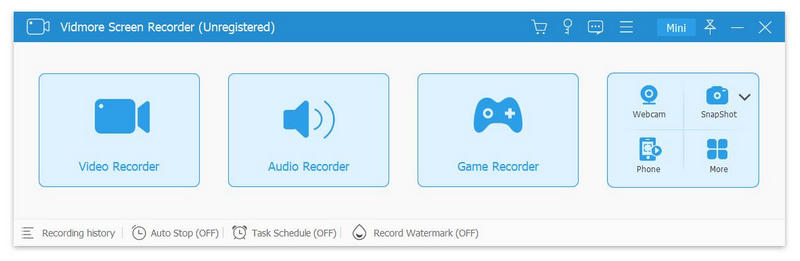
Do you have trouble in downloading some video or audio files? If you are looking for a solution to this problem, Vidmore Screen Recorder is your best choice. With it, you are able to record the video and audio files you could not download. And you could select the area you want to record according to your need.


Key functions:

1.Record video and audio files
Vidmore Screen Recorder is good at recording any video and audio files that you could not download or you want to convert the format of them. With this powerful recording software, you could save any precious video or audio files as you like. In addition, the audio recorder function also allows you to record the system and microphone sound.

2.Record GIF
Vidmore Screen Recorder could also be a GIF converter, it enables you to save the recorded videos or screenshot as GIF format.

3.Trim recordings
If you want to cut the recorded part after your finish the recording, please do not worry, the trim function could help you solve this problem. You could choose the start and end time for your recorded clip rather than recording it again.

4.Editing function
With the simple editing function, you could add text, arrows and shapes to your recording or screenshot. What is more, you could also set video format, video codec and video quality as you like. In addition, adding mouse click and mouse area effects while recording is also possible.

Graphcat<

AVS Audio Editor 9.1.1.537

Type: Shareware
Cost: $39
Size: 46.83 MB
Release date: Jul 02 2019
Platform: Win2000,WinXP,Win7 x32,Win7 x64,Windows 8,Windows 10,WinServer,WinOther,WinVista,WinVista x64
Publisher’s Site:  http://www.avs4you.com
Publisher’s Product Page:  http://www.avs4you.com/AVS-Audio-Editor.aspx
Country: United Kingdom


AVS Audio Editor

AVS Audio Editor is a perfect tool for audio editing. Edit and save audio files in MP3, WMA, WAV, FLAC, M4A, AAC, AMR, OGG, AC3 etc.
Cut, join, trim, mix, delete parts, split audio with AVS Audio Editor.
Record audio data from various inputs like microphone, vinyl records, and other input lines on a sound card.
Extract and edit audio from your video files directly in the program interface.
Improve sound quality using specially designed filters to remove noise and irritating sounds like roaring, hissing, crackling, etc.
Select between 20 built-in effects including delay, flanger, equalizer, chorus, reverb, auto correction and more.
Mix audio and blend several audio tracks.
Edit an audio track and create your own ringtone for iPhone. Work faster – make up a Favourites panel with the most frequently used functions.
Text to Speech allows to convert any written text into a natural sounding voice with a single click. Save it in a popular audio format that can be played on any device. Speed up or slow the speech rate down, change pitch if necessary.

AVS Audio Editor is a part of the AVS4YOU package. Register once and work with all tools from the AVS4YOU.com. Subscribe for $39/year or $59/lifetime.

Apeaksoft DVD Creator 1.0.30

Type: Shareware
Cost: $44.76
Size: 62.90 MB
Release date: Mar 17 2020
Platform: Win2000,WinXP,Win7 x32,Win7 x64,Windows 8,Windows 10,WinServer,WinOther,WinVista,WinVista x64
Publisher’s Site:  https://www.apeaksoft.com/
Publisher’s Product Page:  https://www.apeaksoft.com/dvd-creator/
Country: China


Apeaksoft  DVD Creator

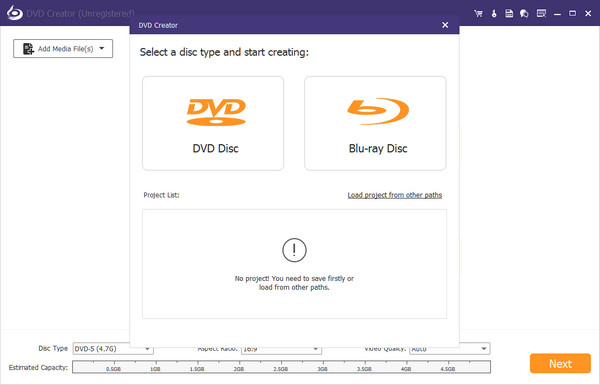
Apeaksoft DVD Creator can create DVD/Blu-ray disc/folder/ISO files with all kinds of popular videos. Therefore, you can convert MP4/AVI/MKV and other videos to DVD/Blu-ray. Moreover, it can also help you add the audio track and subtitle. In addition, you can choose your preferred menu templates, frames and button styles and add background music. Furthermore, you can trim the video length, crop the video frame and add watermark to the video as you like.

Key functions:

1. Create DVD/Blu-ray with any video formats
Apeaksoft DVD Creator can help you burn DVD/Blu-ray disc folder/ISO files with any video formats including MP4, AVI, WMV, MKV, MOV, M4V, TS, MTS, etc.

2. Edit your DVD/Blu-ray
Apeaksoft DVD Creator is able to help you edit the video effect, such as trimming the video length, cropping the video frame, adding watermark to the video, adjusting the video effect.

3. Customize DVD/Blu-ray menu
With this DVD Creator, you can choose your favorite DVD/Blu-ray menu like frame/button/text style. Moreover, you can add background music, add background picture, and browse opening film according to your needs.

4. Add audio track and subtitle
This software allows you to add audio track including language, volume, latency, encoder, bit rate, and channels. Meanwhile, your preferred subtitles can also be added to the video and you can choose its language, change its position, and set the delay, font size, its name and color.

5. Fast speed and super high quality
Apeaksoft DVD Creator can provide you with fast burning speed and high quality. You never need to wait for long time for the creation. Just a few minutes, you can enjoy your burned videos.