Category Archives: Audio & Multimedia

Audio Encoders/Decoders, Audio File Players, Audio File Recorders, CD Burners, CD Players, Multimedia Creation Tools, Music Composers, Other, Presentation Tools, Rippers & Converters, Speech, Video Tools

AnyMP4 Blu-ray Copy Platinum 7.2.62

Type: Shareware
Cost: $33.75
Size: 24.96 MB
Release date: Jan 16 2020
Platform: Win2000,WinXP,Win7 x32,Win7 x64,Windows 8,Windows 10,WinServer,WinOther,WinVista,WinVista x64
Publisher’s Site:  https://www.anymp4.com/
Publisher’s Product Page:  https://www.anymp4.com/blu-ray-copy-platinum/
Country: China

AnyMP4 Blu-ray Copy Platinum

AnyMP4 Blu-ray Copy Platinum is powerful and professional Blu-ray burning software for Blu-ray disc. It can help you copy your major Blu-ray Discs as a Blu-ray folder or ISO image file to PC or hard drive. It can support Windows 10 system.


Key Features:

1. Copy Blu-ray disc to a blank Blu-ray disc perfectly.
AnyMP4 Blu-ray Copy Platinum is a magic Blu-ray copier to keep the quality after copying process. Users can easily back up Blu-ray disc to a blank Blu-ray disc and copy Blu-ray disc with compressed BD-50 to BD-25, keep the source original quality well. Clone mode enables you to copy Blu-ray disc with original quality.

2. Back up Blu-ray disc to local Blu-ray folder or ISO file.
AnyMP4 Blu-ray Copy Platinum help you back up the Blu-ray disc to the hard drive as a Blu-ray folder or ISO file. To avoid Blu-ray disc loss and damage, this wizard Blu-ray backup software can also help you save the Blu-ray movies in your computer.

3. Burn local Blu-ray folder to Blu-ray disc or ISO file.
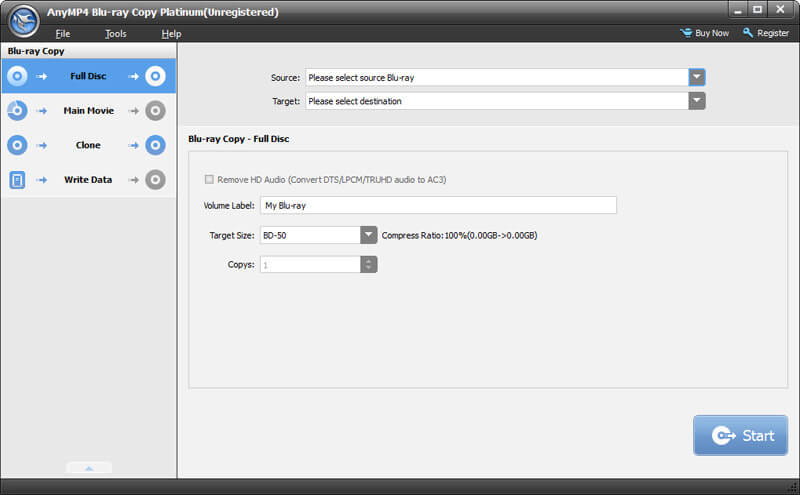
AnyMP4 Blu-ray Copy Platinum can burn local Blu-ray folder to Blu-ray disc or ISO file with super excellent Blu-ray quality. This multi-functional AnyMP4 Blu-ray Copy software provides you with three different copy modes for copying the Blu-ray Disc and movie like Complete Disc, Main Movie, Cloning modes. You can choose one according to your demand.

4.Easy and simple interface.
AnyMP4 Blu-ray Copy Platinum has a simple and user-friendly interface to help users quickly learn how to clone and back up Blu-ray disc.

Graphcat<

Aiseesoft DVD Creator for Mac 5.2.12

Type: Shareware
Cost: $15
Size: 42.42 MB
Release date: Jan 17 2020
Platform: Mac OS X,
Publisher’s Site:  https://www.aiseesoft.com/
Publisher’s Product Page:  https://www.aiseesoft.com/dvd-creator-for-mac/
Country: China


Aiseesoft DVD Creator for Mac

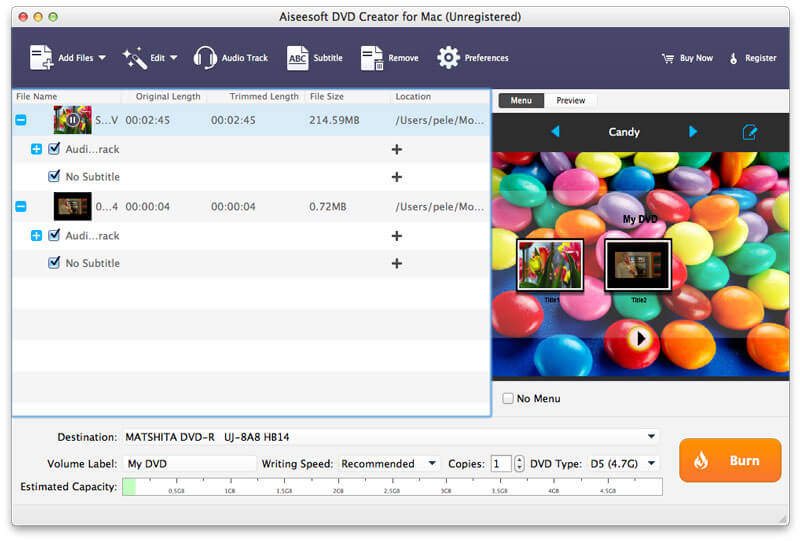
Aiseesoft DVD Creator for Mac lets you create DVDs easily on Mac (latest macOS Catalina and macOS Mojave supported) from all kinds of popular video formats, such as MP4, AVI, MKV, VOB, FLV, MXF, MOV, etc.

Features:
1. Create DVD from any video
With DVD Creator for Mac, you can easily merge multiple videos files in different formats and burn them all into a single DVD or a DVD folder or into ISO image files.

2. Customize DVD menu
There are dozens of DVD menu templates built in this Mac DVD burning software, such as Animal, City, Festival, Plant, Scenery and more. You can personalize your own DVD menu by defining the menu frame and button, editing the menu text, defining its font, size and color, adding a background picture, and more.

3. Add audio tracks and subtitles
You are able to add multiple audio tracks as well as subtitles into your video files before burning DVD. You can even adjust the subtitle’s position, font, size or color and the audio track volume, and select the audio encoder/bitrate/channels as you like. Moreover, if the audio track doesnt match the video scenes, this DVD burner for Mac allows you to adjust the audio latency, so do the subtitles.

4. Edit video effects before creating DVD
You can adjust the brightness, hue, saturation, contrast and the output volume, cut, crop, add watermark to your source videos to enhance the video quality. After that, you can burn the videos to most types of DVD+-R/RW/R DL, DVD-RAM, DVD-5(4.5G) and DVD-9(8.5GB) discs.

Apeaksoft DVD Creator for Mac 1.0.22

Type: Shareware
Cost: $31.20
Size: 36.47 MB
Release date: Jan 16 2020
Platform: Mac OS X,
Publisher’s Site:  https://www.apeaksoft.com/
Publisher’s Product Page:  https://www.apeaksoft.com/dvd-creator/
Country: China


Apeaksoft  DVD Creator for Mac

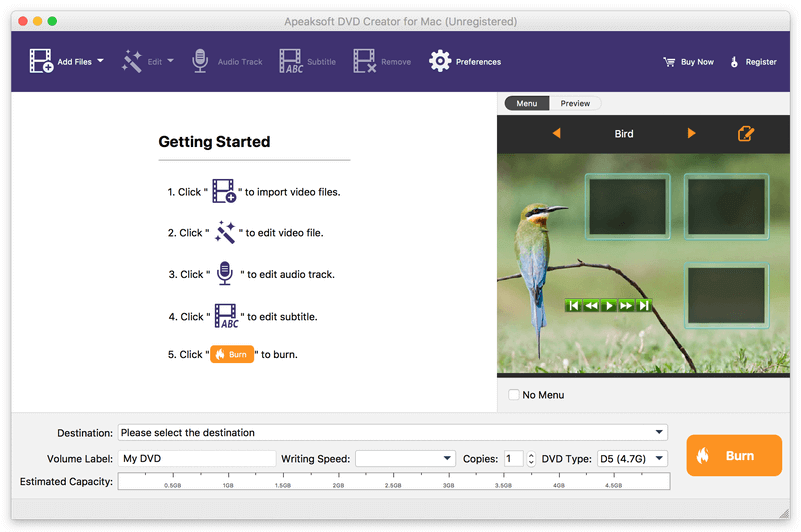
Apeaksoft DVD Creator for Mac can create DVD/Blu-ray disc/folder/ISO files with all kinds of popular videos. Therefore, you can convert MP4 to DVD/Blu-ray, AVI to DVD/Blu-ray and other videos to DVD/Blu-ray. Moreover, it can help you add the audio track and subtitle. In addition, you can choose your preferred menu templates, frames and button styles and add the background music. Furthermore, you can trim the video length, crop the video frame and add watermark to the videos as you like.

Key functions

1. Create DVD/Blu-ray with any video formats
Apeaksoft DVD Creator for Mac can help you burn DVD/Blu-ray disc/folder/ISO files with any video formats including MP4, AVI, WMV, MKV, MOV, M4V, MTS,etc.

2. Edit your DVD/Blu-ray
It is able to help you edit the video effect, such as trimming the video length, cropping the video frame, adding watermark to the video, adjusting the video effect.

3. Customize the DVD/Blu-ray menu
With this software, you can choose your favorite DVD/Blu-ray menu like frame/button/text style. Moreover, you can add background music, add background picture and browse opening film according to your needs.

4. Add audio track and subtitle
This software allows you to add the audio track including language, volume, latency, encoder, bit rates, and channels. Meanwhile, your preferred subtitles can also be added to the videos and you can choose its language, change its position, and set the delay, font size, its name and colors.

5. Fast speed and high quality
Apeaksoft DVD Creator for Mac can provide fast burning speed and high quality for you. You never need to wait for long time for the creation. Just a few minutes, you can enjoy your DVD/Blu-ray in your DVD/Blu-ray player.