Category Archives: Audio & Multimedia

Audio Encoders/Decoders, Audio File Players, Audio File Recorders, CD Burners, CD Players, Multimedia Creation Tools, Music Composers, Other, Presentation Tools, Rippers & Converters, Speech, Video Tools

Total Video Tools for Mac 1.2.6

Type: Shareware
Cost: $34.99
Size: 38.53 MB
Release date: Nov 04 2019
Platform: Mac OS X,
Publisher’s Site:  http://moviemator.net/
Publisher’s Product Page:  http://www.macvideotool.com/total-video-tools-mac.html
Country: Hong Kong


Total Video Tools for Mac

Total Video Tools Mac Key Features:


1 Lossless Screen/Voice Recorder for Mac
Support long recording of screen and camera and output lossless videos.
Support audio inputs by microphone and record your voice with the screen synchronized.
Usage scenario: web-based instructional videos recording, software tutorial videos recording, game videos recording, game commentary videos recording, favorite online video clips recording…

2 Full-Featured Video Editing on Mac
Video Trimming: Trim any video to get the most wanted clip for saving and sharing.
Audio Trimming: Freely trim audio files of any format.
Rotation: It offers real-time preview for 4 rotation modes: flip horizontal, flip vertical, rotation 90 degrees clockwise and counterclockwise!
Merging Tool: Merge multiple video clips and convert them to any format.
Video Mux: Combine videos and audios. Add or change the background music to the videos.
Audio Removal: Remove the original audio tracks to extract soundless video streams.
Audio Extraction: Extract lossless song or audio.
Audio Normalization: Batch analyze audio files to the same volume level.
Video Compression: Compress videos in a batch with 4 kinds of compression ratio.
Audio Compression: All popular audio formats are supported.

3 Fastest Video & Audio Conversion Mac
Enjoy 30X conversion speed between 200+ formats breakthrough hardware acceleration technology.
Support HEVC (H.265) codecs and improve image quality.
Convert to 4K videos (H.265, H.264, etc.) regardless of input device or format.
Cut down conversion time with Lossless batch conversion.
Preset the best format & resolution of each output device.
Support 160+ devices: iPhone, iPad, PSP, Apple TV, Xbox

4 Multimedia Player Mac
Smoothly play 200+ multimedia formats like MTS, MKV, VOB, MP4, AVI, MP3, OGG, M4A and more.
Intelligently detect and display the media information of each file.
Play video files frame-by-frame without missing any detail.

Graphcat<

AnyMP4 Blu-ray Ripper for Mac 8.2.18

Type: Shareware
Cost: $33.75
Size: 48.41 MB
Release date: May 21 2019
Platform: Mac OS X
Publisher’s Site:  https://www.anymp4.com/
Publisher’s Product Page:  https://www.anymp4.com/blu-ray-ripper-for-mac/
Country: China


AnyMP4  Blu-ray Ripper for Mac

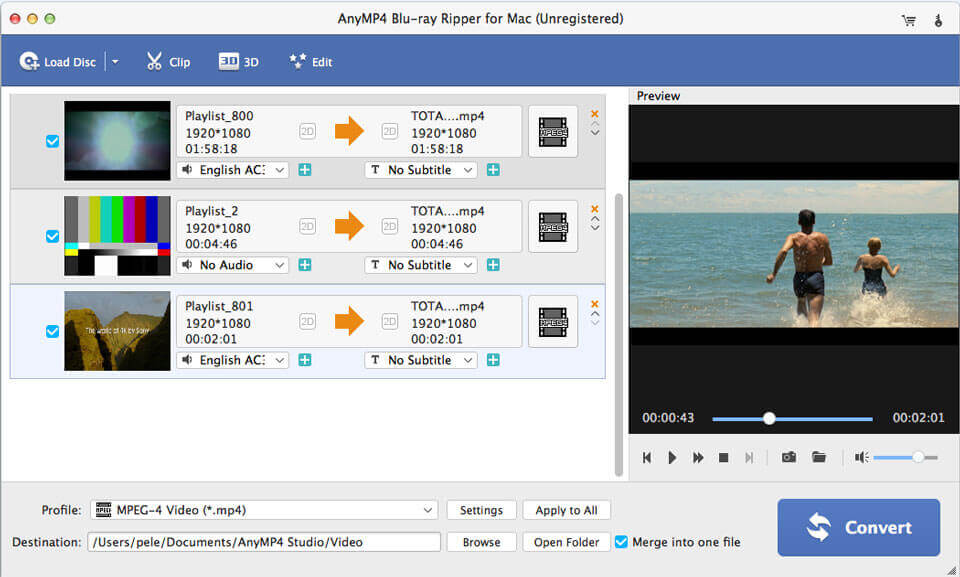
AnyMP4 Blu-ray Ripper for Mac can easily rip Blu-ray disc, Blu-ray folder, and Blu-ray ISO image file to multiple digital device like iPhoneXS/XS Max/X/8/8 Plus, iPad Por, iPad Air 2, iPad mini 4, Samsung Galaxy S7, Samsung Galaxy Note 5, LG G5, Sony Z5, HTC 10, Huawei P9, and others. This software also lets you rip Blu-ray to other devices like Apple TV, Samsung TV, LG TV, Xbox 360, PS3/PS4, Final Cut Pro, iMovie, and more for playing or editing easily.

Key Features:

1.Edit Blu-ray and adjust video effects
The professional Blu-ray Ripper for Mac is equipped with many useful editing features to help you customize video effects before ripping the Blu-ray . For instance, you can rotate video position, cut the video length to only save the necessary part, crop video to remove the black edge, add personal text and image watermark, adjust output video effects like brightness, contrast, saturation and hue.

2.Super fast Blu-ray ripping speed and high quality
Thanks to the latest hardware acceleration technology, AnyMP4 Blu-ray Ripper for Mac gives you a super-fast Blu-ray ripping speed. It can rip Blu-ray to HD video format like MP4, MOV, MKV, AVI, WebM, TS and more. After ripping, you can enjoy the fantastic image and sound quality. In profile settings, you are allowed to set parameters, such as video codec, resolution, bitrate, frame rate, audio codec, audio channels, and so on.

3. Convenient use and easy operation
If the original Blu-ray contains multiple audio tracks and subtitles, this Blu-ray Ripper will show you all audio tracks and subtitles. Then you can select your preferred audio track and subtitle for the output video. The built-in player helps you preview the Blu-ray and you can quickly check the desired titles of the Blu-ray.

Apeaksoft Video Converter Ultimate 1.0.28

Type: Shareware
Cost: $48.30
Size: 37.71 MB
Release date: Nov 18 2019
Platform: Win2000,WinXP,Win7 x32,Win7 x64,Windows 8,Windows 10,WinServer,WinOther,WinVista,WinVista x64
Publisher’s Site:  https://www.apeaksoft.com/
Publisher’s Product Page:  https://www.apeaksoft.com/video-converter-ultimate/
Country: China


Apeaksoft Video Converter Ultimate

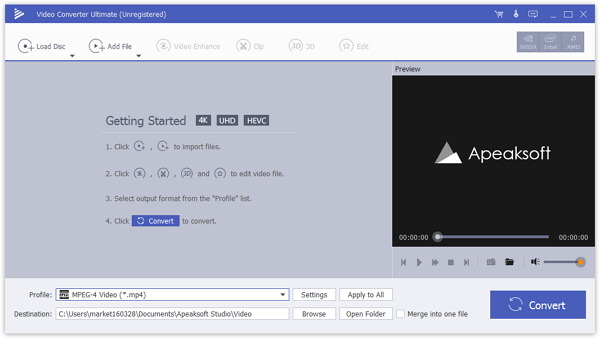
Apeaksoft Video Converter Ultimate helps convert any video to other formats like MP4, MOV, AVI and more so that you can enjoy your videos on more devices. Before your conversion, you could edit video effects. And the enhance function enables you to enhance video by optimizing brightness and contrast, upscaling video resolution, removing video noise etc.

Key features

1. Convert homemade DVD
Apeaksoft Video Converter Ultimate enables you to load DVD videos or folders, and lets you edit and convert homemade DVD videos with ease. You can convert homemade DVD to video in MP4, AVI, WMV, 3GP, FLV and other formats and 3D video files with simple clicks.

2. Convert video and audio
This excellent software enables you to convert any video and audio to various formats such as MP4, AVI, WMV, HD MPEG-4 MP4, 4K MP4, MP3, AVC and more. So that you can use the converted files on multiple devices.

3. Edit, enhance and rotate the video to meet your requirement
You can rotate the video to the correct angle and enhance the video by upscaling resolution, optimizing brightness and contrast, removing video noise and reducing video shaking. Before converting your video to other video format, you are also able to edit your video as you like: crop the video area size, convert 2D to 3D, add watermark and adjust the video effects.

4. Support various devices
Convert video or audio files to iOS devices, Android devices, PSP, Avid, Wii, Adobe Permiere, USB flash drives or external hard drivers, etc. easily.