Category Archives: Audio & Multimedia

Audio Encoders/Decoders, Audio File Players, Audio File Recorders, CD Burners, CD Players, Multimedia Creation Tools, Music Composers, Other, Presentation Tools, Rippers & Converters, Speech, Video Tools

AVS Audio Converter 9.1.1.597

Type: Shareware
Cost: $39
Size: 49.49 MB
Release date: Jul 02 2019
Platform: Win2000,WinXP,Win7 x32,Win7 x64,Windows 8,Windows 10,WinServer,WinOther,WinVista,WinVista x64
Publisher’s Site:  http://www.avs4you.com
Publisher’s Product Page:  http://www.avs4you.com/AVS-Audio-Converter.aspx
Country: United Kingdom


AVS Audio Converter

Convert, edit, create ringtones, enjoy audio conversion process. Convert MP3, WMA, WAV, M4A, AMR, OGG, FLAC, MP2, etc.


Manage APE files and encode them to any key audio format supported by AVS Audio Converter.

Select and convert audio from your video files. It supports DVD, MPEG, MP4, AVI, DIVX, MOV, WMV, VOB, 3GP, RM, QT, FLV, etc.

Use batch mode to convert and work with several files at one go.

Edit audio before conversion. Trim, delete parts, merge files, apply effects.

Modify extra text information in your audio files.

Support of H.265 (HEVC) and VP8/ VP9 video codecs.

Create audiobooks with AVS Audio Converter: convert your audio tracks to M4B format, divide them into chapters, add bookmarks, set up quality level before audio conversion, prepare audio files for your iPod/iPhone.

Add your own information to audio files (titles, authors, comments).

Create Ringtone for iPhone with AVS Audio Converter: edit an audio file and save it to M4R format, make an individual ringtone.

Automate routine work using ready conversion templates without clicking the program buttons manually. Create your own conversion patterns, set favourite presets and schedule an automatic conversion process.

AVS4YOU tools let you easily rip, convert and edit audio/video files, burn DVDs, create ringtones, upload videos to portable devices, players, phones and much more!

AVS Audio Converter is a part of AVS4YOU package. Register once and work with all tools from the AVS4YOU.com. Subscribe for $39/year or $59/lifetime.

Graphcat<

Aiseesoft 4K Converter 9.2.20

Type: Shareware
Cost: $27.30
Size: 39.78 MB
Release date: May 08 2019
Platform: Win2000,WinXP,Win7 x32,Win7 x64,Windows 8,Windows 10,WinServer,WinOther,WinVista,WinVista x64
Publisher’s Site:  https://www.aiseesoft.com
Publisher’s Product Page:  https://www.aiseesoft.com/4k-converter/
Country: China


Aiseesoft 4K Converter

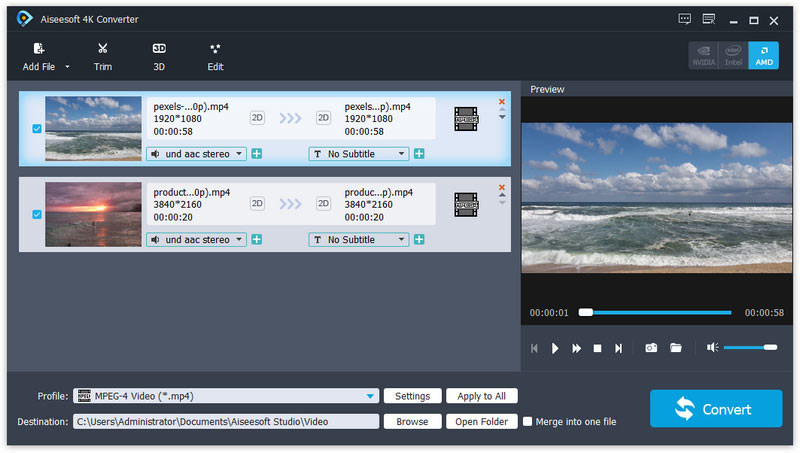
Aiseesoft 4K Converter blazes a path for 4K converting. It helps 4K users to convert the downloaded or recorded 4K video to other 4K formats for higher compatibility, or compress 4K to 1080p HD, 720p HD and SD video. It also enables you to upscale HD or SD videos to 4K.

Key features:

1. Convert 4K videos to HD/SD
Import your 4K video to 4K Converter, choose HD or SD format as profile and click Convert, you can convert your 4K video to any HD or SD video/audio formats as you like. So if you have some 4K video files which occupy much space on your hard disc, now you have a solution. After resizing, you will have more free space to save more files.

2. Convert 4K video to popular formats
As the development of 4K technology, you will find more 4K resources. For example, you may get a 4K camcorder and recorded some 4K video, or download some 4K videos from YouTube, but the format is not what you want. Under such circumstances, you need second consideration and comparasion before choosing a 4K converter to convert your valuable 4K video. Aiseesoft 4K Converter is the most professional one in the market for now. As it adopts the latest kernal, supporting all popular 4K encoding technologies, including HEVC/H.265, MPEG, XviD, VP8, VP9.

3. Upscale video to 4K
Apart from down scaling, you can also upscale any of your video to 4K. By doing so, you will have one more way to get 4K content. The supported output 4K format including MP4, TS, AVI, WebM, MKV and FLV.

4. Edit 4K videos as you like
4K Converter also features the 4K editing function. You use the built-in editor to adjust the brightness, contrast, saturation, hue and volume of the video, you can also add your own watermark to make it your own. Also, the trimming function enables you to get certain part(s) of the 4K video. It is also possible if you want to turn the 2D video to 3D. It has multiple 3D for you to choose.

UkeySoft Video Converter for Mac 10.0

Type: Shareware
Cost: $39.95
Size: 10.24 MB
Release date: Jan 01 2019
Platform: Mac OS X
Publisher’s Site:  https://www.ukeysoft.com
Publisher’s Product Page:  https://www.ukeysoft.com/video-converter-mac/
Country: China


UkeySoft Video Converter for Mac

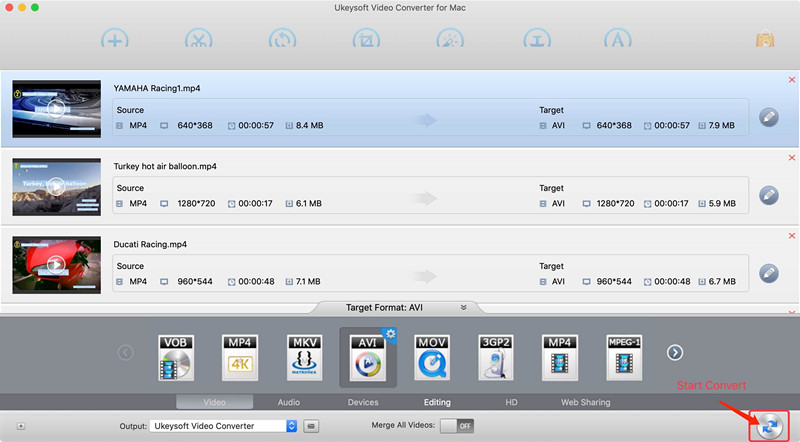
Looking for an video converter to convert any media files on Mac OS X? UkeySoft Video Converter for Mac is one of the fastest and most error-free ways to convert your video and audio files to any desired format for multiple devices. Download this UkeySoft Video Converter for Mac and enjoy your videos and audios without format limitations!

UkeySoft Video Converter for Mac is designed to convert any Video & Audio files to any formats you want.

Input and Output Video Formats: MP4, MKV, AVI, WMV, HEVC, H.264, H.265, MKV, 3GP, FLV, SWF, HTML5, M4V, MOV, ASF, DV, VOB, OGV, YouTube, ASF, RM, MTS/M2TS/TS/TP/TRP, MOD, TOD, DPG
Input and Output Audio Formats: : MP3, MP2, WMA, M4R, M4A, M4B, AC3, AAC, APE, OGG, WAV, FLAC, AIFF, AU, RealMedia
Supported output device: iPad Air, iPad Mini, iPhone 8/8 Plus, iPhone XS(Max), iPhone X, Apple TV, Samsung Galaxy S10/S9/S8/Note 9/Note 8, Google Android, Kindle Fire HD, Sony PSP, LG, Motorola, Huawei, Xbox 360 and more.

UkeySoft Video Converter for Mac build-in video editor function can help you trim video clips, crop video, rotate video, join videos into one. Add subtitles, audio tracks, watermark, special effects. Edit video codecs, dimension, bit rate, frame rate, sample rate, channel, video/audio quality and more. So, you can edit the video and audio files before the conversion.