Category Archives: Audio & Multimedia

Audio Encoders/Decoders, Audio File Players, Audio File Recorders, CD Burners, CD Players, Multimedia Creation Tools, Music Composers, Other, Presentation Tools, Rippers & Converters, Speech, Video Tools

MovieMator Video Editor Pro for Win 2.5.7

Type: Shareware
Cost: $29.99
Size: 91.21 MB
Release date: Jun 01 2019
Platform: Win2000,WinXP,Win7 x32,Win7 x64,Windows 8,Windows 10,WinServer,WinOther,WinVista,WinVista x64
Publisher’s Site:  http://moviemator.net/
Publisher’s Product Page:  http://moviemator.net/
Country: Hong Kong


MovieMator Video Editor Pro for Win

MovieMator Video Editor Pro is a useful Video Editing Software to Create Smooth Animations effects with Keyframes. You can make wonderful movie by cutting and cropping, adding transitions, titles, music and effects which requires no skills. It can animate and modify fixed effects with keyframes and provides stunning video transitions and effects. Animated plain and 3D subtitles are for your choice.


MovieMator Video Editor Pro comes with unlimited video and audio tracks and fully supports all media formats like 4K UltraHD, H.265, MP3, OGG, JPG, SVG, etc. It also supports many export formats, which helps you to save your video for YouTube, Facebook, and Instagram …

Create Smooth Animations by Key Frames of MovieMator Video Editor Pro
Key frame animation will greatly enhance your video quality in many ways:
* Text animation: text varies from one frame to another. This feature can be used to add subtitles to your video.
* Blur animation: add smooth transition by blurring some frames. It makes your video more eye-catching.
* Rotate animation: zoom in and zoom out video to make a popular vlog. You can also use this feature to spin you video.
* White balance animation: colour your video in different frame of your clip. This feature can be used to colour some scenes, for example, making the colour of sunset and sunrise deeper.

Easily Edit Videos/Audios/Images With MovieMator Video Editor Pro
* Import and mix music tracks to make music video like a pro
* Create your vivid slideshows with photos, music and fades.
* Make a video tutorial/advertisement and create your own wedding video.

Complete Video Optimization Makes Your Video Blog Go Viral
* Full of visual effects: Blur, Old Film, Sharpen, Stabilize, Vignette, White Balance, Fade in/out…
* Picture-in-Picture effect and Fast/Slow-motion.
* 20+ stunning transitions: Dissolve, Iris Circle, Clock Top, Cut, Bar Vertical…
* Import all videos/photos from iPhone 6s, GoPro, camcorder or other

Graphcat<

Aiseesoft Video Converter for Mac 9.2.10

Type: Shareware
Cost: $31.50
Size: 52.18 MB
Release date: Feb 24 2019
Platform: Mac OS X
Publisher’s Site:  http://www.aiseesoft.com
Publisher’s Product Page:  https://www.aiseesoft.com/video-converter-for-mac.html
Country: China


Aiseesoft Video Converter for Mac

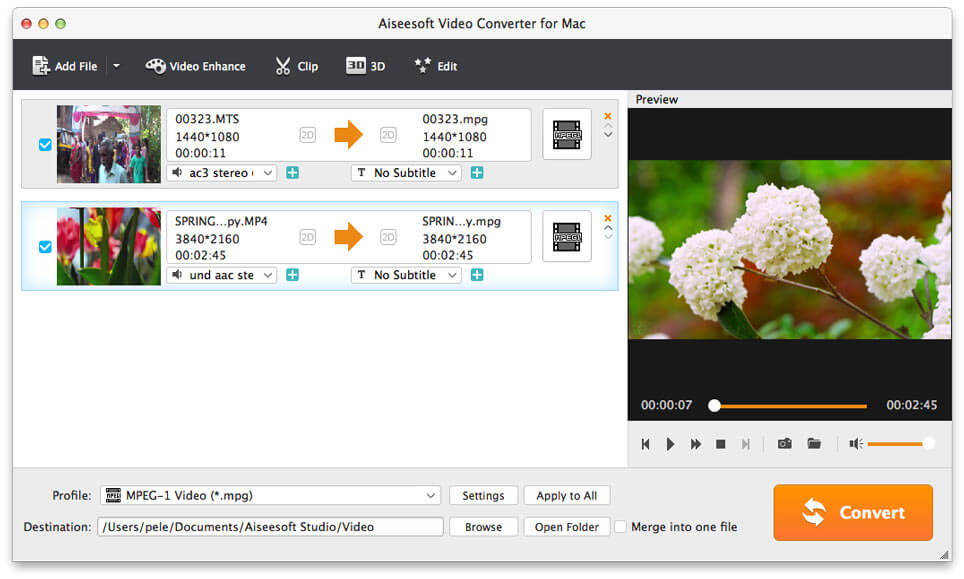
Aiseesoft Video Converter for Mac is used to help users convert any video to popular video (MKV, MOV, MTV, VOB, WMV, AVI, etc.) and audio (AAC, AIFF, AMR, FLAC, MP3, etc.) formats on Mac with the super fast conversion speed and excellent output video/audio quality. What’s more, it is highly compatible with iPad mini 3/2, iPad Air 2, iPhone XR/XS/XS/Max, Samsung Galaxy S6 now.

Key Features

1.Convert any video/audio file including 4K video
This Video Converter for Mac is able to help users convert any video/audio file, including 3GP, 3G2, AVI, DV, DIF, FLV, SWF, F4V, MOD, MJPG, MJPEG, MKV, VOB, DAT, MP4, M4V, MPV, QT, MOV, RM, RMVB, TOD, TS, TRP, TP, WMV, ASF, MPEG-2 HD, MPEG-4 HD, QuickTime HD, WMV HD, HD TS, HD MTS, HD M2TS, HD TRP video and AAC, AIF, AIFF, APE, OGG,etc audio on Mac.

2.Enhance video quality
Upscale video resolution, optimize the brightness and remove video noise to make your video more energetic. What’s more, you are allowed to rotate and flip your video to the right angle according to your needs.

3. Clip and merge videos
Clip a video to your desired time length segments by setting the start and end time. In addition, try to merge different videos to one.

4. Crop Video Frame and Add Video Watermarks
Also you can cut off unwanted playing areas of a video to fit your different portable players. Personalize your video with the image or text watermarks, and adjust its position, transparency, etc.

5. Define video or audio effect
This software enables you to define the output video or audio parameters, such as Video Encoder, Frame Rate, Video Bitrate, Resolution, and Audio Encoder, Sample Rate, Channels, Audio Bitrate. Also you can adjust the video brightness, contrast, saturation, hue and volume.

6. Convert one file to multiple formats
Aiseesoft Video Converter for Mac enables users to select multiple output formats for the source video/audio, and then users can get multiple output video or audio formats at the same time.

Aiseesoft HEIC Converter for Mac 1.0.12

Type: Shareware
Cost: $19.95
Size: 14.93 MB
Release date: Feb 25 2019
Platform: Mac OS X
Publisher’s Site:  http://www.aiseesoft.com
Publisher’s Product Page:  https://www.aiseesoft.com/free-heic-converter/
Country: China


Aiseesoft HEIC Converter for Mac

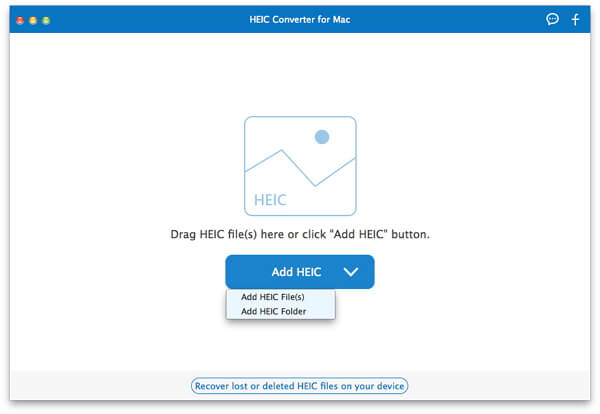
Aiseesoft HEIC converter for Mac, which you can convert all your HEIF (.heic) photos to JPG/JPEG or to PNG on Mac without any hassle. Besides, it provides amazingly fast and time-saving conversion process. This software supports Mac OS X 10.6 or above (macOS High Sierra and macOS Mojave included). And it also supports most popular portable devices, like iPhone XS/ XR/XS Max/X/ 8/8 Plus/7/6/6S/5S/5C, iPad mini 3/2, iPad Air 2/iPod, etc.

Key Features

1. Convert HEIC to JPG/JPEG on Mac
JPG/JPEG is more useful and compatible with the majority of platforms. JPG is a file type developed by JPEG, also referring to the Joint Photographic Experts Group. It is the standard for professional photographers. JPG images compress image data by reducing sections of images

2. Convert HEIC to PNG and Batch Convert HEIC Files
PNG images support multiple colors and internet graphics.This HEIC Converter for Mac can help you professionally convert unlimited HEIC images to JPG or PNG without hassle.

3.Suppor various Devices
This software highly supports iPhone XS/ XR/XS Max/X/ 8/8 Plus, iPad mini 3/2, iPad Air 2, iPod, Apple TV, etc. This software supports Mac OS X 10.6 or above (macOS High Sierra and macOS Mojave included).

4: Free and Fast
HEIC Converter for Mac lets you convert 10 HEIC files for free, providing amazingly fast and time-saving conversion process. It adopts more advanced and modern compression, allowing digital photographs taken by iPhone, iPad or iPod running iOS 11 to be created in smaller file sizes, while keeping higher image quality.