Category Archives: Audio & Multimedia

Audio Encoders/Decoders, Audio File Players, Audio File Recorders, CD Burners, CD Players, Multimedia Creation Tools, Music Composers, Other, Presentation Tools, Rippers & Converters, Speech, Video Tools

Debut Video Capture Software Free 5.11

Type: Freeware
Cost: $0
Size: 2.24 MB
Release date: May 24 2018
Platform: Win2000,WinXP,Win7 x32,Win7 x64,Windows 8,Windows 10,WinServer,WinOther,WinVista,WinVista x64
Publisher’s Site:  https://www.nchsoftware.com/inventory/index.html
Publisher’s Product Page:  https://www.nchsoftware.com/capture/index.html
Country: United States of America

Debut Video Capture Software Free

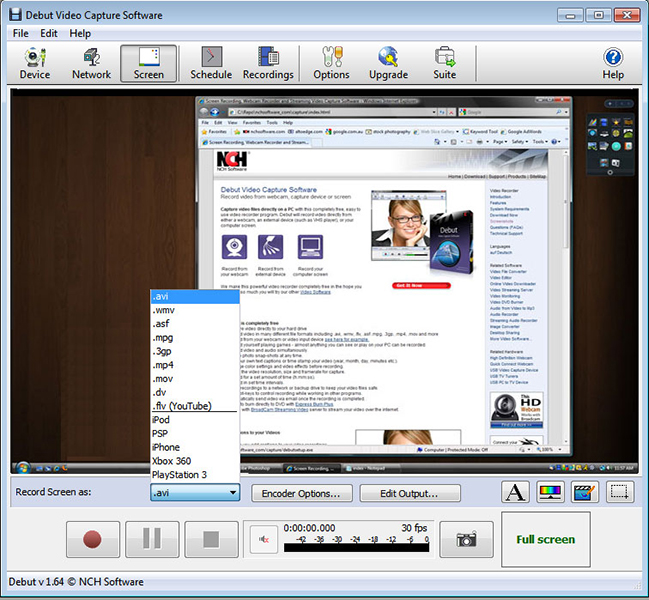
Debut free Screen Capture Software for Windows allows you to easily capture video from your PC. Use Debut to save video captured on your Windows PC directly to your hard drive. Debut Free supports most popular file types including avi, flv, mkv, mpg, and more. Debut Free for Windows support several devices. These devices include webcam, IP Camera, and even VHS tapes. With Debut Free you can add your own text or time stamps ot video you have captured.
Debut Free Video Capture for Windows Features:
* Screen capture entire screen or a small selection
* Digital zoom with mouse wheel
* Highlight mouse pointer for added visibility
* Record video alone or with audio
* Time lapse video recording option
* Record audio from speakers, microphone, or both
Graphcat<

Zulu DJ Software Masters Edition for Mac 3.70

Type: Shareware
Cost: $60.00
Size: 2.02 MB
Release date: Nov 28 2016
Platform: Mac OS X
Publisher’s Site:  https://www.nchsoftware.com/inventory/index.html
Publisher’s Product Page:  https://www.nch.com.au/dj/index.html
Country: United States of America


Zulu DJ Software Masters Edition for Mac

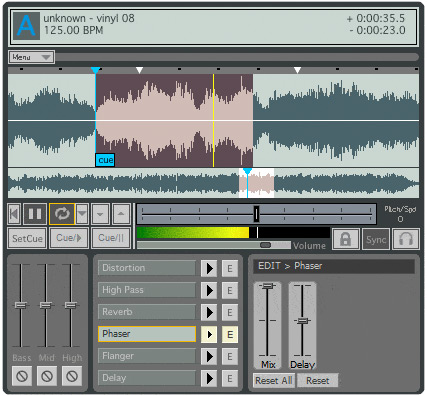
Zulu Masters Edition DJ software is a professional audio mixing and DJ software for Mac. This professional DJ software lets you mix music and other audio recordings live. When loading a music track onto a deck Zulu will automatically scan the file for a beat and assign a beat per minute (BPM), and will change the tempo in the second deck for perfect synchronization. Drag and drop music into and around the application’s interface and preview an upcoming track through headphones via a secondary audio output.


Features include:
~Crossfade in between two tracks.
~Automatic beat detection.
~Synchronization between the Decks.
~Supports a large number of audio file formats including wav (multiple codecs), mp3, vox, gsm, real audio, au, aif, flac, ogg and many more
~Change the pitch in real time of each track, slow it down or speed it up to manually sync it with the other tracks.
~Add a cue pointer marker at any point in a track to instantly start playing the track from that point.
~Loop sections within a track and synchronize that loop to the BPM.
~Real Time Equalization on each Deck (track) including "kill" buttons for instant EQ.
~Apply effects in real-time to a track.
~Effects include Distortion, High Pass Filter, Reverb, Phaser, Flanger and Delay.
~Separate output for headphones.
~Simple and intuitive user interface for day-to-day operation.

MovieMator Video Editor Pro for Win 2.5.2

Type: Shareware
Cost: $29.99
Size: 174.32 MB
Release date: Dec 11 2018
Platform: Win2000,WinXP,Win7 x32,Win7 x64,Windows 8,Windows 10,WinServer,WinOther,WinVista,WinVista x64
Publisher’s Site:  http://www.macvideostudio.com
Publisher’s Product Page:  http://www.macvideostudio.com/moviemator-video-editor-pro-win.html
Country: Hong Kong


MovieMator Video Editor Pro for Win

MovieMator Video Editor Pro is a Powerful Video Editing Software to Create Smooth Animations effects with Keyframes. You can make wonderful movie by cutting and cropping, adding transitions, titles, music and effects which requires no skills. It can animate and modify fixed effects with keyframes and provides stunning video transitions and effects. Animated plain and 3D subtitles are for your choice.

MovieMator Video Editor Pro comes with unlimited video and audio tracks and fully supports all media formats like 4K UltraHD, H.265, MP3, OGG, JPG, SVG, etc. It also supports many export formats, which helps you to save your video for YouTube, Facebook, and Instagram …

Create Smooth Animations by Key Frames of MovieMator Video Editor Pro
Key frame animation will greatly enhance your video quality in many ways:
* Text animation: text varies from one frame to another. This feature can be used to add subtitles to your video.
* Blur animation: add smooth transition by blurring some frames. It makes your video more eye-catching.
* Rotate animation: zoom in and zoom out video to make a popular vlog. You can also use this feature to spin you video.
* White balance animation: colour your video in different frame of your clip. This feature can be used to colour some scenes, for example, making the colour of sunset and sunrise deeper.

Easily Edit Videos/Audios/Images With MovieMator Video Editor Pro
* Import and mix music tracks to make music video like a pro
* Create your vivid slideshows with photos, music and fades.
* Make a video tutorial/advertisement and create your own wedding video.

Complete Video Optimization Makes Your Video Blog Go Viral
* Full of visual effects: Blur, Old Film, Sharpen, Stabilize, Vignette, White Balance, Fade in/out…
* Picture-in-Picture effect and Fast/Slow-motion.
* 20+ stunning transitions: Dissolve, Iris Circle, Clock Top, Cut, Bar Vertical…
* Import all videos/photos from iPhone 6s, GoPro, camcorder or other