Category Archives: Audio & Multimedia

Audio Encoders/Decoders, Audio File Players, Audio File Recorders, CD Burners, CD Players, Multimedia Creation Tools, Music Composers, Other, Presentation Tools, Rippers & Converters, Speech, Video Tools

DarkWave Studio 5.7.1

Type: Freeware
Cost: $0
Size: 2.89 MB
Release date: Jun 19 2017
Platform: Win2000,WinXP,Win7 x32,Win7 x64,Windows 8,Windows 10,WinServer,WinOther,WinVista,WinVista x64
Publisher’s Site:  http://www.experimentalscene.com/
Publisher’s Product Page:  http://www.experimentalscene.com/software/darkwave-studio/
Country: Australia

DarkWave Studio

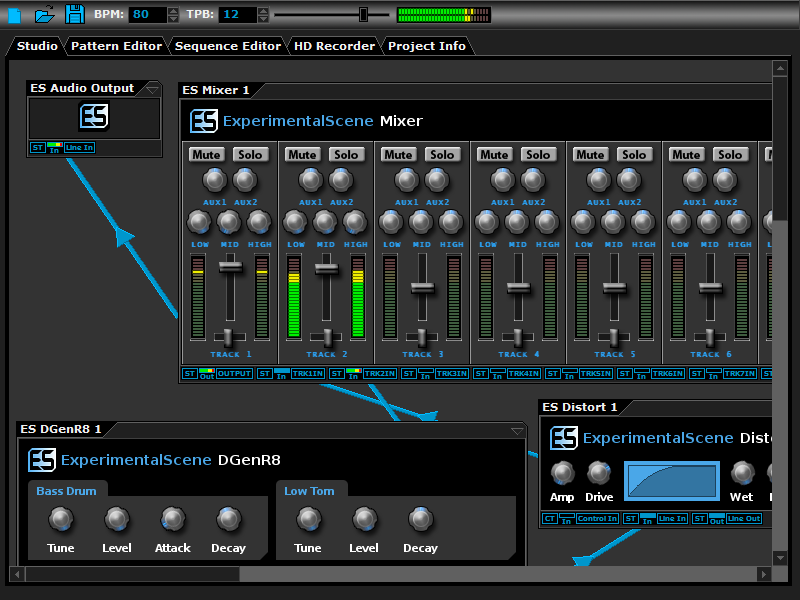
DarkWave Studio is a free Digital Audio Workstation (DAW) / modular virtual music studio for Windows. You can easily use the built in sequencer, bundled DarkPlug machines and third-party VST effects and VSTi instruments to create music. DarkWave Studio allows the connection of machines in an ad-hoc fashion. The installer ships with both a 32-bit and 64-bit version.


DarkWave consists of the following main parts:

Studio (Work With Machines)
Pattern Editor (Create Pieces Of Music)
Sequencer (Arrange Patterns Into A Song)
Multi-track Hard Disk Recorder (Master Your Music)

The following plugins are included with DarkWave:

ES Audio Input (Allows For Input From Sound Card)
ES Arpeggiator (Play Arpeggios With A MIDI Keyboard)
ES ControlChange Mapper (Map Control Change Events From One Index To Another)
ES MIDI Input (Use MIDI Keyboards With DarkWave Instruments)
ES MIDI Output (Sequence External MIDI Synthesizers)
ES AntiAlias (32x Digital Oversampling)
ES SpatialVerb (Room Modelling Reverb Unit)
ES Stomp (Rave Kick Generator)
ES BassHead (Subtractive Virtual Analog Synthesizer)
ES DGenR8 (Virtual Analog Drum Machine)
ES QuadDelay (Echo And Chorus Effect)
ES Mixer (8 Track Mixer With 2 Auxillary Tracks)
ES Distort (Basic Overdrive Distortion Effect)
ES Crunch (Limit Bits Per Sample Anywhere From 16 To 1 Bits)
ES StereoSplitter (Split An Input Stereo Signal Into Left And Right Output Mono Signals)
ES StereoJoiner (Combine Left And Right Input Mono Signals Into A Single Output Stereo Signal)
ES Scope (View Generated Waveforms In Realtime)
ES Control Monitor (View Control Messages)
ES DownStepper (Sample Rate Reduction Filter)

Features:

Highly Optimized 64-bit Double Precision Precision Audio Processing
Incredibly Fast And Small Download
Low Latency ASIO And DirectSound Audio Output Support
SSE2 (Streaming Single Instruction Multiple Data Extensions) Optimizations.

Graphcat<

JamApp 1.0

Type: Freeware
Cost: $0
Size: 5.74 MB
Release date: Oct 20 2014
Platform: Win7 x32,Win7 x64,WinVista,WinVista x64,WinXP
Publisher’s Site:  http://www.gfsoftware.com
Publisher’s Product Page:  http://www.guitar-and-bass-software.com/eng/jamapp.html
Country: Paraguay


JamApp

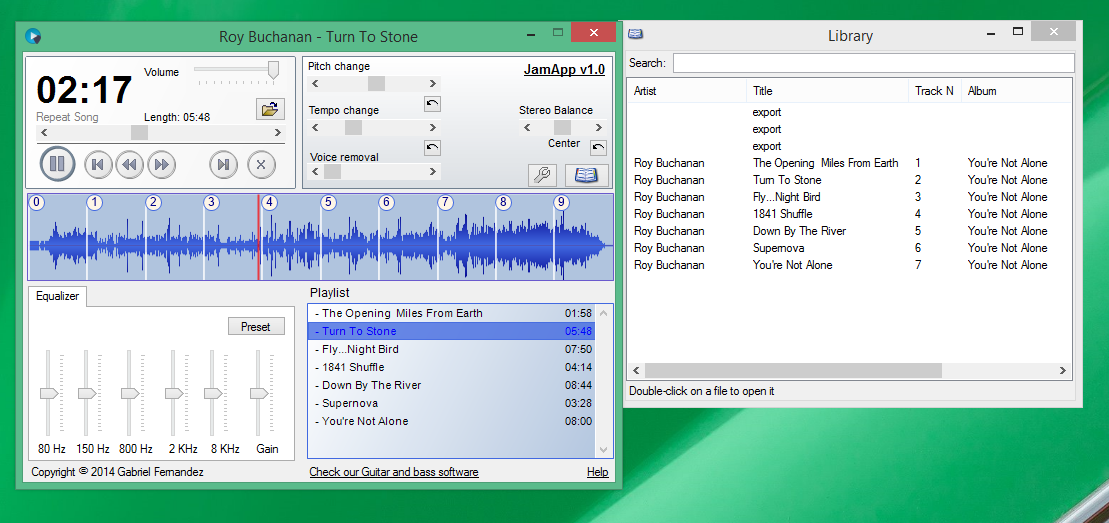
JamApp is an audio player designed for musicians. Now learning songs is a lot easier !
Select the part of a song you want to practice, and focus on that. Change the speed, and pitch with a click.
Easily create a playlist with all the songs you need to practice, and save it.

Features:
– Tempo/Speed control
– Pitch control
– Stereo balance control
– Loops: Practice a single part of a song
– Marks: Easily jump to different parts of a song pressing the numeric keys of your keyboard.
– 5 band Equalizer

MovieMator Video Editor Pro 2.1.0

Type: Shareware
Cost: $29.99
Size: 46.89 MB
Release date: Apr 27 2017
Platform: Mac OS X
Publisher’s Site:  http://www.macvideostudio.com
Publisher’s Product Page:  http://www.macvideostudio.com/mac-video-editor-moviemator-pro.html
Country: Hong Kong


MovieMator Video Editor Pro

MovieMator Video Editor Pro is a full-featured Mac video editor for creating videos in minutes. It allows users to edit video in many ways, like trimming, cropping, splitting, rotating and more. With 40+ filter effects supported by keyframes techniques, it is possible to create videos with a variety of eye-catching animation effects by MovieMator Video Editor Mac Pro.
MovieMator Video Editor Mac Pro comes with unlimited video and audio tracks and fully supports all media formats like 4K UltraHD, H.265, MP3, OGG, JPG, SVG, etc. MovieMator Video Editor Mac Pro also supports many export formats, which helps you to save your video for YouTube, Facebook, and Instagram …

Create Smooth Animations by Key Frames of MovieMator Video Editor Mac Pro
Key frame animation will greatly enhance your video quality in many ways:
* Text animation: text varies from one frame to another. This feature can be used to add subtitles to your video.
* Blur animation: add smooth transition by blurring some frames. It makes your video more eye-catching.
* Rotate animation: zoom in and zoom out video to make a popular vlog. You can also use this feature to spin you video.
* White balance animation: colour your video in different frame of your clip. This feature can be used to colour some scenes, for example, making the colour of sunset and sunrise deeper.

Easily Edit Videos/Audios/Images With MovieMator Video Editor Mac Pro
* Import and mix music tracks to make music video like a pro
* Create your vivid slideshows with photos, music and fades.
* Make a video tutorial/advertisement and create your own wedding video.

Complete Video Optimization Makes Your Video Blog Go Viral
* Full of visual effects: Blur, Old Film, Sharpen, Stabilize, Vignette, White Balance, Fade in/out…
* Picture-in-Picture effect and Fast/Slow-motion.
* 20+ stunning transitions: Dissolve, Iris Circle, Clock Top, Cut, Bar Vertical…
* Import all videos/photos from iPhone 6s, GoPro, camcorder or other