Category Archives: Audio & Multimedia

Audio Encoders/Decoders, Audio File Players, Audio File Recorders, CD Burners, CD Players, Multimedia Creation Tools, Music Composers, Other, Presentation Tools, Rippers & Converters, Speech, Video Tools

eTinysoft Total Video Converter Mac 4.2.5

Type: Shareware
Cost: $29.99
Size: 79.24 MB
Release date: Dec 30 2016
Platform: Mac OS X
Publisher’s Site:  http://www.effectmatrix.com/
Publisher’s Product Page:  http://www.macvideostudio.com/total-video-converter-mac.html
Country: Hong Kong


eTinysoft Total Video Converter Mac

Total Video Converter Mac Pro developed by EffectMatrix Ltd is the official legal version of Total Video Converter which was a globally recognized brand since 2006.


Total Video Converter for Mac Pro = Mac Video / Audio Converter + Mac DVD Burner + DV Auto Importer + Video Combiner + GIF Exporter + Audio Extractor + Video Editor + Video Multiplex + Video/Audio Trimer

Total Video Converter for Mac Pro has everything you need to make and watch videos! It is more than just a video converter! You can use this all-in-one video tool to do everything! It is very easy to use! No technical knowledge is needed!

Main Features:
1 Support VoiceOver and 4K HD video output format.
2 HDTV: Samsung TV, Panasonic TV, Toshiba TV, Philips TV, HDTV 720P, HDTV 1080P etc.
3 Professional video editing function.
4 Convert your multi-track video with your favorite sound track
5 Importing lots of subtitle file formats, including .srt, .sub, .ssa, .ass .smi, .smai etc.
6 Burn both SD and HD video to NTSC/PAL DVD with high speed
7 CONVERT almost all video formats to any device!
8 EXTRACT lossless audio form a video file.
9 AUTO import DV videos and easily convert to iMovie, FCP and other mobile devices
10 TRIM video/audio to desired clip with setting customized ‘start’ and ‘end’ time point
11 Despite the formats of the videos, you can merge multiple video files into a singe long video.
12 Videos of various sizes can be converted to animated GIF which has smaller size and needs less network traffic to upload.
13 Adjust the brightness, contrast, saturation, rotate or flip your video, add artistic effects like 3D or sharpen to make your video different and special.
14 Highly compatible HDV and DV video formats: *.mod, *.tod, *.m2ts, *.evo, *.vro, *.mts, etc.
15 Support 13 Languages: English, German, Japanese, Russian, Spanish etc.

Graphcat<

MovieMator Free Mac Video Editor 1.4.7

Type: Freeware
Cost: $0
Size: 60.28 MB
Release date: Jan 06 2017
Platform: Mac OS X
Publisher’s Site:  http://www.effectmatrix.com/
Publisher’s Product Page:  http://www.macvideostudio.com/moviemator-free-mac-video-editor.html
Country: Hong Kong


MovieMator Free Mac Video Editor

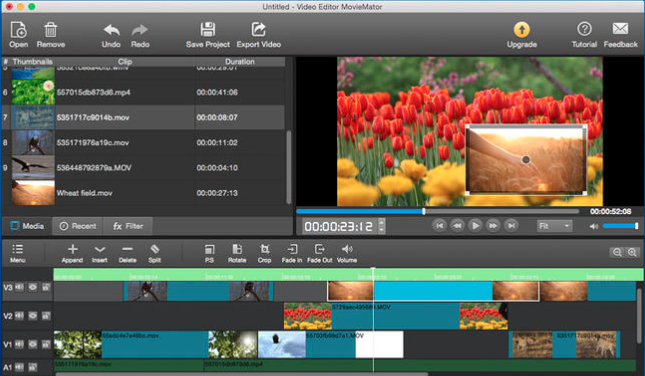
MovieMator Free Mac Video Editor is a free but quite professional Mac video editing software, which is carried with 60+ professional-looking filters and transitions. Amazing home movies and vivid photo slideshow will be created in a few minutes with this free video editor for Mac!

MovieMator Free Mac Video Editor not only allows users to do all the basic editing work such as trimming, cropping, splitting, rotating, merging and more, but also provides more advanced editing features like video overlay (PIP), Slow/Fast Motion, etc.

Key Features of this free video editing software:
1. Unlimited video tracks and audio tracks help users handle all large projects.
2. Trim / Merge / Split / Crop / Rotate video/audio/image clips of any format with MovieMator Free Mac Video Editor.
3. The interface of MovieMator Free Mac video editor is extremly intuitive and all features are clear at a glance.
4. This video editor for Mac fully supports all media formats and can incredibly fast export HD videos in 200+ media formats like MP4, AVI, MPEG, WMV, MKV, MPG, RMVB, M4V, 3GP, FLV, TS, M4V, VOB, F4V, MP3, WAV, MKA, OGG, FLAC, AAC, JPG, PNG, TIF, BMP, SVG and more for playback on all devices.
5. Create Fast/Slow-motion video by adjusting the playing speed as you like with this video editing software for Mac.
6. MovieMator Free Mac Video Editor allows you to set fade in/out time for videos and audios with freedom.
7. Make your work personalized with PIP and other Hollywood-level effects.
8. Easy-to-use cut, copy, and paste operations in this free video editor Mac.
9. Hide, mute, and lock video track and audio track with one-click.
10. Arrange and Trim all elements on the timeline by dragging and dropping.
11. Real-time preview feature ensures what you see is what you get.
12. Customize output parameters like resolution, frame rate, aspect ratio and etc.
13. Auto save the project for direct editing next time when the window is closed unexpectedly.

DarkWave Studio 5.6.2

Type: Freeware
Cost: $0
Size: 2.89 MB
Release date: Jan 04 2017
Platform: Win2000,WinXP,Win7 x32,Win7 x64,Windows 8,Windows 10,WinServer,WinOther,WinVista,WinVista x64
Publisher’s Site:  http://www.experimentalscene.com/
Publisher’s Product Page:  http://www.experimentalscene.com/software/darkwave-studio/
Country: Australia


DarkWave Studio

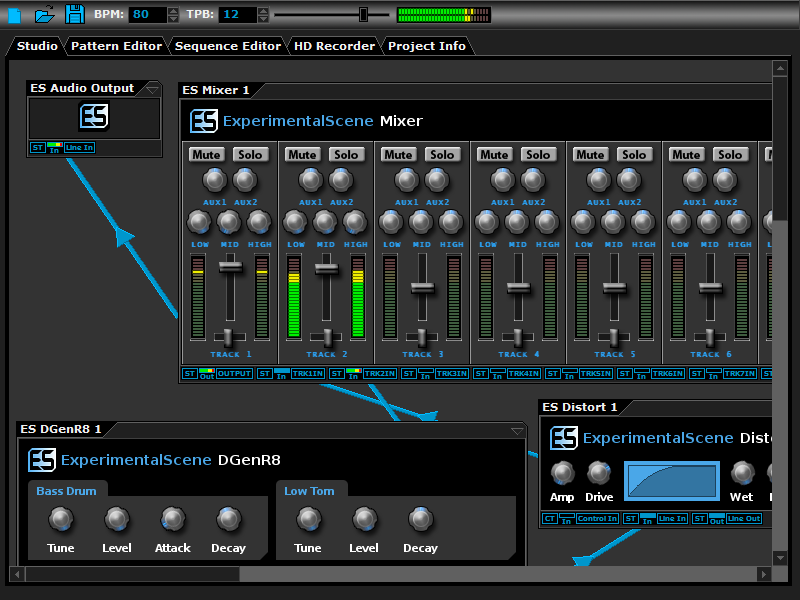
DarkWave Studio is a free Digital Audio Workstation (DAW) / modular virtual music studio for Windows. You can easily use the built in sequencer, bundled DarkPlug machines and third-party VST effects and VSTi instruments to create music. DarkWave Studio allows the connection of machines in an ad-hoc fashion. The installer ships with both a 32-bit and 64-bit version.

DarkWave consists of the following main parts:

Studio (Work With Machines)
Pattern Editor (Create Pieces Of Music)
Sequencer (Arrange Patterns Into A Song)
Multi-track Hard Disk Recorder (Master Your Music)

The following plugins are included with DarkWave:

ES Audio Input (Allows For Input From Sound Card)
ES Arpeggiator (Play Arpeggios With A MIDI Keyboard)
ES ControlChange Mapper (Map Control Change Events From One Index To Another)
ES MIDI Input (Use MIDI Keyboards With DarkWave Instruments)
ES MIDI Output (Sequence External MIDI Synthesizers)
ES AntiAlias (32x Digital Oversampling)
ES SpatialVerb (Room Modelling Reverb Unit)
ES Stomp (Rave Kick Generator)
ES BassHead (Subtractive Virtual Analog Synthesizer)
ES DGenR8 (Virtual Analog Drum Machine)
ES QuadDelay (Echo And Chorus Effect)
ES Mixer (8 Track Mixer With 2 Auxillary Tracks)
ES Distort (Basic Overdrive Distortion Effect)
ES Crunch (Limit Bits Per Sample Anywhere From 16 To 1 Bits)
ES StereoSplitter (Split An Input Stereo Signal Into Left And Right Output Mono Signals)
ES StereoJoiner (Combine Left And Right Input Mono Signals Into A Single Output Stereo Signal)
ES Scope (View Generated Waveforms In Realtime)
ES Control Monitor (View Control Messages)
ES DownStepper (Sample Rate Reduction Filter)

Features:

Highly Optimized 64-bit Double Precision Precision Audio Processing
Incredibly Fast And Small Download
Low Latency ASIO And DirectSound Audio Output Support
SSE2 (Streaming Single Instruction Multiple Data Extensions) Optimizations.