Category Archives: Audio & Multimedia

Audio Encoders/Decoders, Audio File Players, Audio File Recorders, CD Burners, CD Players, Multimedia Creation Tools, Music Composers, Other, Presentation Tools, Rippers & Converters, Speech, Video Tools

The Webplayer 1.08

Type: Shareware
Cost: $14.45
Size: 7.35 MB
Release date: Jun 16 2016
Platform: Win2000,WinXP,Win7 x32,Win7 x64,Windows 8,Windows 10,WinServer,WinOther,WinVista,WinVista x64
Publisher’s Site:  http://coderely.com
Publisher’s Product Page:  http://thewebplayer.com
Country: United States of America


The Webplayer

The Webplayer is a Windows application, which provides easy streaming from your favorite web site. There are two main components in The Webplayer: Web Browser and Media Player. When selecting a media link in the Web Browser window, the playback starts in the Media Player window.


Application Features.

Close the Web Browser window at any time, your playback will not be interrupted.
Save your place when you reopen the Web Browser window, you will be returned to where you left off.
Resize the Media Player window and position it anywhere on your screen, no need to reset your preferences your player window will open in the same place and size every time you open the application.
Always on top – your player stays open in front of other windows – you can work, game or enjoy social media while you watch. Now, you can watch videos without missing a single scene, even if you are using other applications.
Need to keep your shows in the background? This feature can be turned on and off.

YouTube fans will love the special features designed to improve your YouTube experience. Enjoy custom browsing with YouTube API, which allows you to quickly move from section to section in your YouTube account. One click takes you to your Liked Videos, Favorites, Watch Later, Watch History, Subscriptions and Playlists from the Media Player. An advanced search feature makes locating your favorite programs simple.

Currently The Webplayer works with all of the most popular providers, including YouTube, Netflix, Hulu, Amazon Video, HBO, Showtime and more. At your request new content will be added, including the websites of your choice. For more information or to see whether your favorite streaming web site is supported – contact support@thewebplayer.com

Graphcat<

DarkWave Studio 5.6.0

Type: Freeware
Cost: $0
Size: 2.88 MB
Release date: Dec 08 2016
Platform: Win2000,WinXP,Win7 x32,Win7 x64,Windows 8,Windows 10,WinServer,WinOther,WinVista,WinVista x64
Publisher’s Site:  http://www.experimentalscene.com/
Publisher’s Product Page:  http://www.experimentalscene.com/software/darkwave-studio/
Country: Australia


DarkWave Studio

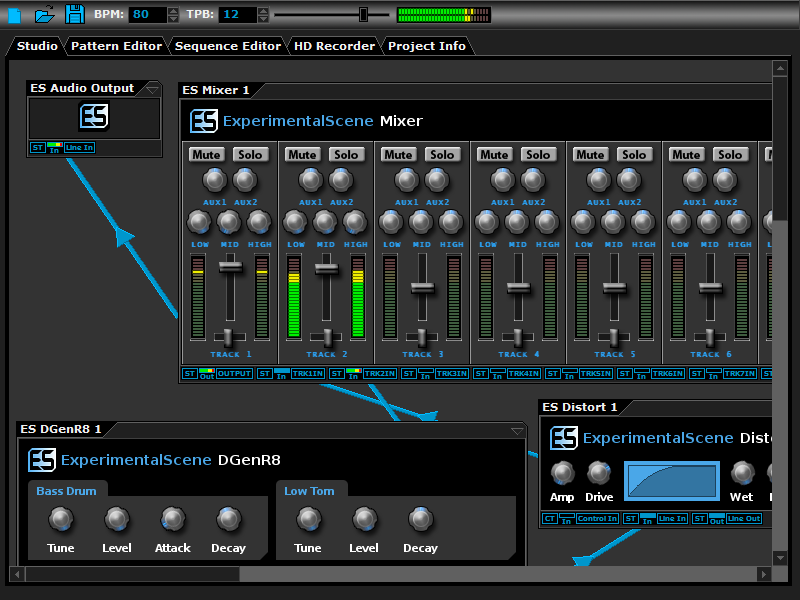
DarkWave Studio is a free Digital Audio Workstation (DAW) / modular virtual music studio for Windows. You can easily use the built in sequencer, bundled DarkPlug machines and third-party VST effects and VSTi instruments to create music. DarkWave Studio allows the connection of machines in an ad-hoc fashion. The installer ships with both a 32-bit and 64-bit version.

DarkWave consists of the following main parts:

Studio (Work With Machines)
Pattern Editor (Create Pieces Of Music)
Sequencer (Arrange Patterns Into A Song)
Multi-track Hard Disk Recorder (Master Your Music)

The following plugins are included with DarkWave:

ES Audio Input (Allows For Input From Sound Card)
ES Arpeggiator (Play Arpeggios With A MIDI Keyboard)
ES ControlChange Mapper (Map Control Change Events From One Index To Another)
ES MIDI Input (Use MIDI Keyboards With DarkWave Instruments)
ES MIDI Output (Sequence External MIDI Synthesizers)
ES AntiAlias (32x Digital Oversampling)
ES SpatialVerb (Room Modelling Reverb Unit)
ES Stomp (Rave Kick Generator)
ES BassHead (Subtractive Virtual Analog Synthesizer)
ES DGenR8 (Virtual Analog Drum Machine)
ES QuadDelay (Echo And Chorus Effect)
ES Mixer (8 Track Mixer With 2 Auxillary Tracks)
ES Distort (Basic Overdrive Distortion Effect)
ES Crunch (Limit Bits Per Sample Anywhere From 16 To 1 Bits)
ES StereoSplitter (Split An Input Stereo Signal Into Left And Right Output Mono Signals)
ES StereoJoiner (Combine Left And Right Input Mono Signals Into A Single Output Stereo Signal)
ES Scope (View Generated Waveforms In Realtime)
ES Control Monitor (View Control Messages)

Features:

Highly Optimized 64-bit Double Precision Precision Audio Processing
Incredibly Fast And Small Download
Low Latency ASIO And DirectSound Audio Output Support
SSE2 (Streaming Single Instruction Multiple Data Extensions) Optimizations.

SpatialVerb VST 5.6.0

Type: Freeware
Cost: $0.00
Size: 1.15 MB
Release date: Dec 08 2016
Platform: Win2000,WinXP,Win7 x32,Win7 x64,Windows 8,Windows 10,WinServer,WinOther,WinVista,WinVista x64
Publisher’s Site:  http://www.experimentalscene.com/
Publisher’s Product Page:  http://www.experimentalscene.com/software/spatialverb/
Country: Australia


SpatialVerb VST

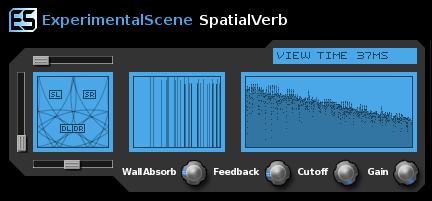
SpatialVerb VST has a powerful ray tracing system for generating the early impulse response of the reverb unit. The late impulse response is generated by a feedback delay network to minimize ringing. This simple to use yet powerful VST effect is great for those who want a realistic reverb effect. This plugin has high quality 32-bit processing with full stero input and output. Reverberation is modelled with a raytracer which generates the early reverb response and a feedback delay network which generates a smooth (no ringing) late response.