Category Archives: Audio & Multimedia

Audio Encoders/Decoders, Audio File Players, Audio File Recorders, CD Burners, CD Players, Multimedia Creation Tools, Music Composers, Other, Presentation Tools, Rippers & Converters, Speech, Video Tools

MovieMator Free Mac Video Editor 1.4.2

Type: Freeware
Cost: $0
Size: 60.28 MB
Release date: Aug 31 2016
Platform: Mac OS X
Publisher’s Site:  http://www.macvideostudio.com/
Publisher’s Product Page:  http://www.macvideostudio.com/moviemator-free-mac-video-editor.html
Country: Hong Kong

MovieMator Free Mac Video Editor

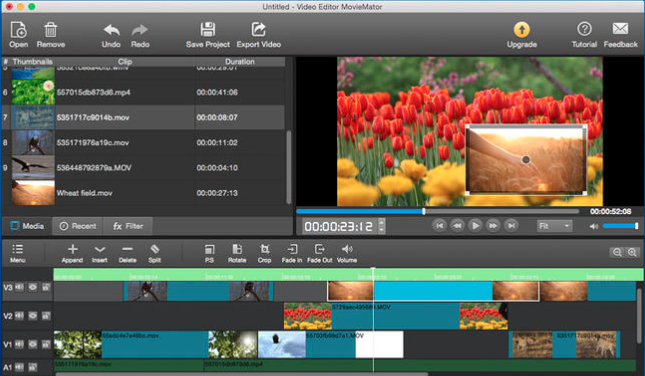
MovieMator Free Mac Video Editor is a totally free but very professional Mac video editing tool which is carried with lots of unique visual effects and transitions. Amazing home movies and vivid photo slideshow will be created in a few minutes with this free video editor for Mac!


What is more, MovieMator Free Mac Video Editor allows users to easily add images for a vivid photo slideshow or as cut-ins between video clips on Mac OS X. It is easy to use and supports to enhance the video quality with one Chroma Key. Edit videos into an excellent home movie with MovieMator Free Mac Video Editor Now!

MovieMator Free Mac Video Editor Key Features:

1. MovieMator Free Mac Video Editor supports to edit videos, audios and photos and allows users to trim, split, rotate & crop and split clips on the timeline.

2. Multi-track timeline is available for videos, audios and photos editing on this free video editor for Mac. Users can add multiple videos in the same frame on multi-track timeline to make a picture-in-picture effect.

3. De-interlacing function is available on MovieMator Free Mac Video Editor.

4. MovieMator Free Mac Video Editor supports to adjust video properties, such as speed, aspect ratio, scan mode and sync.

5. Automatically save and recover the media files with MovieMator Free Video Editor for Mac.

6. 160+ video formats can be imported to MovieMator Free Mac Video Editor: 4K, HEVC(H.265), TS, TRP, AVI, ASF, MOV, M4V, WMV, MKV and many more.

7. Input audio formats supported by MovieMator Free Video Editor for Mac: MP3, M4A, AC3, AAC, WMA, WAV, OGG…

8. Users are able to add all common photo formats such as BMP, GIF, JPEG, PNG, SVG, TGA, TIFF to this free video editor for Mac.

9. MovieMator Free Mac Video Editor helps users to exported their home movie as these formats: HEVC(H.265), WMV, OGG, WebM, MPEG-2, ProRes, DNxHD, HDV, DVCPro50, XDCAM-422, etc.

Graphcat<

DarkWave Studio 5.5.8

Type: Freeware
Cost: $0
Size: 2.87 MB
Release date: Oct 08 2016
Platform: Win2000,WinXP,Win7 x32,Win7 x64,Windows 8,Windows 10,WinServer,WinOther,WinVista,WinVista x64
Publisher’s Site:  http://www.experimentalscene.com/
Publisher’s Product Page:  http://www.experimentalscene.com/software/darkwave-studio/
Country: Australia


DarkWave Studio

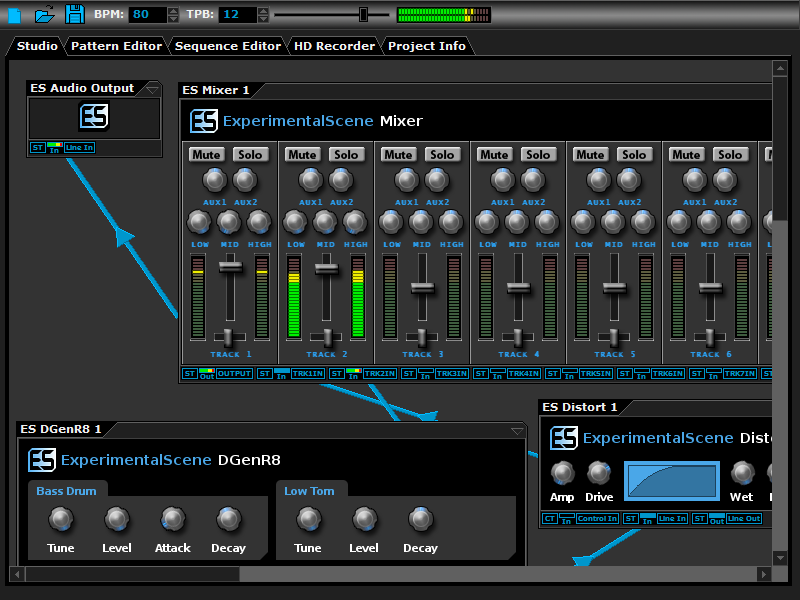
DarkWave Studio is a free Digital Audio Workstation (DAW) / modular virtual music studio for Windows. You can easily use the built in sequencer, bundled DarkPlug machines and third-party VST effects and VSTi instruments to create music. DarkWave Studio allows the connection of machines in an ad-hoc fashion. The installer ships with both a 32-bit and 64-bit version.

DarkWave consists of the following main parts:

Studio (Work With Machines)
Pattern Editor (Create Pieces Of Music)
Sequencer (Arrange Patterns Into A Song)
Multi-track Hard Disk Recorder (Master Your Music)

The following plugins are included with DarkWave:

ES Audio Input (Allows For Input From Sound Card)
ES Arpeggiator (Play Arpeggios With A MIDI Keyboard)
ES ControlChange Mapper (Map Control Change Events From One Index To Another)
ES MIDI Input (Use MIDI Keyboards With DarkWave Instruments)
ES MIDI Output (Sequence External MIDI Synthesizers)
ES AntiAlias (32x Digital Oversampling)
ES SpatialVerb (Room Modelling Reverb Unit)
ES Stomp (Rave Kick Generator)
ES BassHead (Subtractive Virtual Analog Synthesizer)
ES DGenR8 (Virtual Analog Drum Machine)
ES QuadDelay (Echo And Chorus Effect)
ES Mixer (8 Track Mixer With 2 Auxillary Tracks)
ES Distort (Basic Overdrive Distortion Effect)
ES Crunch (Limit Bits Per Sample Anywhere From 16 To 1 Bits)
ES StereoSplitter (Split An Input Stereo Signal Into Left And Right Output Mono Signals)
ES StereoJoiner (Combine Left And Right Input Mono Signals Into A Single Output Stereo Signal)
ES Scope (View Generated Waveforms In Realtime)
ES Control Monitor (View Control Messages)

Features:

Highly Optimized 64-bit Double Precision Precision Audio Processing
Incredibly Fast And Small Download
Low Latency ASIO And DirectSound Audio Output Support
SSE2 (Streaming Single Instruction Multiple Data Extensions) Optimizations.

DarkWave Studio 5.5.7

Type: Freeware
Cost: $0
Size: 2.88 MB
Release date: Sep 28 2016
Platform: Win2000,WinXP,Win7 x32,Win7 x64,Windows 8,Windows 10,WinServer,WinOther,WinVista,WinVista x64
Publisher’s Site:  http://www.experimentalscene.com/
Publisher’s Product Page:  http://www.experimentalscene.com/software/darkwave-studio/
Country: Australia


DarkWave Studio

DarkWave Studio is a free Digital Audio Workstation (DAW) / modular virtual music studio for Windows. You can easily use the built in sequencer, bundled DarkPlug machines and third-party VST effects and VSTi instruments to create music. DarkWave Studio allows the connection of machines in an ad-hoc fashion. The installer ships with both a 32-bit and 64-bit version.

DarkWave consists of the following main parts:

Studio (Work With Machines)
Pattern Editor (Create Pieces Of Music)
Sequencer (Arrange Patterns Into A Song)
Multi-track Hard Disk Recorder (Master Your Music)

The following plugins are included with DarkWave:

ES Audio Input (Allows For Input From Sound Card)
ES Arpeggiator (Play Arpeggios With A MIDI Keyboard)
ES ControlChange Mapper (Map Control Change Events From One Index To Another)
ES MIDI Input (Use MIDI Keyboards With DarkWave Instruments)
ES MIDI Output (Sequence External MIDI Synthesizers)
ES AntiAlias (32x Digital Oversampling)
ES SpatialVerb (Room Modelling Reverb Unit)
ES Stomp (Rave Kick Generator)
ES BassHead (Subtractive Virtual Analog Synthesizer)
ES DGenR8 (Virtual Analog Drum Machine)
ES QuadDelay (Echo And Chorus Effect)
ES Mixer (8 Track Mixer With 2 Auxillary Tracks)
ES Distort (Basic Overdrive Distortion Effect)
ES Crunch (Limit Bits Per Sample Anywhere From 16 To 1 Bits)
ES StereoSplitter (Split An Input Stereo Signal Into Left And Right Output Mono Signals)
ES StereoJoiner (Combine Left And Right Input Mono Signals Into A Single Output Stereo Signal)
ES Scope (View Generated Waveforms In Realtime)
ES Control Monitor (View Control Messages)

Features:

Highly Optimized 64-bit Double Precision Precision Audio Processing
Incredibly Fast And Small Download
Low Latency ASIO And DirectSound Audio Output Support
SSE2 (Streaming Single Instruction Multiple Data Extensions) Optimizations.