Category Archives: Audio & Multimedia

Audio Encoders/Decoders, Audio File Players, Audio File Recorders, CD Burners, CD Players, Multimedia Creation Tools, Music Composers, Other, Presentation Tools, Rippers & Converters, Speech, Video Tools

ConvertXtoVideo 1.5.0.36

Type: Shareware
Cost: $39.99
Size: 36.01 MB
Release date: Mar 27 2015
Platform: WinXP,Win7 x32,Win7 x64,Windows 8,WinVista,WinVista x64
Publisher’s Site:  http://www.vso-software.fr
Publisher’s Product Page:  http://www.vso-software.fr/products/video-converter/convert-x-to-video.php
Country: France

ConvertXtoVideo

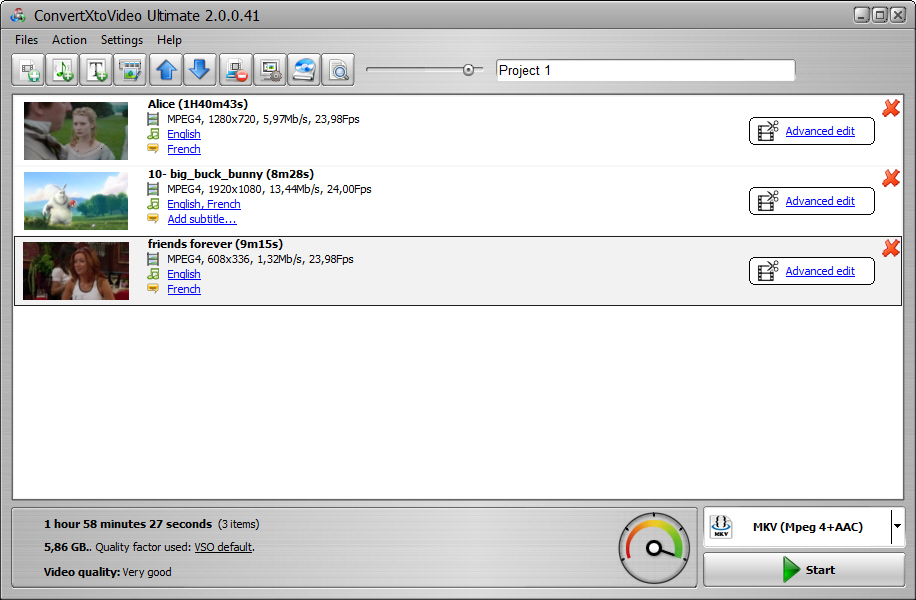
All-in-one video conversion tool. It converts any video into the most popular formats: avi, mkv, DVD, mp4, mpeg, WebM, tablets, smartphones, game consoles, Blu-ray, AVCHD, audio profiles. This universal converter is perfect for the beginners as well as the most advanced users. Default settings allow beginner users to convert their file(s) immediately and get excellent conversion results.
An editing window displays streams as a time line for easy editing. Add additional audio and or subtitle streams. Videos can be cut, merged, cropped, chapter edited as well as image brightness and contrast edited. Advanced users and get their hands on bitrate settings and optimize conversions with hardware optimizations. Use the custom profile editor to create any type of file. A burning engine is included supporting CD, DVD, or Blu-ray disks and various settings. The conversion engine is fast and robust providing excellent results playable on any device!

Graphcat<

PepBlast Motion Pictures 1.2

Type: Freeware
Cost: $0
Size: 46.88 MB
Release date: Mar 10 2015
Platform: iOS
Publisher’s Site:  http://www.pepblast.com
Publisher’s Product Page:  http://www.pepblast.com
Country: United States of America


PepBlast Motion Pictures

Mix your pictures with music and make fun movies and slideshows easily. Personalize your video with amazing styles. See your movie preview immediately and unleash your photos in motion to share with the world.


Watch your PepBlast feed, follow friends, let others to follow you, and experience trending movies.

Main features:

* Slide Show Maker with Music
* Motion Pic Collage for Slides with Photo Editor
* Your photos are animated with video backgrounds and music
* 1000’s of free designs or design your own
* Free and optional Pro plans
* Easy, fast, and fun way to express yourself
* Share with friends by Facebook, Twitter, email, etc.

This Movie Maker of Slideshow with Music features a PRO paid subscription that gives you access to exclusive styles, backgrounds and songs. If you don’t want to pay, you can still use over thousands of free styles, backgrounds, and songs in your movie.

When your photos are uploaded for movie creation, they are also posted to your PepBlast photos (pic.pepblast.com) – public/private (you choose) – in addition to creating a unique PepBlast webpage for your movie with a secret id (which can be shared or not).

We develop apps to make video with pictures and music. Our technology to create video from photos has evolved from picture slideshow to PepBlast movie app to make a video from pictures. PepBlast app allows users to make a slideshow video or make a video with pictures in motion. Users turn pictures into video easily. In order to make your own slideshow, or make your own video, PepBlast has a photo editor and tools to make beautiful short movies. Our movie creator app to make video from photos is fast, easy and fun! The video creator runs in the PepBlast cloud to make movies from pictures to share online.

See sample videos at http://www.pepblast.com

Make unique pic collage videos! We cannot wait to see your amazing movies and slideshows with music created by this amazing movie maker!

The PepBlast Team

LoopBe30 1.6

Type: Shareware
Cost: $19.90
Size: 1.02 MB
Release date: May 21 2011
Platform: Win2000,Win7 x32,Win7 x64,WinServer,WinVista,WinVista x64,WinXP
Publisher’s Site:  http://www.nerds.de
Publisher’s Product Page:  http://www.nerds.de/en/loopbe30.html
Country: Germany


LoopBe30

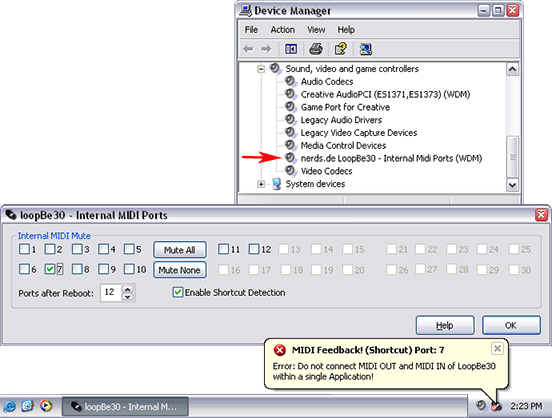
LoopBe30 is a virtual MIDI device driver for transferring MIDI data between computer programs.
Basically LoopBe30 provides up to 30 independent ‘invisible cables’ to connect MIDI outports of applications to any other application’s MIDI inport.
You may connect up to 8 applications to every single inport and up to 8 application to every single outport, all sending and receiving at the same time. Every port provides the full 16 MIDI channels.

LoopBe30 is a native Windows WDM kernel mode driver. Expect the lowest possible latency.

Select only the number of ports you need and only that number of ports will be installed on your system and be visible in your audio applications. This will save system resources and usability. This can be done using the system tray application (LoopBe30 Monitor).
Additionally you can mute each MIDI port individually. A muted port behaves similarly to an audio device. All data sent to the port is simply discarded, but the sending application will not realize anything.

LoopBe30 comes with a powerful shortcut detection. It mutes its ports if the data rate is higher than the MIDI specification of 31.25 kbps. Sometimes it might be necessary or desirable to send more data, for example by sending excessive MIDI polyphonic aftertouch messages. A hardware legacy device would fail here, but not LoopBe30. If you want to send more data than allowed by the spec, and you are sure your setup is shortcut free, simply disable the shortcut detection.

This free Evaluation Copy works for 60 minutes after it has been sent its first MIDI data. After every reboot it will work again for a period of 60 minutes.