Category Archives: Audio & Multimedia

Audio Encoders/Decoders, Audio File Players, Audio File Recorders, CD Burners, CD Players, Multimedia Creation Tools, Music Composers, Other, Presentation Tools, Rippers & Converters, Speech, Video Tools

Hanso Burner 3.2.0

Type: Freeware
Cost: $0
Size: 2.50 MB
Release date: Oct 10 2014
Platform: WinXP,Win7 x32,Win7 x64,Windows 8,WinOther,WinVista,WinVista x64,Other
Publisher’s Site:  http://www.hansotools.com
Publisher’s Product Page:  http://www.hansotools.com/hansoburner/
Country: United Kingdom


Hanso Burner


Hanso Burner belongs to the first-class of CD/DVD burning software that work with Windows. The program is a most comprehensive solution for doing backups and creating/reading ISO files.


Hanso Burner is all about simplicity and convenience – no overcrowded tabs, windows and icons or futile features to get you confused. Hanso Burner gets the job done with high speed and accuracy requiring to special skill from the user; it’s based on a very powerful engine and modern burning technology, full features for backup solutions, user-friendly interface and the classic but well known GUI.

At launching Hanso Burner you will presented in the main window with six clearly labeled icons: Data Disc (CD/DVD), Audio Disc, Video Disc, Write Image, Copy Disc, Read Disc and a top toolbar which, however, can be customized. Click on the View button at the top of the window, select Toolbars and then Customize. Further configuration of the program (for which there’s a special icon in the top-right) includes General (features), Advanced (features), Language (features), Shell Extensions (features).
Hanso Burner is released under GPL version 3.

Why to use Hanso Burner. The software offers:

Support for creating custom data;
Options to create rewritable and multisession discs;
Options to generate audio and mixed-mode projects;
Options to make direct disc copies, on the fly or using a temporary disc image;
Ability to create disc copies;
Ability to record disc images;
Ability to save (and encode) audio and data tracks to files;
Ability to open and edit projects that you have previously saved;
Ability to erase rewritable discs through multiple methods;
Ability to record to dual-layer DVDs;
Ability to burn disc images (ISO and BIN/CUE);
Ability to read and save audio and also data tracks to files (formats such as wma, wav, mp3 and .iso);

Graphcat<

ePaperFlip Software 3.3

Type: Shareware
Cost: $999
Size: 44.76 MB
Release date: Feb 22 2013
Platform: WinXP,WinVista,WinVista x64,Mac OS X
Publisher’s Site:  http://www.epaperflip.com/
Publisher’s Product Page:  http://www.epaperflip.com/
Country: United States of America


ePaperFlip Software


ePaperflip is the leading technology provider of digital publishing software solutions. Our technology allows you to convert your printed material into a unique digital content experience. Our suite of innovative digital publishing software allowing you to deliver content via the web, tablets, mobiles devices, and social channels. The elite features of ePaperflip surpass any other software solution in the publishing industry. ePaperFlip Software available for both PC and Mac.

How It Works?
ePaperflip Software (ES) will convert PDFs and other printed materials into online and offline customized flipping digital editions. Customizations include the ability to personally brand the content with a logo, embed unlimited video and audio, translate into various languages, and sell products from within the edition. Our user friendly publishing software converts your print ready files into a dynamic, user friendly, page flipping digital publication, which allows for online and off-line versions. ES solution provides statistical tools to keep you informed on audience behavior.

Your audience will be able to view your digital edition directly from your Twitter, Facebook, or Google+ and share your digital edition with friends and colleagues.

Your digital edition can be created in HTML5 or flash. This enables users on the iPhone, iPad, Android and other mobile devices to enjoy a rich viewing experience.

ePaperflip digital magazine software solutions allow many brands worldwide to create digital editions in minutes, including digital catalogs, brochures, magazines and more.

From concept to completion, you will be able to Create It, Host It, and Own It!

SmartPixel 3.2

Type: Shareware
Cost: $15.90
Size: 27.46 MB
Release date: Apr 04 2014
Platform: WinXP,Win7 x32,Win7 x64,Windows 8,WinVista,WinVista x64
Publisher’s Site:  http://www.smartpixel.com
Publisher’s Product Page:  http://www.smartpixel.com
Country: China


SmartPixel


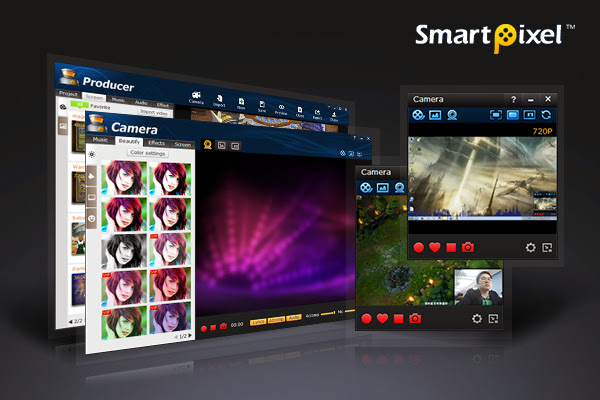
SmartPixel software is a Windows screen video recording tool and editing tool 2 in 1 program to help home user easily create videos to upload online. The screen recorder tool has been seamlessly integrated D3D recording mode inside which compatible with nearly all the PC games video recording. It could help people easily record and edit professional videos in 1080P HD high quality. Its powerful features provide extreme easy and fun screen capture video recording experience with less CPU consumption and lower disk usage. Thus it is widely used for creating desktop screen videos, tutorial videos, webcam videos, game play videos as well as personalized music videos. It is one of the most popular video screen recorder and editor program for the home users.

Smartpixel screen recorder has a PIP mode allows user live comment via webcam and microphone during desktop screen capturing. The webcam video recorder even allows home user to music videos via webcam. It could help user input lyrics and remove the original vocal of the song, besides, it provides various video effects to decorate the webcam video to make it outstanding. If you are a Karaoke fan or a talented singer, it is the idea music video tool for you to make the personalized music video to win more fans for the videos.

SmartPixel video editor might be the easiest video editing software you ever use. With its fast cutting and editing feature, you can be a video editor in a few minutes.It could help editor easily cut, trim, merge video clips by add fast/slow playback section, insert subtitles, dubbing, text effect, background music, scribble painting etc. Almost any ideas you can think of, you can realize in your videos! Furthermore, it has rich effect library including effects, filters, sound clips for the video editors to add more flavor to their video clips. Once the video editing is done, the video clip can be exported with FLV, AVI, MP4, WMV and other general formats to upload to the video sharing site.