Category Archives: Audio & Multimedia

Audio Encoders/Decoders, Audio File Players, Audio File Recorders, CD Burners, CD Players, Multimedia Creation Tools, Music Composers, Other, Presentation Tools, Rippers & Converters, Speech, Video Tools

Vidmore Video Editor 1.0.6

Type: Shareware
Cost: $19.95
Size: 36.69 MB
Release date: Jul 22 2021
Platform: Win2000,WinXP,Win7 x32,Win7 x64,Windows 8,Windows 10,WinServer,WinOther,WinVista,WinVista x64
Publisher’s Site:  https://www.vidmore.com/
Publisher’s Product Page:  https://www.vidmore.com/video-editor/
Country: China

Vidmore Video Editor

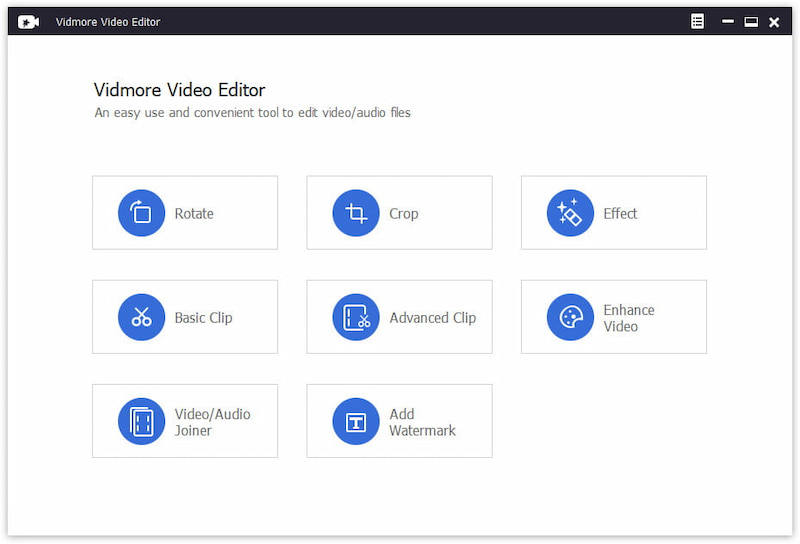
Vidmore Video Editor is a powerful video editing program which lets you rotate and crop your videos according to your need. You could also add watermark to your vides or enhance your video quality. And it supports almost all popular video formats like MP4, MOV, MKV, AVI, WMV, FLV and so on.


Key functions:

1. Rotate and crop videos
Vidmore Video Editor could rotate a video in 90 counterclockwise or clockwise. And it is also able to crop the videos and get rid of black edges simply.

2. Clip videos
It provides two clip methods for users: Basic Clip and Advanced Clip. With this function, you could divide one video into several parts or remove the unwanted parts and keep the parts you want.

3. Conbine video and audio files
If you have some video/audio clips and want to combine them together, the Video/Audio Joiner function could help you accomplish this. It could join some media files into one long movie or music file.

4. Adjust video effects and enhance videos
Vidmore Video Editor is not only a video editing tool but also a video enhancement tool. It could enhance video quality by removing video noise, upscaling video resolution, reduce video shaking. You could also adjust video effetcs, such as contrast, hue, saturation, and brightness manually to create your own videos. Moreover, you are able to add watermarks to your videos according to your preference.

Graphcat<

UkeySoft Amazon Music Converter (Mac) 1.4.0

Type: Shareware
Cost: $14.95
Size: 185.30 MB
Release date: Mar 28 2022
Platform: Mac OS X,
Publisher’s Site:  https://www.ukeysoft.com
Publisher’s Product Page:  https://www.ukeysoft.com/amazon-music-converter/
Country: China


UkeySoft Amazon Music Converter (Mac)

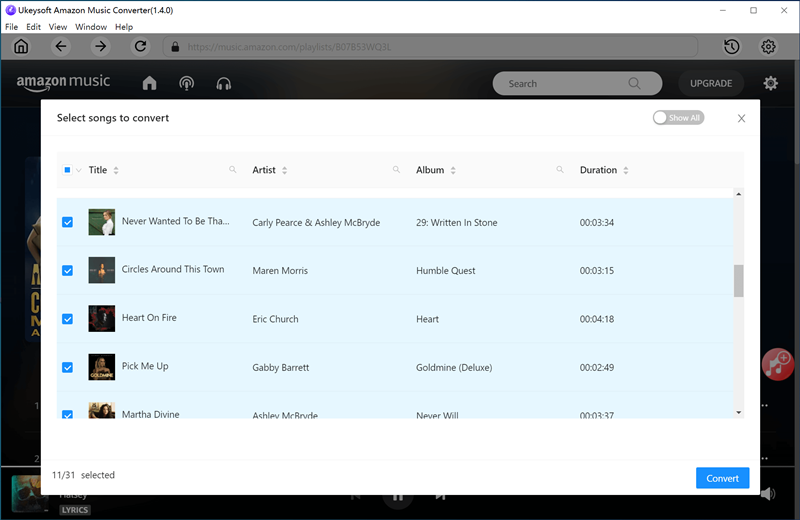
The converter has a built-in web player, with this tool, music lover can easily download and convert Amazon Music to MP3, M4A, AAC, WAV, FLAC or AIFF format at 10X faster speed, keep 100% original audio quality, no need to install any extra apps. Besides, the ID3 tags and metadata reserved after conversion. The program offers trial version, and paid users will enjoy free lifetime update and technical support.

Freely Enjoy Amazon Music Subscriptions
Whether youre an Amazon Music membership or Free Amazon Music users for free listening, you can download and convert Amazon music, playlist, albums and podcast to MP3 for offline listening freely.

Multiple Output Format Supported
Freely download, convert, and save your Amazon Music into local computer, save music as MP3, M4A, AAC, AIFF, WAV, and FLAC audio files. You not only can set the output formats, but also able to change the audio parameters such as bitrate and sample rate to settings as 320 Kbps, 44.1 kHz. Converting Amazon Music to MP3 files in high music quality, keep 100% original audio quality.

Save ID3 Metadata Tags for Managing Your Music Library Easily
Tag info is important for us to manage music library. UkeySoft Amazon Music Converter can keep original ID3 tag information including song title, album, artist, and album cover after conversion. In addition, the program enables you to sort out the converted files by Artist, Album, Artist/Album, Album/Artist or simply save all the songs under the same folder. So, that, you can burn the converted Amazon Music to CD for playback in your car, and transfer them to any MP3 player for listening freely!
After conversion, your can transfer the converted Amazon Music songs to a USB flash drive or external hard drive for backup, or transfer to MP3 player, iPod nano, PS4, Xbox, etc. for offline playback.

Multilingual interface: English, Espaol, Franais, Deutsch, Japanese, Simplified Chinese.

AVAide Screen Recorder 1.0.6

Type: Shareware
Cost: $18
Size: 2.05 MB
Release date: Mar 03 2022
Platform: Win2000,WinXP,Win7 x32,Win7 x64,Windows 8,Windows 10,WinServer,WinOther,WinVista,WinVista x64
Publisher’s Site:  https://www.avaide.com/
Publisher’s Product Page:  https://www.avaide.com/screen-recorder/
Country: Hong Kong


AVAide Screen Recorder

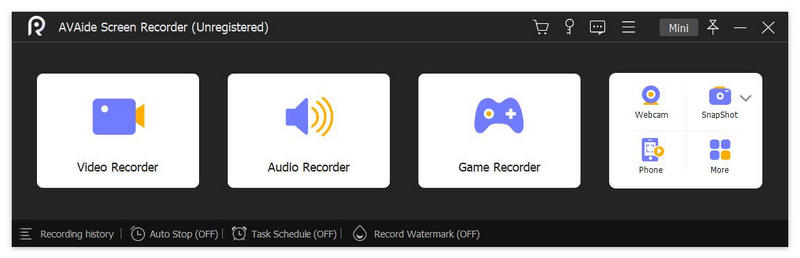
Do you want to capture the highlight moment of your gameplay? Do you want to record your voice for presentation or save the precious videos played on your computer? Just try AVAide Screen Recorder, it will make your life easier.

Key functions:

1. Record videos
AVAide Screen Recorder lets you choose to record the entire screen or customize the area along with sound. You could record Zoom meetings, online courses, video call in lossless quality. You could also add mouse clicks’ effects, perform real-time annotations/drawings, adjust volume, trim recordings, etc.

2. Record audio
With AVAide Screen Recorder, you are able to record the system audio from your computer and your voice from microphone professionally. The microphone enhancement and microphone noise cancellation functions help you record the audio with high quality.

3. Record webcam and gameplays, mirror the phone screen
If you want to record the webcam for lectures, just turn on the webcam button, you could record the webcam easily. More over, you are able to capture the fantastic moment of your gameplay in 1080p quality. AVAide Screen Recorder also provides useful solution to capture your phone. It can record the screen of your phone with or without sound simply.

4. Take screenshot and schedule recording
The Snapshot function allows you to take screenshots and edit the images. While recording, you are also able to take screenshots. When your computer is not in your hand, you could use the task schedule function, which could help you start and stop the recording automatically. You just need to set the start and end time of the recording.