Category Archives: Business

Accounting & Finance, Calculators & Converters, Databases & Tools, Helpdesk & Remote PC, Inventory & Barcoding, Investment Tools, Math & Scientific Tools, Office Suites & Tools, Other, PIMS & Calendars, Project Management, Vertical Market Apps

SQLRD SSRS Data Driven Automation 7.4.20190123

Type: Shareware
Cost: $1400
Size: 628.86 MB
Release date: Jan 28 2019
Platform: Win2000,WinXP,Win7 x32,Win7 x64,Windows 8,Windows 10,WinServer,WinOther,WinVista,WinVista x64
Publisher’s Site:  https://christiansteven.com
Publisher’s Product Page:  https://go.christiansteven.com/ssrs-reports-scheduler-ssrs-reports-automation-sql-rd
Country: United States of America

SQLRD SSRS Data Driven Automation

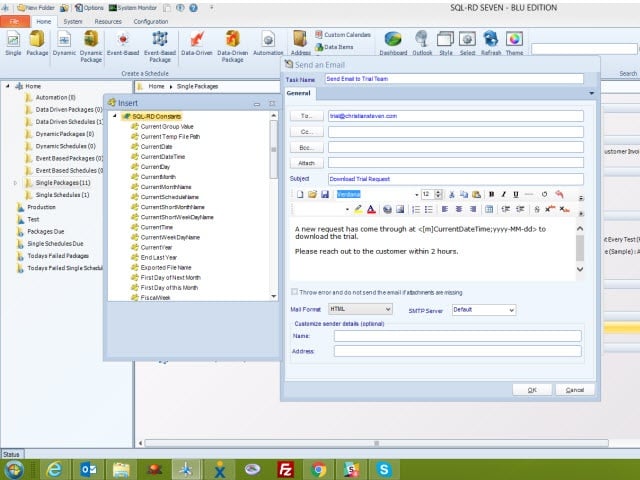
Data Driven & Automated SSRS Reports with SQL-RD


SQL-RD is a dynamic, flexible, function-rich & intuitive automation tool for scheduling, exporting, distributing & delivering your Microsoft SQL Server Reporting Services (SSRS) Reports. Automate report delivery in SSRS & send the reports to printer, fax, folder, FTP, SMS, DropBox, Sharepoint & email in a number of formats including Excel, Word, PDF, Txt, CSV & more. SQL-RD contains powerful system, event triggered, data-driven & business process workflow functions which will make an instant impact on the efficiency of your business.

Automate SQL Reports

Simply set up a ‘schedule’ stating how often you would like each report to run, whether you’d like the output in Word, Excel, HTML, RTF, Acrobat, XML or CSV & who it should be sent to. SQL-RD will do the automated delivery for you, delivering reports to folder, email, printer, fax, DropBox, Sharepoint, FTP or SFTP! You can even select, manage & schedule reports hosted in different SSRS instances.

Date & Time Scheduling

Schedule SSRS Reports to run at a specific date & time, or to run them hourly, daily, weekly, or monthly or set up your own custom frequencies e.g. 4-4-3, every other day, third Monday of the month, & so on. And the same report can be scheduled to be run multiple times with different parameters, formats, frequencies, & destinations.

Event Triggers

Respond to your business needs by setting schedules to run based on events & triggers rather than date. Add real-time monitoring to your SSRS Reports distribution process with SQL-RD’s Event Based Schedules, reports are fired off when events occur e.g. database value is present, file is modified, window is open, an email is received, etc.

Dynamic & Data Driven

Use SQL-RD’s unique Dynamic & Data Driven Schedule processes to trawl through your database to find the parameter values to use & then generate & deliver a unique report for each value.

Graphcat<

Agile Commander for Linux 1.2.2

Type: Shareware
Cost: $6.99
Size: 3.63 MB
Release date: Mar 09 2019
Platform: Linux,Linux Console,Linux Gnome,Linux GPL,Linux Open Source
Publisher’s Site:  https://digitalkarabela.com
Publisher’s Product Page:  https://agilecommander.com/
Country: Poland


Agile Commander for Linux

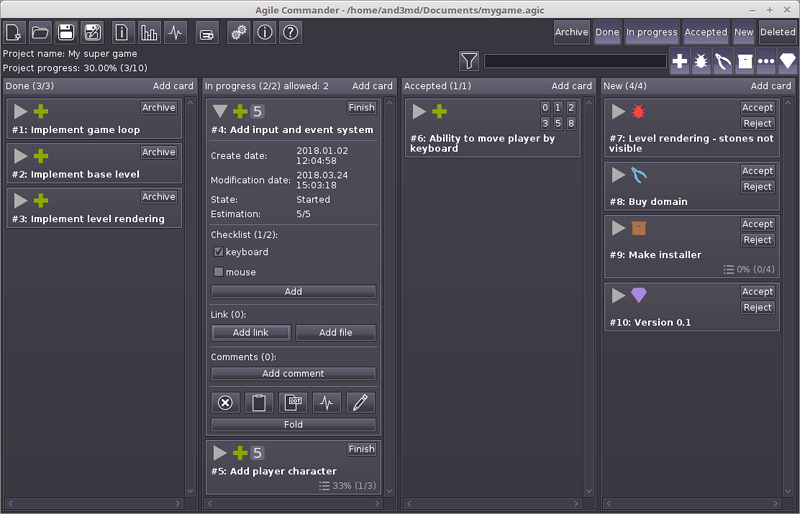
Agile Commander is a desktop kanban board for IT project management Its goal is to be extremely powerful for single programmers (indie developers, freelancers, start-ups) and small teams. Agile Commander is consistent with the software agile principles. Its also a good bug tracker. Available for Windows, MacOS (OSX) and Linux.

Which Agile Commander feature decide, that program is designed especially for single users or small teams?
– is classic application – don’t need server or any additional infrastructure, you can use it on your own computer;
– have got small hardware – requirements application need after launch just about 40 MB RAM, don’t strain your computer resources and don’t affect its efficiency when is off;
– made you an owner of your data – every project is written in custom file in JSON readable format, don’t need to install any database server;
– made your actualization under control – while Agile Commander is a common desktop application, you don’t need to worry that at a crucial moment of your project the web application provider make fundamental changes or end the services. It only depends on you when you switch to a newer version of the software;
– work offline – you do not need an internet connection, work wherever you be without worrying about accessing your data;
– had perpetual license – no monthly fees (subscription);
– had quick story filtering by using text and easily accessible story type buttons.
– checklists
– links and file management
– moving cards between columns using drag&drop
– activity log – full history of changes in the project with convenient filtering
– project statistics – you can check the current state of work at any time

Agile Commander for Mac 1.2.2

Type: Shareware
Cost: $6.99
Size: 11.21 MB
Release date: Mar 09 2019
Platform: Mac OS X
Publisher’s Site:  https://digitalkarabela.com
Publisher’s Product Page:  https://agilecommander.com/
Country: Poland


Agile Commander for Mac

Agile Commander is a desktop kanban board for IT project management Its goal is to be extremely powerful for single programmers (indie developers, freelancers, start-ups) and small teams. Agile Commander is consistent with the software agile principles. Its also a good bug tracker. Available for Windows, MacOS (OSX) and Linux.

Which Agile Commander feature decide, that program is designed especially for single users or small teams?
– is classic application – don’t need server or any additional infrastructure, you can use it on your own computer;
– have got small hardware – requirements application need after launch just about 40 MB RAM, don’t strain your computer resources and don’t affect its efficiency when is off;
– made you an owner of your data – every project is written in custom file in JSON readable format, don’t need to install any database server;
– made your actualization under control – while Agile Commander is a common desktop application, you don’t need to worry that at a crucial moment of your project the web application provider make fundamental changes or end the services. It only depends on you when you switch to a newer version of the software;
– work offline – you do not need an internet connection, work wherever you be without worrying about accessing your data;
– had perpetual license – no monthly fees (subscription);
– had quick story filtering by using text and easily accessible story type buttons.
– checklists
– links and file management
– moving cards between columns using drag&drop
– activity log – full history of changes in the project with convenient filtering
– project statistics – you can check the current state of work at any time