Category Archives: Business

Accounting & Finance, Calculators & Converters, Databases & Tools, Helpdesk & Remote PC, Inventory & Barcoding, Investment Tools, Math & Scientific Tools, Office Suites & Tools, Other, PIMS & Calendars, Project Management, Vertical Market Apps

DataNumen Outlook Repair 5.5

Type: Demo
Cost: $199.95
Size: 7.23 MB
Release date: Mar 29 2018
Platform: Win2000,WinXP,Win7 x32,Win7 x64,Windows 8,Windows 10,WinServer,WinOther,WinVista,WinVista x64
Publisher’s Site:  https://www.datanumen.com
Publisher’s Product Page:  https://www.datanumen.com/outlook-repair/
Country: Hong Kong

DataNumen Outlook Repair

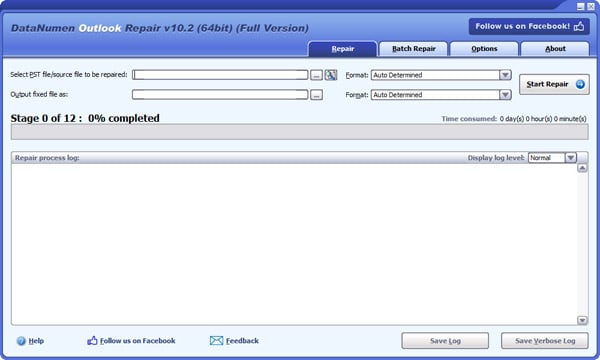
DataNumen Outlook Repair(formerly Advanced Outlook Repair) is the best Microsoft Outlook recovery tool. It uses advanced technologies to scan the corrupt or damaged personal folder files(.pst) and recover your mail messages and all other items as much as possible, so to minimize the loss in file corruption.


Main Features:

1. Support 32bit and 64bit Outlook 97 to 2016.

2. Support to recover mail messages, folders, posts, appointments, meeting requests, contacts, distribution lists, tasks, task requests, journals and notes in PST files. All properties, such as subject, to, from, cc, bcc, date, etc., are recovered.

3. Support to recover mail messages in plain text, RTF and HTML format.

4. Support to recover attachments, including the documents and images attached to messages and embedded in HTML bodies.

5. Support to recover embedded objects, such as another message, Excel Worksheets, Word documents, etc.

6. Support to recover deleted Outlook items, including mail messages, folders, posts, appointments, meeting requests, contacts, distribution lists, tasks, task requests, journals and notes.

7. Support to recover oversized 2GB PST files.

8. Support to split the output PST file into several small files.

9. Support to recover password protected PST files, both compressible encryption and high encryption(or best encryption) are supported.

10. Support to convert PST files from Outlook 97-2002 format into Outlook 2003-2016 format, and vice versa.

11. Support to recover Outlook data from various undamaged or damaged virtual machine disk files, backup files and disk image files.

12. Support to repair PST files on corrupted medias, such as floppy disks, Zip disks, CDROMs, etc.

13. Support to repair a batch of PST files.

14. Support integration with Windows Explorer, so you can repair an Outlook PST file with the context menu of Windows Explorer easily.

15. Support drag & drop operation.

16. Support command line parameters.

Graphcat<

Project Timer 1.23.1.0

Type: Shareware
Cost: $25.82
Size: 4.62 MB
Release date: May 13 2018
Platform: Win2000,WinXP,Win7 x32,Win7 x64,Windows 8,Windows 10,WinServer,WinOther,WinVista,WinVista x64
Publisher’s Site:  https://ontwerpbureaudunes.nl
Publisher’s Product Page:  http://www.projecttimer.com/
Country: Netherlands


Project Timer

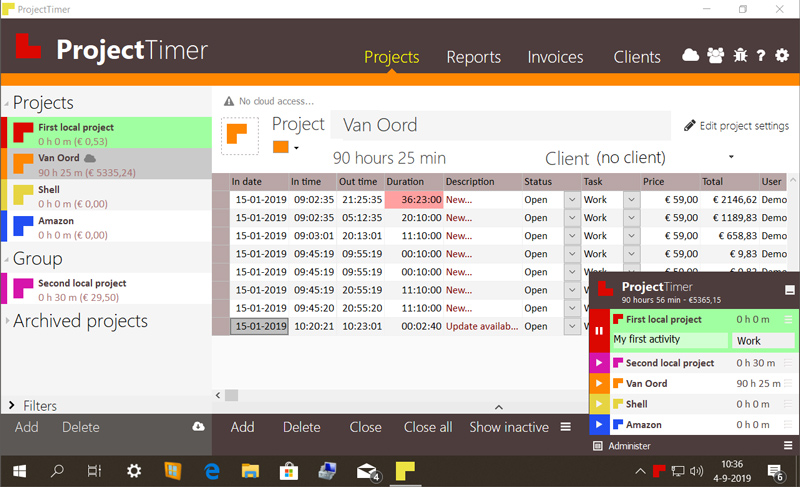
Project Timer is a simple but powerful windows application in the taskbar notification area to manage how much time you’ve spend on your projects. The use of colour will give a fast overview of which timer is running in the taskbar notification area (tray icon). This way you can quickly but non-intrusively see if the timer for the project you’re working on is running.
Activities can have different pricings per hour and the program keeps up the amount of money earned per project, as well as a summary for all your running projects.
You can export your data into reports using the browser or import it in Excel and a simple backup of the data can be zipped, mailed and imported to keep your data safe. Project Timer Pro also allows you to import hours spend by co-workers or freelancers and features extra import and export methods. Sometimes you need to edit your hours afterwards. This is no problem using the administrate panel. You can remove, add and edit activities to your projects.
Project Timer is a light, fast, simple, non-intrusive Windows taskbar application to assists you with your workflow for administrating and billing hours. It features an easy installation and clean uninstall.
The application areas are: advertising, small business, design, web design, healthcare, consulting and accounting, as long as you are working on a Windows machine.

DigiSigner 4.0.1

Type: Freeware
Cost: $0
Size: 8.41 MB
Release date: Mar 26 2018
Platform: Win2000,WinXP,Win7 x32,Win7 x64,Windows 8,Windows 10,WinServer,WinOther,WinVista,WinVista x64
Publisher’s Site:  http://www.digisigner.com
Publisher’s Product Page:  http://www.digisigner.com
Country: Germany


DigiSigner

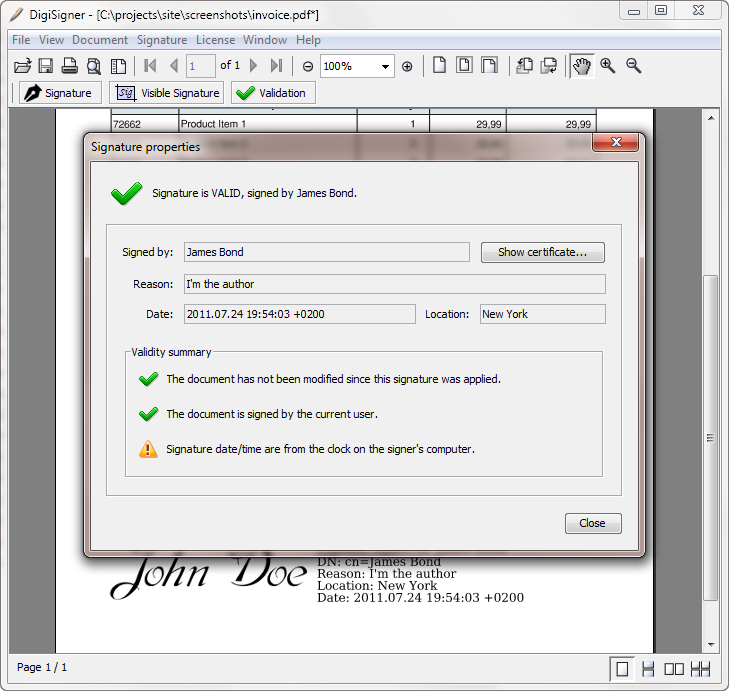
DigiSigner is a simple PDF viewer tool with focus on creating digital and e-signatures in PDF documents.

DigiSigner main features:

– DigiSigner is a PDF viewer so you can always open and inspect the document you are going to sign.

– DigiSigner produces completely Adobe Reader compliant digital signatures, which can be verified in Adobe Reader and vice versa.

– Certificate generation is also supported in DigiSigner.

– Place the signature wherever you want in the document using your mouse.

– Create invisible and professionally looking visible signatures with DigiSigner.

– DigiSigner shows and verifies existing digital signatures in the document. You can also verify them just by clicking on them.

– Your certificates can be easily added or removed and DigiSigner always memorizes all the changes you made.

– DigiSigner lets you quickly open PDF documents using right-click mouse menu.

– You can simultaneously open and sign as many PDFs as you want.

– There are versions for Mac and Linux.

DigiSigner is perfect tiny tool to view and digitally sign your PDF invoices or business contracts.