Category Archives: Business

Accounting & Finance, Calculators & Converters, Databases & Tools, Helpdesk & Remote PC, Inventory & Barcoding, Investment Tools, Math & Scientific Tools, Office Suites & Tools, Other, PIMS & Calendars, Project Management, Vertical Market Apps

RationalPlan Single Project for Linux 4.16.0

Type: Freeware
Cost: $0
Size: 35.82 MB
Release date: Sep 15 2017
Platform: Linux,Linux Console,Linux Gnome,Linux GPL,Linux Open Source
Publisher’s Site:  http://www.rationalplan.com
Publisher’s Product Page:  http://www.theprojectalternative.com/single-project-management-software.php
Country: Romania


RationalPlan Single Project for Linux

RationalPlan Single Project is a powerful project management software designed to assist project managers in developing plans, allocating resources, tracking progress, managing budgets and analyzing workload. You can use RationalPlan in the area of construction, engineering, services and consulting, business or software development. It will help you to complete your project as scheduled, on time and within budget.


The application is an affordable alternative to Microsoft Project and it is covering project management area from WBS construction, project planning and scheduling to critical path management, overallocated resources detection, progress tracking, cost estimation, etc.

Here are some key reasons for using RationalPlan Single Project:

* provides a clean way to break down your project, build schedules, allocate resources, and manage budgets
* get resources and finances under control (realistic cost estimates mechanisms, screening cash-flow time distribution for tasks and resources)
* gives you a step by step project guide that walks you through the project management process so you can lay down a project plan immediately
* different scenarios capability via multiple undo and redo levels will allow you to make changes and safely get back
* track project evolution regarding task completion, time and costs
* brings project critical issues to your attention (critical activities with configurable slack, overallocated resources)

RationalPlan is a project management solution that follows the basic project management guidelines.

Graphcat<

SQLRD SSRS Data Driven Automation 7.3.20170928

Type: Shareware
Cost: $1400
Size: 546.78 MB
Release date: Sep 28 2017
Platform: Win2000,WinXP,Win7 x32,Win7 x64,Windows 8,Windows 10,WinServer,WinOther,WinVista,WinVista x64
Publisher’s Site:  https://christiansteven.com
Publisher’s Product Page:  https://go.christiansteven.com/ssrs-reports-scheduler-ssrs-reports-automation-sql-rd
Country: United States of America


SQLRD SSRS Data Driven Automation

Data Driven & Automated SSRS Reports with SQL-RD

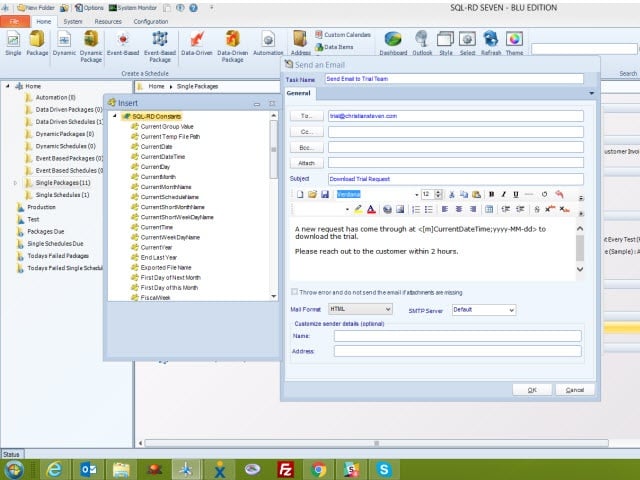
SQL-RD is a dynamic, flexible, function-rich & intuitive automation tool for scheduling, exporting, distributing & delivering your Microsoft SQL Server Reporting Services (SSRS) Reports. Automate report delivery in SSRS & send the reports to printer, fax, folder, FTP, SMS, DropBox, Sharepoint & email in a number of formats including Excel, Word, PDF, Txt, CSV & more. SQL-RD contains powerful system, event triggered, data-driven & business process workflow functions which will make an instant impact on the efficiency of your business.

Automate SQL Reports

Simply set up a ‘schedule’ stating how often you would like each report to run, whether you’d like the output in Word, Excel, HTML, RTF, Acrobat, XML or CSV & who it should be sent to. SQL-RD will do the automated delivery for you, delivering reports to folder, email, printer, fax, DropBox, Sharepoint, FTP or SFTP! You can even select, manage & schedule reports hosted in different SSRS instances.

Date & Time Scheduling

Schedule SSRS Reports to run at a specific date & time, or to run them hourly, daily, weekly, or monthly or set up your own custom frequencies e.g. 4-4-3, every other day, third Monday of the month, & so on. And the same report can be scheduled to be run multiple times with different parameters, formats, frequencies, & destinations.

Event Triggers

Respond to your business needs by setting schedules to run based on events & triggers rather than date. Add real-time monitoring to your SSRS Reports distribution process with SQL-RD’s Event Based Schedules, reports are fired off when events occur e.g. database value is present, file is modified, window is open, an email is received, etc.

Dynamic & Data Driven

Use SQL-RD’s unique Dynamic & Data Driven Schedule processes to trawl through your database to find the parameter values to use & then generate & deliver a unique report for each value.

CRD Crystal Reports Scheduler 7.1.20170920

Type: Shareware
Cost: $1400
Size: 628.75 MB
Release date: Sep 20 2017
Platform: Win2000,WinXP,Win7 x32,Win7 x64,Windows 8,Windows 10,WinServer,WinOther,WinVista,WinVista x64
Publisher’s Site:  https://christiansteven.com
Publisher’s Product Page:  https://go.christiansteven.com/crystal-reports-scheduler-crystal-reports-automation-crd
Country: United States of America


CRD Crystal Reports Scheduler

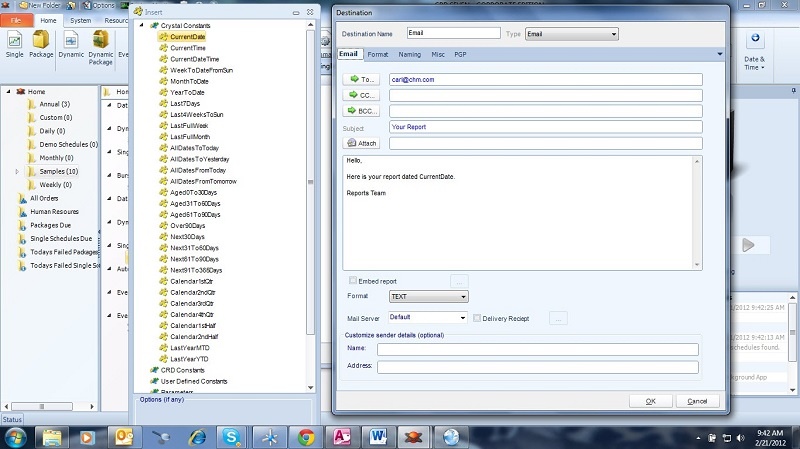
CRD (Crystal Reports Distributor) is a Crystal Reports Scheduler that saves time & money by making it easy to automate Crystal reports. Just define single or packages of Crystal Reports, schedule, run them automatically and send the reports to print, fax, folder, FTP, SMS, DropBox, Sharepoint & email in a number of standard formats including Excel, Word, PDF, RPT and more.

Easy To Use

Simply set up a ‘schedule’ stating how often you would like each report to run, whether you’d like the output in Word, Excel, HTML, RTF, Acrobat, RPT, text format, and more and who it should be sent to. CRD will do the automated delivery for you, delivering reports to folder, email, printer, fax, DropBox, Sharepoint, FTP or SFTP!

Date & Time Scheduling

It’s easy to schedule Crystal Reports to run at a specific date & time, or to run them hourly, daily, weekly, or monthly or set up your own custom frequencies e.g. 4-4-3, every other day, third Monday of the month, & so on. And the same report can be scheduled to be run multiple times with different parameters, formats, frequencies, & destinations.

Event Triggers

Respond to your business needs by setting schedules to run based on events and triggers rather than date. Add real-time monitoring to your Crystal Reports distribution process with CRD’s Event Based Schedules, reports are fired off when events occur e.g. database value is present, file is modified, window is open, an email is received, etc.

Dynamic & Data Driven

Use CRD’s unique Dynamic & Data-Driven Schedule processes to trawl through your database to find the parameter values to use and then generate and deliver a unique report for each value. And with Bursting Schedules you can quickly & easily burst out and deliver report groups to different recipients and destinations.

Pre & Post Delivery Automation

Use CRD’s unique Custom Actions to run another program, enter values in a database, modify a file & lots more.