Type: Shareware
Cost: $60
Size: 125.31 MB
Release date: Aug 11 2017
Platform: Win2000,WinXP,Win7 x32,Win7 x64,Windows 8,Windows 10,WinServer,WinOther,WinVista,WinVista x64
Publisher’s Site: http://www.tracker-software.com
Publisher’s Product Page: https://www.tracker-software.com/product/pdf-tools
Country: Canada
Cost: $60
Size: 125.31 MB
Release date: Aug 11 2017
Platform: Win2000,WinXP,Win7 x32,Win7 x64,Windows 8,Windows 10,WinServer,WinOther,WinVista,WinVista x64
Publisher’s Site: http://www.tracker-software.com
Publisher’s Product Page: https://www.tracker-software.com/product/pdf-tools
Country: Canada
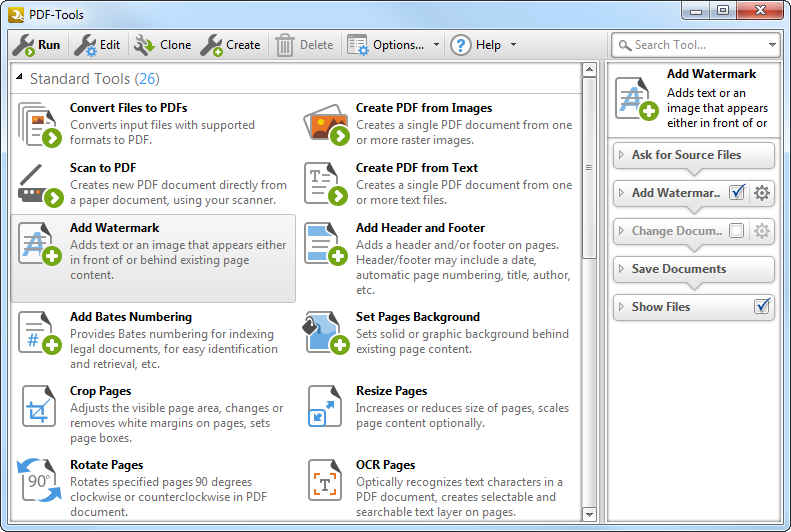

Create new PDF files from the output of any Windows app
Create and Edit Fillable PDF Forms; Dynamic Stamps; Interactive Adobe AcroForms
View Image and MSOffice files natively and convert to PDF automatically
Google Drive Support; OFFice2PDF
Convert PDF to MSPowerPoint format
Improved image and image text character conversion
ISO PDF/A 2a, 2b, 2u(RGB) format support
Supports Revision 6 of Acrobat X password security handler
World leading compression and optimization technology
ISO PDF/A 1a & 1b
Document Security
PDF writer Optimization/Compression Controls
Advanced Memory Management
Convert Image files to PDF and back; .RTF & .DOC to PDF
Append/Prepend Pages from one PDF file into another PDF file
Scan Direct to PDF
OCR – searchable layer
Manipulate and Modify PDF files
Extract Content from PDF to Text/Image/PDF formats
Add/Edit/Modify Bookmarks
Split/Merge/Delete/Crop/Rotate PDF pages
Re-Order Pages within a PDF file
Optimize PDF
Paper Settings & Custom Forms options
URL links embedded
MS Office Table of Contents
n-UP Printing mode automatically mounts/rescales pages to a single page and calculates correct page positions
Enhanced visual layout previewer resizes pages
Brochure/Booklet/Mirrored Printing
Flexible DPI output 50 – 2400DPI
CJK fonts/character set support
Add Watermarks or Overlay PDF pages to new PDF
Auto Bookmark/Auto Header/Footer generation
Graphics Downsampling embedding options
Extended Font embedding options
Create specific printer preferences and save to Profiles for future use.
MAPI/SMTP Automated Email integration options
Developers API available
Multi-language UI support
Citrix Metaframe/Terminal Server Certified.
‘Macro’ based Auto file naming/location – with JS rule based
Comprehensive Digital Signature and Security
Create and Edit Fillable PDF Forms; Dynamic Stamps; Interactive Adobe AcroForms
View Image and MSOffice files natively and convert to PDF automatically
Google Drive Support; OFFice2PDF
Convert PDF to MSPowerPoint format
Improved image and image text character conversion
ISO PDF/A 2a, 2b, 2u(RGB) format support
Supports Revision 6 of Acrobat X password security handler
World leading compression and optimization technology
ISO PDF/A 1a & 1b
Document Security
PDF writer Optimization/Compression Controls
Advanced Memory Management
Convert Image files to PDF and back; .RTF & .DOC to PDF
Append/Prepend Pages from one PDF file into another PDF file
Scan Direct to PDF
OCR – searchable layer
Manipulate and Modify PDF files
Extract Content from PDF to Text/Image/PDF formats
Add/Edit/Modify Bookmarks
Split/Merge/Delete/Crop/Rotate PDF pages
Re-Order Pages within a PDF file
Optimize PDF
Paper Settings & Custom Forms options
URL links embedded
MS Office Table of Contents
n-UP Printing mode automatically mounts/rescales pages to a single page and calculates correct page positions
Enhanced visual layout previewer resizes pages
Brochure/Booklet/Mirrored Printing
Flexible DPI output 50 – 2400DPI
CJK fonts/character set support
Add Watermarks or Overlay PDF pages to new PDF
Auto Bookmark/Auto Header/Footer generation
Graphics Downsampling embedding options
Extended Font embedding options
Create specific printer preferences and save to Profiles for future use.
MAPI/SMTP Automated Email integration options
Developers API available
Multi-language UI support
Citrix Metaframe/Terminal Server Certified.
‘Macro’ based Auto file naming/location – with JS rule based
Comprehensive Digital Signature and Security
 <
<