Category Archives: Business

Accounting & Finance, Calculators & Converters, Databases & Tools, Helpdesk & Remote PC, Inventory & Barcoding, Investment Tools, Math & Scientific Tools, Office Suites & Tools, Other, PIMS & Calendars, Project Management, Vertical Market Apps

FolderMill 4.1

Type: Freeware
Cost: $0
Size: 71.33 MB
Release date: Apr 28 2017
Platform: Win2000,WinXP,Win7 x32,Win7 x64,Windows 8,Windows 10,WinServer,WinOther,WinVista,WinVista x64
Publisher’s Site:  https://www.fcoder.com/
Publisher’s Product Page:  https://www.foldermill.com
Country: Latvia

FolderMill

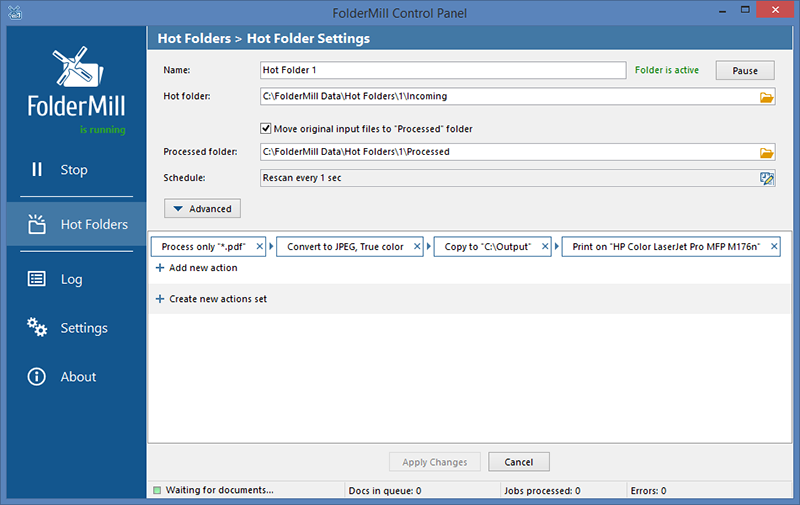
FolderMill monitors a folder and automatically prints or converts to PDF, JPG or TIFF all new documents and image files. System administrator defines special ‘Hot folders’ for monitoring and sets Actions to be performed. After this all employees in the office will be able to print documents or create PDFs as simple as copying files!


FolderMill supports all popular types of office documents including Microsoft Office Word files, RTF and plain text documents, Excel files, PowerPoint presentations, Visio drawings and charts, Microsoft Office Publisher and Adobe PDF files, XPS, JPG, PNG, PCX, DCX, Bitmap, GIF, TGA, TIFF images and documents.

FolderMill ensures conversion of all the incoming files to PDF, JPG or TIFF with very few efforts: simply by placing the documents into one folder and taking them out from another one!

To print or convert the documents all the company employees need to do is to place them into one of the ‘Hot folders’. There is no need to open every file individually, just select the desired Action and specify parameters.

What’s new in FolderMill 4.1:

– New faster PDF engine
– New formats supported: Zebra ZPL, MPP, HPGL, SWF, ONE
– Ability to convert files in ZIP, RAR or 7ZIP archive into PDF or image
– Ability to pause certain Hot Folders
– Ability to set ignore masks for Hot Folders
– Ability to rearrange the order of Actions
– Ability to automatically select printer tray for PDFs depending on paper size
– Ability to automatically delete original input files from Processed Folder on schedule
– Ability to use a list of passwords to process password-protected PDFs
– Ability to force printer settings: paper size, printer tray, page orientation, color mode, duplex mode
– Ability to instantly send files to a Hot Folder via Windows Explorer right-click menu
– Optical Character Recognition (OCR) processing via Adobe Acrobat
– Log clean-up on schedule
– No need to have Microsoft Outlook installed to process EML or MSG files

Graphcat<

StockwareLive 2.1

Type: Demo
Cost: $6.95
Size: 1.43 MB
Release date: Jul 03 2017
Platform: Win2000,WinXP,Win7 x32,Win7 x64,Windows 8,Windows 10,WinServer,WinOther,WinVista,WinVista x64
Publisher’s Site:  http://www.stockwarepro.com
Publisher’s Product Page:  http://www.stockwarepro.com/StockwareLive-Intraday-Stock-Market-Software.html
Country: India


StockwareLive

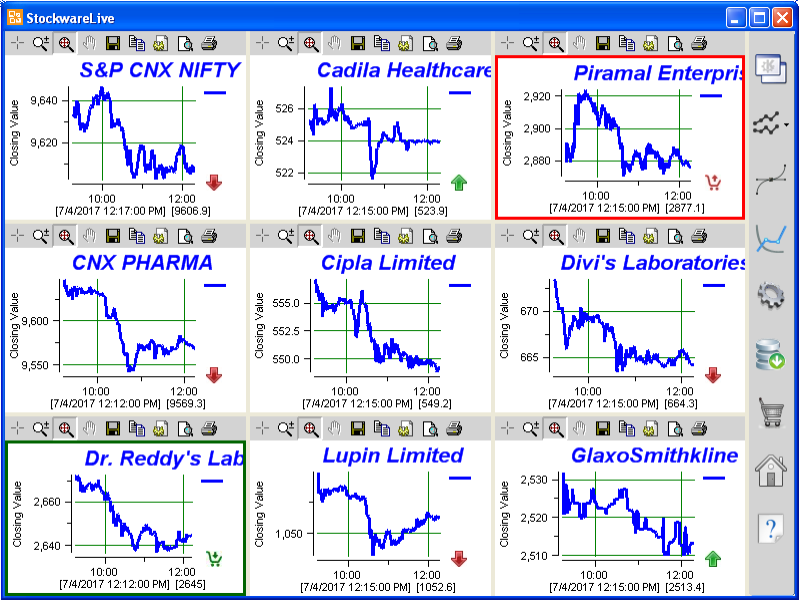
StockwareLive is a software developed specifically for intraday traders. It displays intraday price charts side by side in full screen mode, that auto refreshes with the latest data. It will also plot any technical indicator of your choice and creates buy, sell signals on chart.

The intraday trader can quickly view the price movements of upto 15 securities or stocks side by side for quick evaluation. Stocks from 26 exchanges around the world are listed and made available through Yahoo Finance. The trader can search and select the favorite stocks and group and save them together under various segments like banks, auto, pharma etc. Live intraday data stored locally in the PC in Metastock format can be imported into the software. The user can quickly switch between different data folders or market segments.

It includes Franklin Oscillator, the proprietary indicator of StockwareLive. Franklin oscillator moves like a wave and does not fluctuate too often. It gives clear entry, exit, stop-loss and hold levels for intraday traders. Franklin oscillator crossing the zero line is the buy signal and that typically happens only two or three times during intraday. Buy, sell and hold signals based on Franklin oscillator will be displayed using icons and green or red line borders around the charts. Trigger levels for generating the buy, sell signals can be changed.

Several other technical indicators popular with intraday traders like Stochastic oscillator, MACD, Price rate of change (PROC), Relative strength index (RSI) are also included.

It is the best tool for side-by-side monitoring of your favorite stocks. Track market movements with the help of reliable indicators and make profitable intraday calls.

Fast Utilities for Excel 3.5.1.15

Type: Shareware
Cost: $49
Size: 2.10 MB
Release date: Oct 07 2015
Platform: Win2000,WinXP,Win7 x32,Win7 x64,Windows 8,Windows 10,WinServer,WinOther,WinVista,WinVista x64
Publisher’s Site:  http://www.technocomsolutions.com/
Publisher’s Product Page:  http://technocomsolutions.com/excel-fast-utilities.html
Country: United States of America


Fast Utilities for Excel

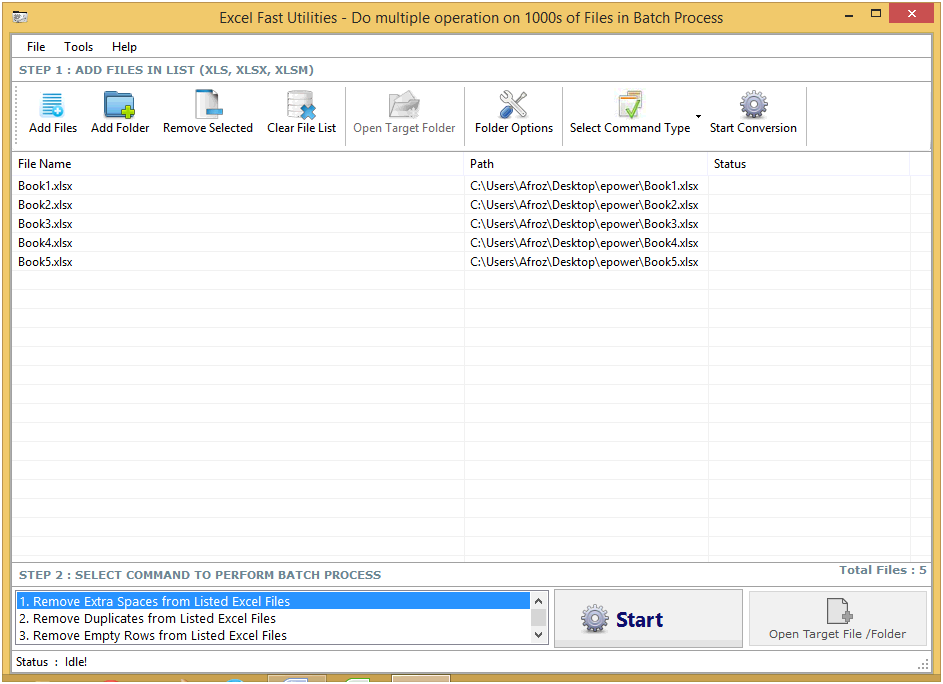
Excel Fast Utilities is an amazing excel software that can remove scrap data from excel sheet without wasting anytime of the user. The tool is capable of removing gaps, spaces, duplicates, and many other things in huge amount from excel sheets. This Excel space remover can remove all these things from selected cells, rows, columns and sheets. The tool is very quick in catering accurate results.

One of the unique features of this Excel Fast Utilities Software is that it can merge and split sheets and workbooks MS excel. With this option users can merge many sheets and workbooks into one and can also split one sheet or workbook into many. It also has choice to remove empty sheets, rows & columns from excel files. So these are the features that make it a different from the queue of best Excel Fast Utilities tools.

In the field of operation this is the easiest tool to handle. All the choices and commands have been placed in such a way that this tool can be handled easily for daily work. There are majorly three functions choose & drop the files. Then select the option according to the change you want to make and at last click on start to begin. It is such a simple tool to operate. After the work is over user can save the files in a target folder assigned by the user.

Excel Fast Utilities is a tool that saves an ample amount of time, effort and money of the user. It works at an astonishing speed. User has nothing regarding the flexibility of this tool. It can perform well in all MS Excel versions i.e. 2013, 2010, 2007 & 2003.