Category Archives: Business

Accounting & Finance, Calculators & Converters, Databases & Tools, Helpdesk & Remote PC, Inventory & Barcoding, Investment Tools, Math & Scientific Tools, Office Suites & Tools, Other, PIMS & Calendars, Project Management, Vertical Market Apps

ESBCalc Pro 9.1.0

Type: Shareware
Cost: $19.00
Size: 3.17 MB
Release date: Sep 02 2016
Platform: Win2000,WinXP,Win7 x32,Win7 x64,Windows 8,Windows 10,WinServer,WinOther,WinVista,WinVista x64
Publisher’s Site:  http://www.esbconsult.com/
Publisher’s Product Page:  http://www.esbconsult.com/esbcalc/esbcalcpro.htm
Country: Australia


ESBCalc Pro

ESBCalc Pro is an Enhanced Windows Scientific Calculator with Infix Processing, Exponential Notation, Brackets, Scientific Functions, Memory, Optional Paper Trail, Printing, Result History List, Integrated Help and more. Functions include Trigonometric, Hyperbolic, Logarithmic – Base 10, Base 2, Natural – Random Number and many more. Also includes heaps of built-in as well as user-defined constants, Hexadecimal Conversions and Fraction Conversions. Also allows for Floating Decimal Point, optionally start at last position and other improvements to the User Interface.


The calculator can have Prefix Functions turned on so that when calculating log (25), you can enter log 25 rather than the traditional 25 log.

The Calculator also has an expression editor that allows the data that has been entered can be then edited and recalculated. Plus you have a dialog that supplies descriptive statistics such as Mean (Average), Median, Variance, Standard Deviation, Skew and Kurtosis. Plus it can now also calculate the time between two dates and/or times.

Precedence can be turned off for those who do not wish it.

Optimized for Windows XP/Vista/7/8 and above in 800×600 (or better).

Registered version also includes Electronic Documentation and PDF designed to produce Printed Documentation. A Portable Version is also available to Registered Users that easily allows the Calculator to be used on Removable/Portable Drives.

Register only once for the life of the product.

Also available as part of the ESBCalc Pro Suite which includes ESBUnitConv Pro, ESBFinCalc Pro and ESBProgCalc Pro

Graphcat<

Project Timer 1.8.0.0

Type: Shareware
Cost: $24.68
Size: 4.33 MB
Release date: Aug 19 2016
Platform: Win2000,WinXP,Win7 x32,Win7 x64,Windows 8,Windows 10,WinServer,WinOther,WinVista,WinVista x64
Publisher’s Site:  https://ontwerpbureaudunes.nl
Publisher’s Product Page:  http://www.projecttimer.com/
Country: Netherlands


Project Timer

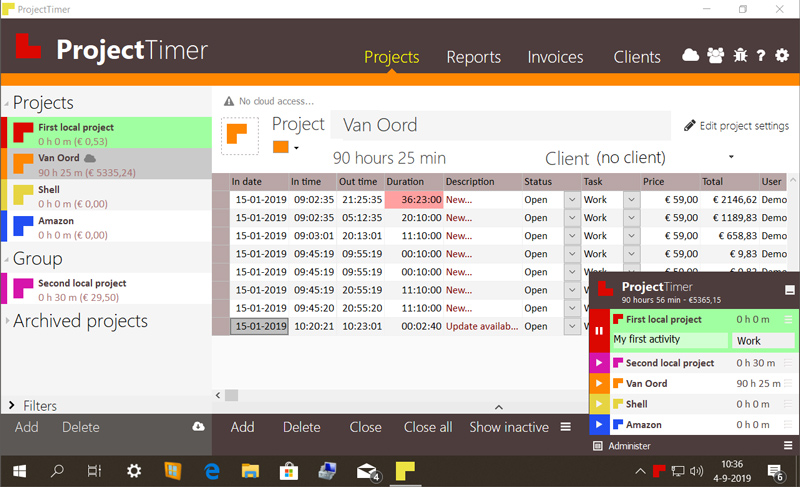
Project Timer is a simple but powerful windows application in the taskbar notification area to manage how much time you’ve spend on your projects. The use of colour will give a fast overview of which timer is running in the taskbar notification area (tray icon). This way you can quickly but non-intrusively see if the timer for the project you’re working on is running.
Activities can have different pricings per hour and the program keeps up the amount of money earned per project, as well as a summary for all your running projects.
You can export your data into reports using the browser or import it in Excel and a simple backup of the data can be zipped, mailed and imported to keep your data safe. Project Timer Pro also allows you to import hours spend by co-workers or freelancers and features extra import and export methods. Sometimes you need to edit your hours afterwards. This is no problem using the administrate panel. You can remove, add and edit activities to your projects.
Project Timer is a light, fast, simple, non-intrusive Windows taskbar application to assists you with your workflow for administrating and billing hours. It features an easy installation and clean uninstall.
The application areas are: advertising, small business, design, web design, healthcare, consulting and accounting, as long as you are working on a Windows machine.

Output Time 1.0

Type: Freeware
Cost: $0
Size: 40.10 MB
Release date: Oct 21 2015
Platform: Win2000,WinXP,Win7 x32,Win7 x64,Windows 8,Windows 10,WinServer,WinOther,WinVista,WinVista x64
Publisher’s Site:  http://www.srimax.com
Publisher’s Product Page:  http://www.outputtime.com
Country: India


Output Time

Output Time is a single solution for Project Management, Time Tracking, Invoicing and Expenses Management. It helps you to estimate in each level (Project/Task/Day-Activity) to make sure always in track.

The wonderful features including Efficient Time Sheets, Time Sheets Approval, Flexible Tasks Management, Descriptive Gantt Chat, Easiest Expenses Management, Quick & Designer Invoices and Mile Stones etc. Also the Standard Integration facility assists you to integrate with your favorite apps and make you enjoy your work. It is real-time and flexible which Visualizes your Projects as well as Cut-down the Project Planning.

Especially, the Reports of Output Time are user-friendly and powerful that provides your Project Expenses, Profit & Loss, the Payments invoiced & un-invoiced instantly through tables, charts and text etc with Standard Business Reports format. Simply it demonstrates the every aspect of your Projects evidently which will get you Smile.