
Category Archives: Business

Accounting & Finance, Calculators & Converters, Databases & Tools, Helpdesk & Remote PC, Inventory & Barcoding, Investment Tools, Math & Scientific Tools, Office Suites & Tools, Other, PIMS & Calendars, Project Management, Vertical Market Apps

FC Compiler 1.21

Type: Shareware
Cost: $10
Size: 7.35 MB
Release date: Mar 22 2016
Platform: Win2000,WinXP,Win7 x32,Win7 x64,Windows 8,Windows 10,WinServer,WinOther,WinVista,WinVista x64
Publisher’s Site:  http://fortrancalculus.info/
Publisher’s Product Page:  http://fortranCalculus.info/apps/fc-compiler.html
Country: United States of America
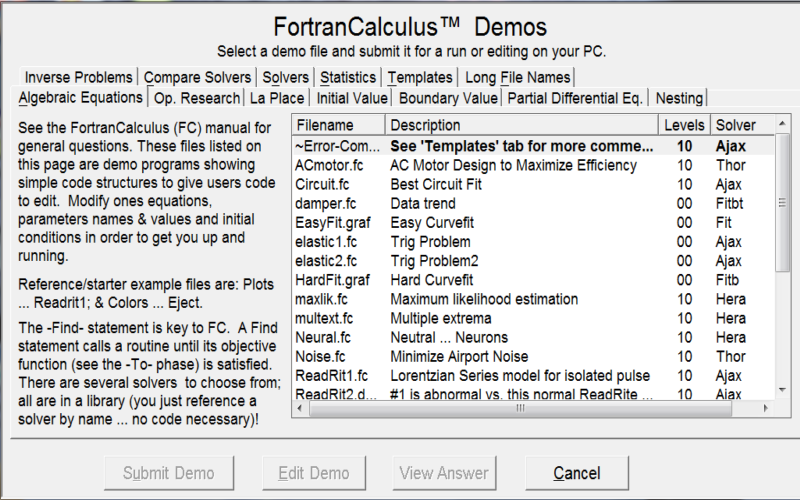

FC Compiler

FC-Compiler ™ is a Calculus (level) Compiler, helps Tweak parameters.. The FortranCalculus (FC) language is for math modeling, simulation, and optimization. FC is based on Automatic Differentiation that simplifies computer code to an absolute minimum; i.e., a mathematical model, constraints, and the objective (function) definition. Minimizing the amount of code allows the user to concentrate on the science or engineering problem at hand and not on the (numerical) process requirements to achieve an optimum solution.


FC-Compiler has many (60+) example problems with output (see Demos) for viewing and getting ideas on solving your own problems. These are improved productivity examples do to using Calculus (level) Problem-Solving. Please share this Calculus Problem-Solving tool with your friends. Thanks!

Industry problems with solutions over the past twenty plus years have been put into a textbook to show the power of Calculus (level) Problem-Solving. The textbook as on our website at fortranCalculus.info/textbook/welcome . The software architect behind Calculus Compilers is Joe Thames (read about Joe on our About page).

Help improve science and engineering productivity by supporting Joe Thames’ MetaCalculus University Rollout efforts, visit metaCalculus.com/campaigns.html, in developing MC Fortran. (There has been little if any corporate funding of Joe’s work for many years!) Help future science & engineers get jobs upon graduation. With MC Fortran, one increases their productivity by a factor of twenty!

Please visit our textbook at fortranCalculus.info/textbook/welcome and help support Calculus level compilers at metaCalculus.com/campaigns.html. Thanks!

50+ Optimization Demo problems Solved, included with FC Compiler are,

3 Stage Rocket Design Optimization; AC Motor Design to Maximize Efficiency; Analysis using Monte Carlo; Bang Bang Control motor; Chemical kinetics parameter estimation; Pilot Ejection Simulation; Wing design optimization.

Graphcat<

Dose for Excel 3.1.7

Type: Shareware
Cost: $9.95
Size: 1.03 MB
Release date: Sep 02 2015
Platform: Win2000,WinXP,Win7 x32,Win7 x64,Windows 8,Windows 10,WinServer,WinOther,WinVista,WinVista x64
Publisher’s Site:  http://www.zbrainsoft.com/
Publisher’s Product Page:  http://www.zbrainsoft.com/
Country: Saudi Arabia


Dose for Excel

Dose for Excel is a powerful, feature-rich add-in for Microsoft Excel, which allows you to quickly perform functions that would otherwise take up much time. The tool integrates with excel and allows you to easily access its features from the command ribbon.
The advantages brought by Dose for Excel are simple and very handy especially for users who often work with Excel. Some features are new to Excel while others are greatly simplified.
All functions are available for current sheet, for the selected cells or the entire workbook:

1- Delete rows: entire empty lines, at least one empty cell or identical rows or with a specific value.
2- Clear spaces: remove leading, trailing, extra spaces or all fields.
3- Cells values: advanced Merge and split cells with many features.
4- Filter by: advanced data filters.
5- Row-to-column: make it easy to view long row data.
6- Data entry: date picker to enter date in cells.
7- Work area: customize the size of the work area.
8- Comments assistant: display only comments or symbols, convert comments into cells and vice versa, and more.
9- Change case letters: upper, lower, proper and capitalize letters.
10- Reading layout view: highlight row and column of the active cell as target shape for easy read.
11- Cell color assistant: create your custom cell format (back color, fore color, borders, text alignment, font size, font bold, etc) which you can use it whenever you work on excel all the time.
12- Sheets Names: extract sheets names with hyperlink to easily navigate to sheets.
13- Import Files Names: import your folder files names into sheet with hyperlink to open or delete them.
14- Backup settings: you can set the tool to auto backup the data each time you open Excel, or only on demand.
15-Export Sheets: Export sheets each in separate workbook to your local disk.

The add-in integrates with Excel and creates an individual section in the command ribbon. Moreover, its ease of use makes it convenient for any user.

Smart Auto Typer and Talker 2.1.6

Type: Shareware
Cost: $5.95
Size: 1.78 MB
Release date: Jul 01 2016
Platform: Mac OS X
Publisher’s Site:  http://www.zbrainsoft.com/home.html
Publisher’s Product Page:  http://www.zbrainsoft.com/smart-auto-typer-talker.html
Country: Lebanon


Smart Auto Typer and Talker

Auto typer and talker utility is used to type text automatically with a certain speed and hotkey you specify for each text.
This is useful for alot of tasks, for examples:
Auto fill a form or window that require fixed values to be set every time, this can save time and efforts for end-users.
Can create videos for YouTube, Facebook, etc.. so easily instead of typing manually on keyboard or using talker to speak the text.

Easy to use utility, it is user friendly, you just set the text and its shortcut and then set it as (Typer or Talker) and start using the tool.