
Category Archives: Business

Accounting & Finance, Calculators & Converters, Databases & Tools, Helpdesk & Remote PC, Inventory & Barcoding, Investment Tools, Math & Scientific Tools, Office Suites & Tools, Other, PIMS & Calendars, Project Management, Vertical Market Apps

Polaris Office for Windows 7.1.280

Type: Freeware
Cost: $0
Size: 67.95 MB
Release date: Apr 01 2016
Platform: Win2000,WinXP,Win7 x32,Win7 x64,Windows 8,Windows 10,WinServer,WinOther,WinVista,WinVista x64
Publisher’s Site:  https://www.polarisoffice.com
Publisher’s Product Page:  https://www.polarisoffice.com
Country: Korea (Rep)
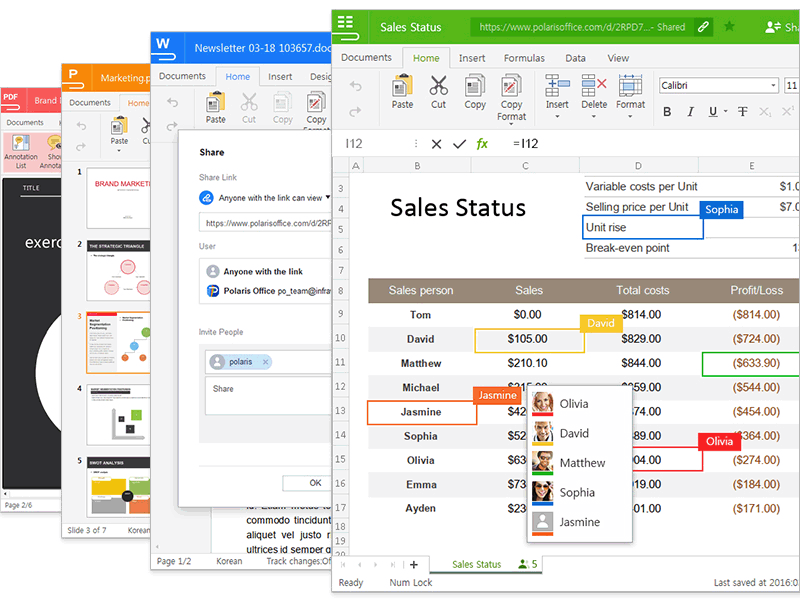

Polaris Office for Windows

[About Polaris Office] Polaris Office, a leading Software as a Service (SaaS) company, offers todays digital workers an intuitive cloud-based office productivity suite with 40 million users across the globe. To learn more about Polaris Office, visit http://www.polarisoffice.com.


Polaris Office includes best-in-class features such as compatibility with Microsoft Office and auto synchronization across all devices. Designed to combine the functionality of Microsoft Office and the flexibility of Google Docs, Polaris Office combines office productivity functionality such as file creation, file storage, sync and share across multiple platforms and devices, deep editing capabilities, and PDF support with access to disparate apps such as Dropbox, OneDrive, and Google Docs all on one centralized platform with powerful compatibility with .doc, .xls, .ppt, and .pdf file types. the platform offers:

[Key Features] – Edit all document formats in a single program: Edit MS Office, PDF, and etc documents in PC and Mobile for free.
(DOC, DOCX, XLS, XLSX, PPT, PPTX, PPS, PPSX, PDF, TXT, ZIP, ODT, etc.)

– Share your documents and collaborate with others: Easily share files with a link and co-edit the shared document, increasing your teams productivity. (Supported in Word, PowerPoint, and Excel)

– Powerful cloud-based office suite: Easily search texts within a documents using the Search function. and all documents are automatically synced to Cloud for faster, easier way to access them anytime you wish.

– A seamless experience on all devices: Collaborate anytime, anywhere on all devicesstarting free of charge.

– Connectivity to cloud storage platforms: Access documents in multiple cloud storages, including Google Drive, Dropbox and Box, among others.

Graphcat<

RationalPlan Single Project 4.13.0

Type: Shareware
Cost: $57
Size: 76.26 MB
Release date: Apr 01 2016
Platform: Win2000,WinXP,Win7 x32,Win7 x64,Windows 8,Windows 10,WinServer,WinOther,WinVista,WinVista x64
Publisher’s Site:  http://www.rationalplan.com
Publisher’s Product Page:  http://www.theprojectalternative.com/single-project-management-software.php
Country: Romania


RationalPlan Single Project

RationalPlan Single Project is a powerful project management software designed to assist project managers in developing plans, allocating resources, tracking progress, managing budgets and analyzing workload. You can use RationalPlan in the area of construction, engineering, services and consulting, business or software development. It will help you to complete your project as scheduled, on time and within budget.

The application is an affordable alternative to Microsoft Project and it is covering project management area from WBS construction, project planning and scheduling to critical path management, overallocated resources detection, progress tracking, cost estimation, etc.

Here are some key reasons for using RationalPlan Single Project:

* provides a clean way to break down your project, build schedules, allocate resources, and manage budgets
* get resources and finances under control (realistic cost estimates mechanisms, screening cash-flow time distribution for tasks and resources)
* gives you a step by step project guide that walks you through the project management process so you can lay down a project plan immediately
* different scenarios capability via multiple undo and redo levels will allow you to make changes and safely get back
* track project evolution regarding task completion, time and costs
* brings project critical issues to your attention (critical activities with configurable slack, overallocated resources)

RationalPlan is a project management solution that follows the basic project management guidelines.

Python Operating Environment 1.2.1

Type: Freeware
Cost: $0
Size: 2.47 MB
Release date: Oct 02 2015
Platform: Win2000,WinXP,Win7 x32,Win7 x64,Windows 8,Windows 10,WinServer,WinOther,WinVista,WinVista x64
Publisher’s Site:  http://www.visral.com
Publisher’s Product Page:  http://www.visral.com
Country: United States of America


Python Operating Environment

Visral Operating Environment for Python
1) The results from code executed in the four Visral OE’s editing PADs are directed to separate document windows. This means command line prompts are unnecessary and work product is kept separate, not intermixed with instructions.
2) Because the output windows are also document editors, comments and images that might be necessary to clarify or augment the result can easily be added. Finished documents can be printed in-part or in-full and saved as RTF files, which can be further edited with MS Word.
3) Besides being able to cut, copy, and paste into a PAD, any selection of code can be run, edited, and then rerun again without the need to retype the entire expression.
4) The more common Python modules are automatically imported with their alias on startup, saving having to constantly re-enter them. There is also a Python priming file for the same purpose that can be user configured.
5) There is syntax coloring, auto indexing, de-indexing, and auto-complete for both variables and methods. There are insertion menus for variables and file names to assist in recollection, as well as alleviating the need for typing them.
6) PAD editor contents, selected or full, can be printed or saved as Python text, RTF, or HTML files. Contents can be loaded from Python text or extracted from RTF files.
7) A 30,000 character rolling history of all executed code is maintained allowing its examination and recovery if needed.
8) The actual Python engines run in processes separate from the editors, meaning if some experimental code caused it to hang, say in an endless loop, all is not lost. Python can be restarted from within Visral, preventing the loss of work and permitting a modified version of the culprit code to be tried again.
9) There are built-in Python methods that permit real-time access to operating system resources while simultaneously pausing code execution until requests have been completed.