Category Archives: Business

Accounting & Finance, Calculators & Converters, Databases & Tools, Helpdesk & Remote PC, Inventory & Barcoding, Investment Tools, Math & Scientific Tools, Office Suites & Tools, Other, PIMS & Calendars, Project Management, Vertical Market Apps

DataNumen Office Repair 2.5

Type: Demo
Cost: $499.95
Size: 16.48 MB
Release date: Aug 21 2015
Platform: Win2000,WinXP,Win7 x32,Win7 x64,Windows 8,Windows 10,WinServer,WinOther,WinVista,WinVista x64
Publisher’s Site:  https://www.datanumen.com
Publisher’s Product Page:  https://www.datanumen.com/office-repair/
Country: Hong Kong

DataNumen Office Repair

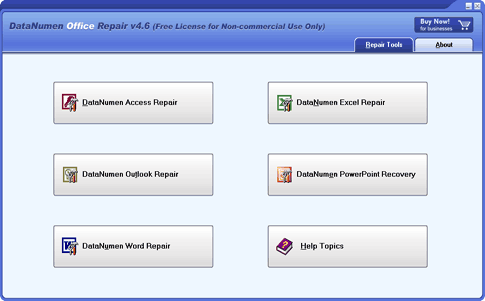
DataNumen Office Repair(formerly Advanced Office Repair) is a Microsoft Office data recovery suite. It includes recovery tools for corrupt or damaged MS Access databases, MS Excel worksheets, MS Word documents, MS Outlook data files, and MS Outlook Express dbx and mbx files.


Main features:

1. Support to repair Microsoft Access 95 to 2013 databases.

2. Support to repair Microsoft Excel xls and xlsx files in Excel version 3 to 2013 formats.

3. Support to repair Microsoft Word 6.0 to 2013 .doc and .docx documents.

4. Support to repair Microsoft Outlook 97 to 2013 PST data files.

5. Support to recover Microsoft Outlook Express 4 mbx files and Outlook Express 5/6 dbx files.

6. Support to repair files on corrupted medias, such as floppy disks, Zip disks, CDROMs, etc.

7. Support to repair a batch of corrupt files.

8. Support integration with Windows Explorer, so you can repair a file with the context menu of Windows Explorer easily.

9. Support drag & drop operation.

10. Support command line parameters.

Graphcat<

CHAX 8.3.4

Type: Demo
Cost: $149
Size: 31.00 MB
Release date: Aug 22 2011
Platform: Win2000,WinXP,Win7 x32,Win7 x64,Windows 8,WinServer,WinOther,WinVista,WinVista x64
Publisher’s Site:  http://www.chax.com
Publisher’s Product Page:  http://www.chax.com/check-by-phone.htm
Country: United States of America


CHAX

Now, collecting payments by check has never been easier or more convenient. When a customer says, ‘I’ll put the check in the mail,’ you just tell them to CHAX it – by fax, phone, or internet. With the help of CHAX user friendly software, simply input the check information into any PC, print out a check, and deposit it.

Why Use Chax?
For any business, who needs to receive payment quickly and securely, CHAX is a must have. How many times has a company paid fees for electronics funds transfer, or to ‘overnight’ a payment. With CHAX this is unnecessary. Customers can call and provide their check information over the phone, fax in a check or through the internet, saving you time, money, and stress.
To survive in todays business atmosphere all companies must have a laser printer, a phone or a fax machine. Thats all the equipment needed to take advantage and implement the CHAX software. Why not capitalize on this investment, save your customers money, and hassle to boot!!! Collect money instantly!!! Chax is also great for periodical debits and collections.

Is it Legal to use Check by Phone, Check by Fax, Checks by Internet?
Check by phone, check by fax and check by internet are completely legal. More commonly named ‘Draft Check’ or pre-authorized paper bank drafts have been in use in the industry since 1996. The main requirement for Draft Checks is that you need written or verbal pre-authorization from the primary checking account holder. After acquiring the pre-authorization, the banks will only need to see a stamp saying that the check was pre-authorized. Read our ‘Drafting Checks – Legal?’ page for more info.

No Signature Required!
Such as a credit card payment over the phone does not need a signature, so can checks. The banks only need to see on the check that it has been pre-authorized, so they can process the check.

Download the CHAX – free trial check printing software today! Visit https://www.chax.com/ for more details.

Project Timer 1.3.0.0

Type: Shareware
Cost: $24.14
Size: 4.21 MB
Release date: Jul 31 2015
Platform: Win2000,WinXP,Win7 x32,Win7 x64,Windows 8,WinServer,WinOther,WinVista,WinVista x64
Publisher’s Site:  http://software.dunesmm.nl/
Publisher’s Product Page:  http://www.projecttimer.com/
Country: Netherlands


Project Timer

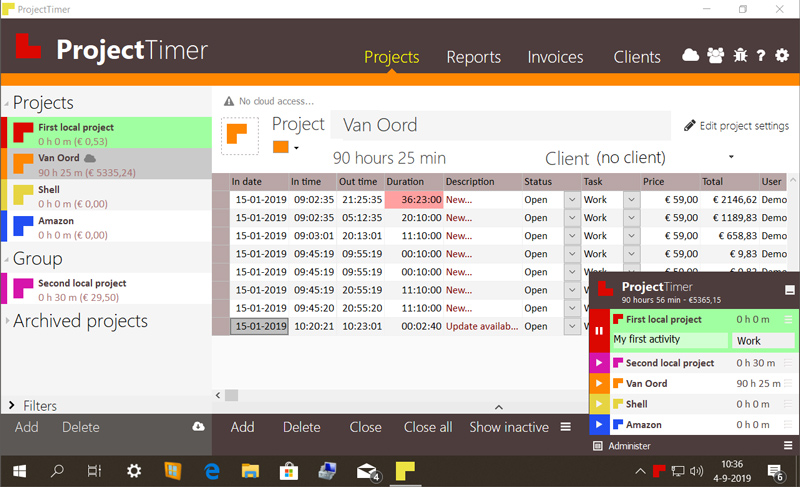
Project Timer is a simple but powerful windows application in the taskbar notification area to manage how much time you’ve spend on your projects. The use of colour will give a fast overview of which timer is running in the taskbar notification area (tray icon). This way you can quickly but non-intrusively see if the timer for the project you’re working on is running.
Activities can have different pricings per hour and the program keeps up the amount of money earned per project, as well as a summary for all your running projects.
You can export your data into reports using the browser or import it in Excel and a simple backup of the data can be zipped, mailed and imported to keep your data safe. Project Timer Pro also allows you to import hours spend by co-workers or freelancers and features extra import and export methods. Sometimes you need to edit your hours afterwards. This is no problem using the administrate panel. You can remove, add and edit activities to your projects.
Project Timer is a light, fast, simple, non-intrusive Windows taskbar application to assists you with your workflow for administrating and billing hours. It features an easy installation and clean uninstall.
The application areas are: advertising, small business, design, web design, healthcare, consulting and accounting, as long as you are working on a Windows machine.