Category Archives: Business

Accounting & Finance, Calculators & Converters, Databases & Tools, Helpdesk & Remote PC, Inventory & Barcoding, Investment Tools, Math & Scientific Tools, Office Suites & Tools, Other, PIMS & Calendars, Project Management, Vertical Market Apps

PowerShell Scripts for SQL 2.0

Type: Freeware
Cost: $0
Size: 258.00 kB
Release date: Sep 05 2012
Platform: WinXP,Win7 x32,Win7 x64,Windows 8
Publisher’s Site:  http://www.idera.com
Publisher’s Product Page:  http://www.idera.com/productssolutions/freetools/sqlpowershellscripts
Country: United States of America


PowerShell Scripts for SQL

Get available SQL Servers Get/Set default data or log file locations Get server version and attributes Get database file sizes Get query results using a T-SQL script in a file Get available SQL Servers Get/Set default data or log file locations Get available SQL Servers Get/Set default data or log file locations Get server version and attributes Get database file sizes Get query results using a T-SQL script in a file Get available SQL Servers Get/Set default data or log file locations Get available SQL Servers Get/Set default data or log file locations Get server version and attributes Get database file sizes Get query results using a T-SQL script in a file Get available SQL Servers Get/Set default data or log file locations

Graphcat<

Personal Address File 1.23

Type: Shareware
Cost: $12
Size: 363.00 kB
Release date: Feb 25 2009
Platform: Win98,WinOther,Win2000,WinXP,Win7 x32,Win7 x64,Windows 8,WinServer,WinVista,WinVista x64
Publisher’s Site:  http://www.kadifeli.com/fedon/addrfile.htm
Publisher’s Product Page:  http://www.kadifeli.com/fedon/addrfile.htm
Country: Turkey


Personal Address File

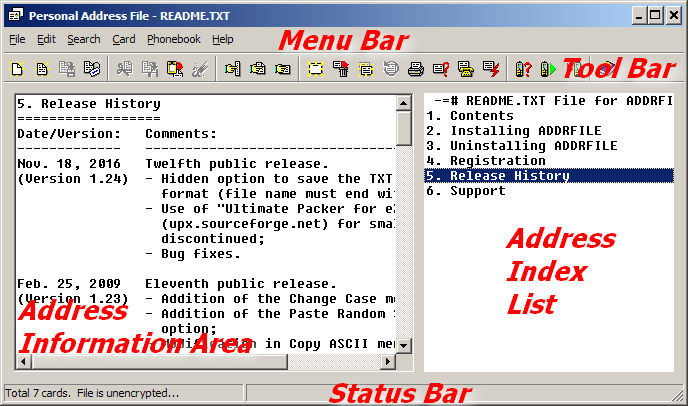
ADDRFILE is a utility which can be used for keeping personal address information. For example, you can keep people’s addresses, phone numbers, e-mail addresses, etc. It is similar to the old Windows CARDFILE program and it can read (.CRD) files created by that program. You can use this program to keep personal notes too, just as you can use NOTEPAD for this purpose. However, by using this program, you can organize your data and access any information you need more easily.

Information is stored normally in CSV format, so you can import files created by ADDRFILE to other programs, like Microsoft Excel. You can save to and read from TXT files also. You can optionally encrypt and/or compress your CSV files.

Using ADDRFILE, you can read and update phonebook entries of your mobile phone using Serial, USB, Bluetooth, or Infrared (IrDA) connection to your PC. Sony Ericsson, Nokia, Motorola, and Siemens mobile phones are known to work with ADDRFILE.


ADDRFILE has an integrated phone dialer similar to, but better than the one in CARDFILE. Another useful feature is the ability to execute system commands stored in your data file.

This program was written mainly to overcome some limitations of CARDFILE. For example, in CARDFILE the size of card cannot be larger than 12×40 characters including the index line. In ADDRFILE there is no such limitation. The main philosophy behind this program is its simplicity and easiness of use.

Note: You can use the full functionality of ADDRFILE even if you do not register.

Seal Report 1.6

Type: Freeware
Cost: $0
Size: 9.48 MB
Release date: Dec 10 2014
Platform: WinXP,WinVista,WinVista x64,Win7 x32,Win7 x64,WinServer,Windows 8
Publisher’s Site:  http://www.sealreport.org
Publisher’s Product Page:  http://www.sealreport.org
Country: Switzerland


Seal Report

Seal Report is an open and powerful database reporting tool. It offers a complete framework for producing every day reports from any database.

The product focuses on an easy installation and report design: Once setup, reports can be built and published in a minute.

Seal Report is an Open Source for the Microsoft .Net Framework entirely written in C#.

Main Features:
– Dynamic SQL sources: Use either your SQL or let the Seal engine build dynamically the SQL used to query your database.
– Native Pivot Tables: Simply drag and drop elements directly in a pivot table (Cross Tab) and display them in your report.
– HTML5 Charts and Microsoft Charts: Define and display Chart Series in two mouse clicks.
– HTML5 Rendering using Razor engine: Use the power of HTML5 in the report result (Tabs, Tables sorting and filtering). Customize your report presentation in HTML with the Razor engine parsing.
– Web Report Server: Publish your reports on the web (requires Internet Information Server 7 or 8 with MVC4).
– Task Scheduler: Schedule your report executions and generate results in folders or send them by emails ((integrated with the Windows Tasks Scheduler).
– Low TCO (total cost of ownership): The product is designed for minimal ongoing maintenance.