Category Archives: Graphic Apps

Animation Tools, CAD, Converters & Optimizers, Editors, Font Tools, Gallery & Cataloging Tools, Icon Tools, Other, Screen Capture, Viewers

ColorPix 2.1.20

Type: Freeware
Cost: $0
Size: 1.56 MB
Release date: May 06 2014
Platform: Win2000,WinXP,Win7 x32,Win7 x64,Windows 8,Windows 10,WinServer,WinOther,WinVista,WinVista x64
Publisher’s Site:  https://windowsutilities.com/
Publisher’s Product Page:  https://windowsutilities.com//colorpix.html
Country: United States of America

ColorPix

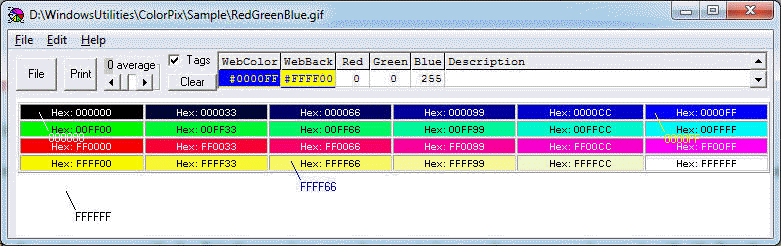
Color codes are show as the cursor is moved in the ColorPix window. A cursor click displays the color code in web Hex and decimal Red, Green, Blue, along with the color compliment. The ColorPix screen can be pasted from the clipboard or read from a file. Sucessive clicks save the pixel colors in a list with user descriptions for review or printing. ColorPix is an essential utility for web page development.
– Pick the best color and background for web text and graphics
– Display color codes in web hex and RBG decimal; also the color complement
– ColorPix can also display the average color in a region around the cursor
– Save and print clicked pixel color codes with user descriptions
– Graphics from the clipboard or a graphic file

Graphcat<

ACDSee 2018.0.725

Type: Shareware
Cost: $59.99
Size: 944.00 kB
Release date: Aug 29 2017
Platform: Win2000,WinXP,Win7 x32,Win7 x64,Windows 8,Windows 10,WinServer,WinOther,WinVista,WinVista x64
Publisher’s Site:  http://www.acdsee.com
Publisher’s Product Page:  http://www.acdsee.com/en/products/photo-studio-standard
Country: Canada


ACDSee

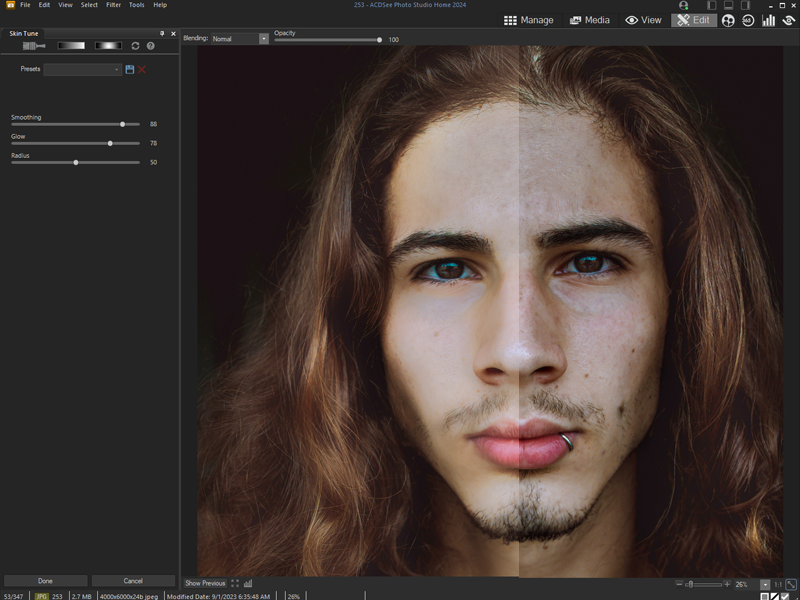
ACDSee Photo Studio 2018 – Organize, edit, and share your photos with ease.


The Best Digital Asset Manager on the Market
Developed over decades, ACDSee Photo Studio Standard 2018 stands up to the demands of modern image processing. Photo Studio Standard 2018 continues to offer trusted, efficiency-driven digital asset management tools paired with photo editing essentials for the practical amateur. With productivity-based improvements, such as mobile syncing, streamlined importing, improved facilities for keywording and categorizing, and much more, Photo Studio Standard provides all of the fundamental elements you need for your photography workflow.

Effortless Digital Asset Management
Finding, sorting, moving, organizing, and sharing everything you need for complete mastery over your photography workflow is right here, at your fingertips. Add ratings, hierarchical keywords, categories, and location data to your images. Quickly identify photos for further processing with visual tags or customizable color labels.

Mobilize Your Life
With ACDSee Mobile Sync, you can wirelessly and instantly send photos and videos directly to ACDSee Photo Studio from your mobile device! Just select and send. Available on iPhone and Android, the ACDSee Mobile Sync app keeps track of which photos have been sent, so you don’t have to. Zoom through your process with flexible selection options and configurable filenames and subfolders.

Intelligent & Advanced Adjustments
Strike the perfect light and color balance in your images. Control white and color balance, tint, saturation, hue, and lightness with mathematical precision. Intuitive lighting adjustment tools allow you to effortlessly adjust exposure and contrast with our patented Light EQ technology. Manipulate shadows, midtones, and highlights for picture-perfect lighting.

Keep it Quiet
Dynamic noise reduction designed to preserve detail makes it possible to define the type of grainy noise artifacts to remove.

Tweddo 1.0

Type: Freeware
Cost: $0
Size: 15.96 MB
Release date: Aug 21 2017
Platform: Win2000,WinXP,Win7 x32,Win7 x64,Windows 8,Windows 10,WinServer,WinOther,WinVista,WinVista x64
Publisher’s Site:  https://www.tweddo.com
Publisher’s Product Page:  https://www.tweddo.com
Country: Netherlands


Tweddo

Tweddo is a powerful and feature-rich batch photo editor for Windows and MacOS, offering full flexibility in all your basic and advanced image editing tasks. It lets photo fanatics, archivists, photographers, web designers, and families enhance large collections of photos, while still having the capabilities and quality of Photoshop or Lightroom.

Tweddo offers a total of 53 processing jobs to serve your needs. To name a few:
– Resize (also by DPI);
– Crop (also by aspect);
– Rotate and (De)skew;
– Apply various effects;
– Annotate and date stamp;
– Add watermark by text or image;
– Rename, move, copy, and delete originals;
– Strip images from EXIF data and comments.

The application is specialized in restoration and enhancement of scanned photo archives and photos in general. Therefore it offers 21 smart and automatic image processing jobs:
– Manual/auto color correction and removal of color casts;
– Manual/auto contrast and gamma correction;
– Manual/auto sharpen and denoise;
– Manual/auto multi crop, trim, rotate/deskew and orientation;
– Fix photo negatives;
– Clean dust and scratches from scanned images with infrared channel.

Everything is configurable in such a way that you’ll never be restricted. You can easily override configurations per photo to provide individual treatment when needed. In addition to this, you can preview the output before and after in a split view and act accordingly. Tweddo has broad support for reading and writing all common image formats (RAW, BMP, JPEG, JP2, PNG, GIF, TIFF, ICO, TGA, PSD). It can be configured to output to multiple files of different types, making it an ideal image converter as well. Last but not least, you can use Tweddo to watch over your folders for new images and process image editing tasks automatically.

It is available for free for all your basic image editing tasks, and has paid versions for the more advanced needs. Try it free now!