Category Archives: Graphic Apps

Animation Tools, CAD, Converters & Optimizers, Editors, Font Tools, Gallery & Cataloging Tools, Icon Tools, Other, Screen Capture, Viewers

ACDSee Ultimate 10.4.912

Type: Shareware
Cost: $149.99
Size: 1.26 MB
Release date: May 10 2017
Platform: Win2000,WinXP,Win7 x32,Win7 x64,Windows 8,Windows 10,WinServer,WinOther,WinVista,WinVista x64
Publisher’s Site:  http://www.acdsee.com
Publisher’s Product Page:  http://www.acdsee.com/en/products/acdsee-ultimate
Country: Canada


ACDSee Ultimate

ACDSee Ultimate 10 – As an all-in-one digital asset manager and editor with layers, ACDSee Ultimate 10 boldly proclaims that you no longer need to purchase and run multiple applications to achieve your organizational and image editing goals. Combining GPU-accelerated adjustment layers, RAW editing, hundreds of filters and adjustments, and workflow-expediting tools perfected over decades, ACDSee Ultimate 10 makes it easy to create professional-grade photography, original advertising, innovative graphics, and powerful art imagery.


Features:
As the first digital asset management software with layers, ACDSee Ultimate 10 is perfectly positioned to fulfill an unparalleled number of creative graphic and image composition needs. With the addition of a number of parametric adjustments and effects, targeted brushing and selecting, improved performance, stats at a glance, and much more, ACDSee Ultimate 10 offers the complete flexibility to create the image composites, photo manipulations, and innovative graphics you’ve been envisioning.

Graphcat<

Colibrico Design Studio 1.1.3

Type: Shareware
Cost: $49
Size: 33.07 MB
Release date: Apr 22 2017
Platform: Win2000,WinXP,Win7 x32,Win7 x64,Windows 8,Windows 10,WinServer,WinOther,WinVista,WinVista x64
Publisher’s Site:  http://www.colibrico.de/en/
Publisher’s Product Page:  http://www.Colibrico.de/en/
Country: Germany


Colibrico Design Studio

Colibrico Design Studio is a design tool with an extensive icon library.
Colibrico Design Studio automates the creation of graphics and icon sets.
Providing the graphics via the graphic tool offers several advantages.

– The graphics can be exported in any size.
– All graphics can be combined.
– Color filters can be used to create additional color variations of the graphics.
– The graphics are presented in a clear form.
– The search function helps you to select a symbol.
– With design elements and additional effects, modern and individual button sets
can be created in any color

With design templates you can create individual graphics, an icon set or a button set easy and fast.

For the creation of individual button sets, different design elements with background shapes, frames, lighting effects and shadow effects are offered.

Saved color filters or custom changes are applied to all selected graphics. This allows you to create and export multiple color variants in a matter of seconds.

Design settings can be saved and reused for additional icon sets. You can create individual color groups and apply them to a flat icon set.

You can import your own SVG graphics to speed up the creation of icon sets.
The file formats SVG, PNG, JPG, BMP and ICO are supported for export.

reaConverter 7.3.19

Type: Shareware
Cost: $49.99
Size: 160.95 MB
Release date: May 15 2017
Platform: Win2000,WinXP,Win7 x32,Win7 x64,Windows 8,Windows 10,WinServer,WinOther,WinVista,WinVista x64
Publisher’s Site:  http://reasoft.com
Publisher’s Product Page:  https://www.reaconverter.com/
Country: United States of America


reaConverter

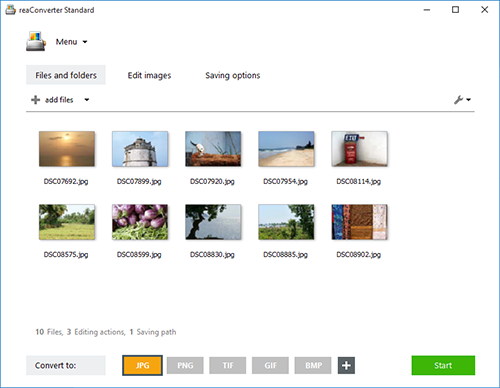
reaConverter is a powerful batch image converter which allows you to convert multiple images between a huge variety of different formats in a single operation. The bulk image converter provides immense support for different formats, so you can use it to open and convert any image of any format you are ever likely to encounter, including both rare and obsolete formats. In total, 545 input image formats are supported as well as 56 output formats.

Supported formats include all of the standard and advanced formats, RAW formats used by professional digital photographers, Microsoft Office Document formats including DOC, DOCX and RTF, CAD and AutoCAD formats and a whole lot more.

In addition to standard bulk image conversion features, you can also edit multiple images in one hit, including resizing, mirroring, applying filters and watermarks and much more. If you are looking for the ultimate batch image converter, then reaConverter is the solution you should be looking for.

The new update of reaConverter 7 lets creative people do what they should – create – taking the most of routine operations upon itself. The feature is called Watch Folders, and that’s what it does: watches folders containing images for new or modified files
and instantly applies predefined actions to them. Working invisibly in the background, reaConverter’s Watch Folders feature allows a user to resize, crop, adjust brightness and colors, add watermarks and otherwise alter images of 400+ supported formats that landed in the specified source folder.

You can find out more at http://www.reaconverter.com and download a trial version or purchase the bulk image converter today.