Category Archives: Graphic Apps

Animation Tools, CAD, Converters & Optimizers, Editors, Font Tools, Gallery & Cataloging Tools, Icon Tools, Other, Screen Capture, Viewers

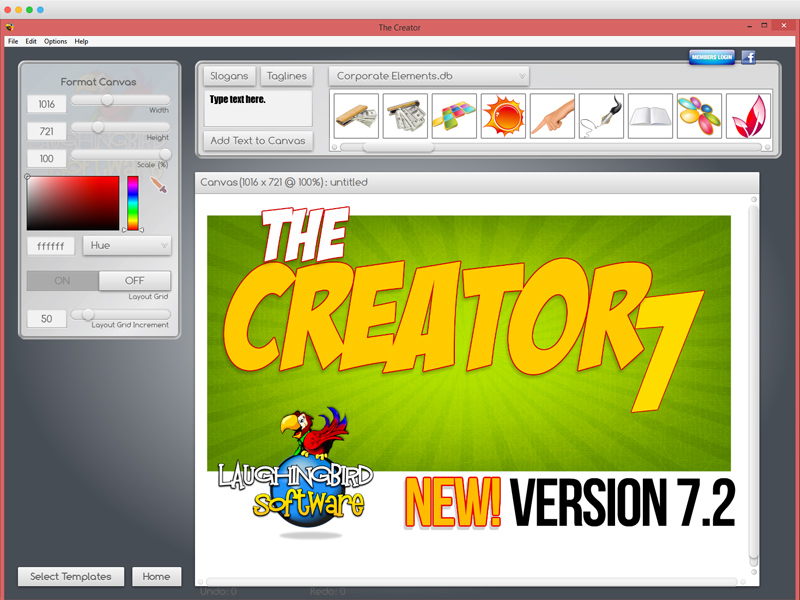
The Creator by Laughingbird Software 7.2.9.1

Type: Demo
Cost: $37
Size: 24.50 MB
Release date: Feb 26 2017
Platform: Win2000,WinXP,Win7 x32,Win7 x64,Windows 8,Windows 10,WinServer,WinOther,WinVista,WinVista x64
Publisher’s Site:  https://www.laughingbirdsoftware.com
Publisher’s Product Page:  https://www.laughingbirdsoftware.com
Country: United States of America

The Creator by Laughingbird Software

The Logo Creator by Laughingbird Software – create logos that look like a Photoshop guru spent hours laboring over!


The Logo Creator starts you off by showing you over 200 creative templates! No extra work on your part.

So now your landing pages, sales pages and membership sites will all look stunning!

Super easy editing tools! You won’t find any complex Photoshop-like icons to confuse you.

Click on the text, you’ll get your text options.
Click on an image, you’ll get your image options!

With Laughingbird’s amazing software, you can stop wasting time and money and start creating (and selling!) professional graphics that will make you proud.

You can ALSO create web graphics, podcast albums, page headers, Facebook timeline images, and all kinds of graphics for your website, blog or social network group.

It’s WAY more than just Logo design software.

Come visit http://www.thelogocreator.com for more logos and special software (like ANiMATED logo creation toos!)

Graphcat<

ACDSee Pro 10.3.675

Type: Shareware
Cost: $99.99
Size: 1.23 MB
Release date: Feb 23 2017
Platform: Win2000,WinXP,Win7 x32,Win7 x64,Windows 8,Windows 10,WinServer,WinOther,WinVista,WinVista x64
Publisher’s Site:  http://www.acdsee.com
Publisher’s Product Page:  http://www.acdsee.com/en/products/acdsee-pro
Country: United States of America


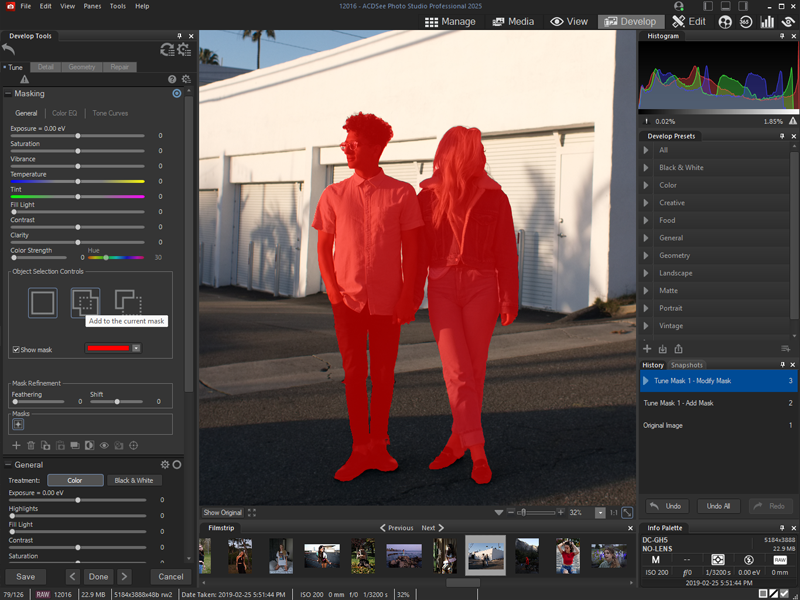
ACDSee Pro

ACDSee Pro 10 – Loaded with everything you need to bring out the best in your images, ACDSee Pro 10 gives you effortless digital asset management and hundreds of non-destructive adjustments for the enhancement and control of your image production. Blaze through all of the essential tasks of your photography workflow with this solid, GPU-enriched member of the ACDSee family.

While ACDSee Pro stands the test of time, it also continues to take on an ever-expanding list of improvements designed to get you the stunning results and ease of use you have come to expect from this trusted software. This established photo enhancement and management solution boasts an impressive array of new features facilitating parametric adjustments and filters, targeted brushing and selecting, stats at a glance, and other additions developed to get you back out where you belong behind the lens.

Shrewd Brushing
-Non-destructive option available
It has become edge-aware! This clever brush allows you to brush on exposure, saturation, fill light, contrast, sharpness, and clarity adjustments in Develop mode, and in most tools in Edit mode, while targeting specific color and brightness ranges.

Non-Destructive Special Effects
As an antidote to boredom, you can now parametrically add color overlays, a number of photo effects, and map colors to shadows and highlights respectively. Fine-tune how these effects interact with the image with the opacity adjustment and two dozen available blend modes.

Clear it up
-Non-destructive option available
Parametrically rescue photos captured through dust, smoke, vapor, or other particles while preserving details. Specify the level of detail to be saved while restoring contrast and lost color.

Flawless and Radiant
-Non-destructive option available
Without the foundation, the concealer, or even painstaking brushing, you can non-destructively smooth away blemishes and flaws with the Skin Tune tool, which automatically aims at skin tones.

ACDSee Photo Editor 10.0.46

Type: Shareware
Cost: $59.99
Size: 1.48 MB
Release date: Feb 08 2017
Platform: Win2000,WinXP,Win7 x32,Win7 x64,Windows 8,Windows 10,WinServer,WinOther,WinVista,WinVista x64
Publisher’s Site:  http://www.acdsee.com
Publisher’s Product Page:  http://www.acdsee.com/en/products/acdsee-photo-editor
Country: United States of America


ACDSee Photo Editor

Total Photography Control
Cut straight to the creative part with this dedicated image adjustment and layered editing software. ACDSee Photo Editor 10 boasts the 64-bit power to actualize the original graphics, polished photography, and compelling art imagery you’ve been envisioning. Enhance photos with pixel-based editing tools, precision targeting, hundreds of filters and adjustments, drawing elements, and much more.

Built-In RAW Support
Take control of your RAW images by removing noise, sharpening, balancing shadows and highlights, targeting colors, and by using a wide variety of other repair, geometry, exposure, color, and detail-oriented improvements. Then save as an ACDC file, which preserves your layers and allows for future non-destructive adjustments. ACDSee Photo Editor 10 supports the RAW editing of over 500 camera models.

Clear & Concise Control
The Dehaze adjustment layer will remove dust, smoke, vapor, or other particles affecting clarity, and restore detail, contrast, and lost color. By using layer masks to control layers’ transparency, you can hide and reveal mist in choice locations, reclaim focus for the subject, and direct the eye.

Layered Retouching & Repair
No foundation, no concealer, no reshoots. You can non-destructively smooth away blemishes and flaws without strenuous, targeted color corrections or blending. Use the Repair tool to copy pixels from flawless areas and blend them into flawed ones for a natural restoration. Combine the Repair tool with a Skin Tune adjustment layer to even tone and restore glow.

Selection Simplified
Make precision adjustments by targeting specific parts of your image with the Selection Brush. Detect edges by selecting based on color, brightness, or a combination of both. Create a mask from your selection. Add lighting, color, detail, or effects-style adjustment layers to your selection. Invert the selection and impact the rest of the image with a different edit.