Category Archives: Graphic Apps

Animation Tools, CAD, Converters & Optimizers, Editors, Font Tools, Gallery & Cataloging Tools, Icon Tools, Other, Screen Capture, Viewers

ACDSee Ultimate 10.3.894

Type: Shareware
Cost: $149.99
Size: 1.26 MB
Release date: Feb 23 2017
Platform: Win2000,WinXP,Win7 x32,Win7 x64,Windows 8,Windows 10,WinServer,WinOther,WinVista,WinVista x64
Publisher’s Site:  http://www.acdsee.com
Publisher’s Product Page:  http://www.acdsee.com/en/products/acdsee-ultimate
Country: United States of America


ACDSee Ultimate

ACDSee Ultimate 10 – As an all-in-one digital asset manager and editor with layers, ACDSee Ultimate 10 boldly proclaims that you no longer need to purchase and run multiple applications to achieve your organizational and image editing goals. Combining GPU-accelerated adjustment layers, RAW editing, hundreds of filters and adjustments, and workflow-expediting tools perfected over decades, ACDSee Ultimate 10 makes it easy to create professional-grade photography, original advertising, innovative graphics, and powerful art imagery.


Features:
As the first digital asset management software with layers, ACDSee Ultimate 10 is perfectly positioned to fulfill an unparalleled number of creative graphic and image composition needs. With the addition of a number of parametric adjustments and effects, targeted brushing and selecting, improved performance, stats at a glance, and much more, ACDSee Ultimate 10 offers the complete flexibility to create the image composites, photo manipulations, and innovative graphics you’ve been envisioning.

Graphcat<

Super Eraser Pro for Mac 2.5.0

Type: Shareware
Cost: $29.99
Size: 24.16 MB
Release date: Feb 22 2017
Platform: Mac OS X
Publisher’s Site:  http://www.effectmatrix.com/
Publisher’s Product Page:  http://www.effectmatrix.com/mac-appstore/photo-eraser-pro-for-mac.htm
Country: Hong Kong


Super Eraser Pro for Mac

Super Eraser Pro is a powerful image processing software to erase unwanted objects, scale, denoise and remove haze for images. Super Eraser Pro magically scales an image or removes unwanted elements such as watermark, date, people, building, etc. without changing important visual content. Powered by the latest revolutionary image restoration algorithm, Super Eraser Pro resizing mostly affects pixels in areas outside of the important visual content without sacrificing quality.

Key Features:
– Scale Images Smartly:
Super Eraser Pro shrinks or enlarges images to improve a composition avoiding distortion of the important parts of the image. It also can be used to remove portion of the image in a consistent way.

– Erase Unwanted Objects from Photo:
Super Eraser Pro has the ability to handle complex scenes or irregular shaped hole with highly textured objects and reconstruct missing or damaged patch from pixels around the selection to create a seamless repair of an image.
1 Remove watermark, logo, signature, date stamp, text etc.
2 Delete unwanted objects, such as wires, buildings, garbage bins, etc.
3 Erase skin blemishes, acnes …
4 Get rid of image objects, pedestrians, tourists.

– Photo Noise Reduction
Using the State-of-art Denoising Technology in the industry, Super Eraser Pro reduces low light and high ISO noise in digital camera shots, tablets and smartphones (iPad, iPhone, Galaxy, HTC). Perfect tool for handling grainy and underexposed digital photos.

– Haze Removal: instantly remove haze from photo to achieve a clear vision.
– Very Fast Speed: Get the magical images done in seconds-to-minutes instead of minutes-to-hours.
– Intuitive User Interface: Simple operation. Easy to use and completely non-technical. Just select the Brush to mark unwanted objects with red color, Super Eraser Pro will do the rest for you.
– Live Preview: Instantly Preview effect and make necessary revisions. Redo immediately if you are dissatisfied with the result.

SmartCapture 3.8.2

Type: Shareware
Cost: $30.00
Size: 1.08 MB
Release date: Dec 10 2016
Platform: Win2000,WinXP,Win7 x32,Win7 x64,Windows 8,Windows 10,WinServer,WinOther,WinVista,WinVista x64
Publisher’s Site:  http://www.desksoft.com
Publisher’s Product Page:  http://www.desksoft.com/SmartCapture.htm
Country: Austria


SmartCapture

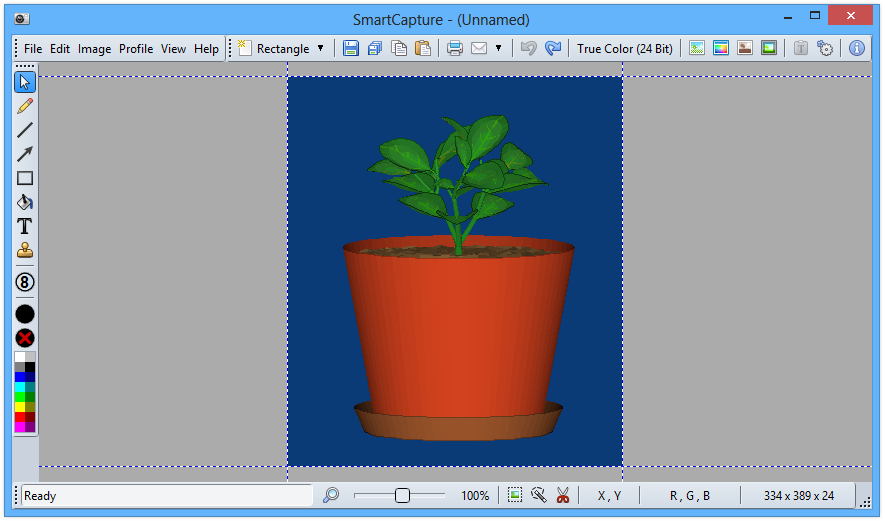
SmartCapture is the professional, easy to use screen capture tool for Windows! The clear and intuitive user interface and powerful features make it the ideal utility for everyone who wants to capture any contents of the Windows desktop. It can capture rectangular screen areas, whole objects, windows or screens and it can acquire images from Twain compatible data sources (e.g. scanners, digital cameras, etc.) The captured images can be cropped very easily and the color depth can be changed to any desired value from monochrome to true color. Images can be printed, saved, copied to the clipboard, sent to MS Word, emailed or edited with any image editor. SmartCapture supports all major file formats, image manipulations (e.g. resize, flip, rotate, etc.) and much more!