Category Archives: Graphic Apps

Animation Tools, CAD, Converters & Optimizers, Editors, Font Tools, Gallery & Cataloging Tools, Icon Tools, Other, Screen Capture, Viewers

Super PhotoCut Pro for Mac 2.6.0

Type: Shareware
Cost: $39.99
Size: 17.12 MB
Release date: Feb 22 2017
Platform: Mac OS X
Publisher’s Site:  http://www.effectmatrix.com/
Publisher’s Product Page:  http://www.effectmatrix.com/mac-appstore/super-photo-cut-pro-for-mac.htm
Country: Hong Kong


Super PhotoCut Pro for Mac

Removing image background from wedding veil & transparent object is a complex and difficult matting task even on the premise that you are proficient in Photoshop. Now it could be easily done by Super PhotoCut Pro, which professionally focuses on Veil & Transparency Masking. With proprietary best-in-class masking algorithm, Super PhotoCut Pro instantly changes complex image background and get the dramatic stand-out images done in seconds-to-minutes instead of minutes-to-hours.


Highlights: Simple operation. No technical skills required. It perfectly cuts out wedding veil and other transparent objects in seconds impossible to achieve using other tools in the market.

Key Features:
1 Instantly change image background from veil & transparent objects, such as glass, water, wedding veil…
2 Smart Algorithm: Cuts object out with critical precision. It enables extremely fast operation with great results on any image, minimizing the amount of work you need to put in.
3 Supports almost all image formats: JPG, BMP, PNG, GIF, RAW…
4 Separate foreground from complex image background easily. Live preview the final effect.
5 Create isolated images with colored or transparent backgrounds.
6 Supports 64-bits.
7 20 kinds of background transition effects are for your choices:
Disc Blur, Gaussian Blur, Box Blur, Motion Blur, Zoom Blur, Color Controls, Exposure Adjust, Gamma Adjust, Hue Adjust, Vibrance, Color Invert, Color Posterize, Chrome, Fade, Instant, Mono, Process, Transfer, Sepia Tone, Vignette, Vignette Effect.
8 Zooming to any level necessary allows you to inspect details while quickly navigating your image.
9 Undo / Redo: never fear that a mistake will ruin your work.
10 Configurable Auto-Brush-Size: The mark size adapts dynamically to your zoom level so that you can easily zoom in to make detailed edits.

Super PhotoCut Pro speeds up your design process, saves your hours and improves the quality of your photos!

Graphcat<

reaConverter Pro 7.2.86

Type: Shareware
Cost: $99.99
Size: 135.96 MB
Release date: Oct 25 2016
Platform: Win2000,WinXP,Win7 x32,Win7 x64,Windows 8,Windows 10,WinServer,WinOther,WinVista,WinVista x64
Publisher’s Site:  http://reasoft.com
Publisher’s Product Page:  http://www.reaconverter.com/
Country: United States of America


reaConverter Pro

Convert Multiple Images Quickly with a Bulk Image Converter

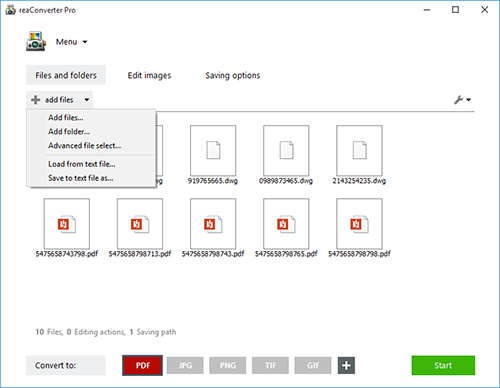
reaConverter is a bulk image converter providing a quick and convenient way to convert any number of images with just a few clicks. Thanks to its simple and clear interface, the program is understandable immediately even to those who have little or no experience with using such programs. When you need to convert large numbers of images all at once or make simple changes to multiple images, this batch image converter makes things quick and simple. Using this software, you will literally save hours and hours compared to manually converting each individual image.

reaConverter is a highly versatile solution which supports virtually every image format that you are ever likely to encounter. You can easily convert folders containing thousands of images in a single operation, and the process is quick and efficient as well. The program can read a huge variety of different formats, including all of the standard formats such as BMP and JPG. It also support numerous RAW format types used by professional digital cameras as well as other advanced formats, metafiles, CAD/AutoCAD formats, vector formats and even formats which are nowadays extremely rare. In total, reaConverter can read no less than 545 different formats, including 338 rare ones. Most of these rare formats will not open with any standard photo or image viewer application, so using the bulk image converter is a great way to make them more accessible with just a few clicks. In addition, reaConverter supports 55 output formats, allowing you to convert any of the supported read formats into a variety of common, advanced and other formats. In short, reaConverter supports pretty much every conceivable image format that you will ever encounter.

Ruckzuck Wasserzeichen 4.0.0.1

Type: Freeware
Cost: $0.00
Size: 9.60 MB
Release date: Dec 22 2016
Platform: Win2000,WinXP,Win7 x32,Win7 x64,Windows 8,Windows 10,WinServer,WinOther,WinVista,WinVista x64
Publisher’s Site:  https://softwareschmiede.org/en/
Publisher’s Product Page:  https://softwareschmiede.org/en/ruckzuck-watermark.html
Country: Germany


Ruckzuck Wasserzeichen

Super-fast watermark, quickly add a few clicks a watermark to your images .sign images.
Easy and fast.
The image size can be adjusted as desired.
The performance of the program has been improved.
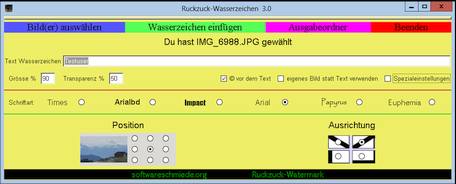
The angle of the watermark can be chosen freely to 90 Grad.
You can specify the distance of the watermark from the edge of the image (in pixels)
or to calculate an optimal distance from the program.
The location and orientation of the watermark can be easily selected with this software.
The size and transparency of the watermark can be set from 0% to 100%.
And the kicker, the software automatically chooses a color with optimum contrast of the watermark to the residual of the images.
You can use as a watermark in a transparent image format gif or png.
Location, orientation, size and transparency can also be selected for the inserted image.
The images are rotated automatically Exif data.
This watermark software is for everyone, from children to seniors insert possible to easily and quickly watermark in any number of images.
This watermark program is not free, but there were quite a few hours of development work done to it to gestallten as user-friendly as possible.
It is easy to use and automatically selects the best color for the watermark.