Category Archives: Graphic Apps

Animation Tools, CAD, Converters & Optimizers, Editors, Font Tools, Gallery & Cataloging Tools, Icon Tools, Other, Screen Capture, Viewers

Q2ID InDesign2017

Type: Demo
Cost: $199
Size: 46.16 MB
Release date: Nov 10 2016
Platform: Win2000,WinXP,Win7 x32,Win7 x64,Windows 8,Windows 10,WinServer,WinOther,WinVista,WinVista x64
Publisher’s Site:  http://www.markzware.com
Publisher’s Product Page:  https://markzware.com/products/q2id/
Country: United States of America


Q2ID

Q2ID is an InDesign plugin to quickly convert QuarkXPress documents in Adobe InDesign. No more re-creating documents from scratch. The Q2ID InDesign plugin gives you a big head-start on QuarkXPress to InDesign data conversion.


Our Q2ID Bundle Subscription gives you access to all current Q2ID plugin versions. You will have access to Q2ID for InDesign CC, CS6, CS5.5 and CS5 both Macintosh and Windows platforms with a single purchase and License.

Currently running Adobe InDesign CS5 but thinking of upgrading? You’ll be covered when you decide to upgrade to CS6 or CC.
If Adobe releases a new CC version which breaks compatibility with our current CC plugin, you’ll get the upgraded plugin for free.
What’s that you say? Quark released a new version? You’ll have access to the upgraded plugins which can convert the new Quark documents.
Easy License Management: Never Remember an Activation Code again!

Markzware’s Q2ID data conversion software converts the intricate details of the original QuarkXPress document and instantly re-creates the document within Adobe InDesign. Q2ID works in InDesign CC, CS6, CS5.5 or CS5 on both Macintosh and Windows platforms.

Items that convert from QuarkXPress using the Q2ID QuarkXPress to InDesign plugin include: page positioning, color models, fonts and styles, images, and text attributes, as well as tables, layers, blends, runarounds, linked text boxes, anchored boxes, and pantone colors.

Q2ID converts Quark 4 through Quark 10 documents. That gives you the ability to convert over 15 years worth of documents.

Read more here: https://markzware.com/products/q2id/

Graphcat<

Super PhotoCut for Mac 2.0.8

Type: Shareware
Cost: $29.99
Size: 11.80 MB
Release date: Oct 20 2016
Platform: Mac OS X
Publisher’s Site:  http://effectmatrix.com/
Publisher’s Product Page:  http://www.effectmatrix.com/mac-appstore/free-remove-background-from-image-for-mac.htm
Country: Hong Kong


Super PhotoCut for Mac

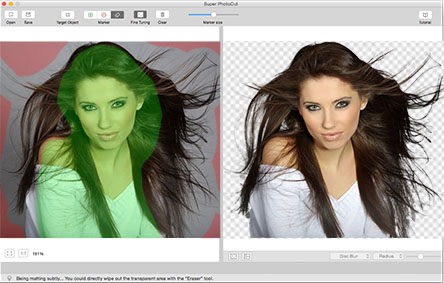
Super PhotoCut for Mac supports instantly Removing Background from Image for Mac. Get the dramatic stand-out images done in seconds-to-minutes instead of minutes-to-hours. It is time to say goodbye to the PhotoShop lasso and magic wand tool in order to remove background from image for Mac.

Key Features:

1 Precision Tool: The only tool for making red/green marks for extremely fast separation without sacrificing quality.

2 Instantly and Accurately remove complex background from images.

3 Smart Algorithm: Cuts object out with critical precision. It enables extremely fast operation with great results on any image, minimizing the amount of work you need to put in.

4 Supports almost all image formats: JPG,BMP,PNG,GIF…

5 Separate foreground from background easily.

6 Simple Interface with real-time feedback: Instant preview final result. Just stay focused and save more time.

7 Transparency Processing Supported. Export to Transparent PNG images.

8 20 kinds of background transition effects are for your choices:
Disc Blur, Gaussian Blur, Box Blur, Motion Blur, Zoom Blur, Color Controls, Exposure Adjust, Gamma Adjust, Hue Adjust, Vibrance, Color Invert, Color Posterize, Chrome, Fade, Instant, Mono, Process, Transfer, Sepia Tone, Vignette, Vignette Effect, Bump Distortion.

9 Zoom and Pan to any level: Nothing is more productive than inspecting details while navigating your image.

10 Create isolated images with colored or transparent backgrounds. Or import your favorite picture as the background image.

11 Undo / Redo: No mistake will ever get your work progress back to zero.

12 Configurable Auto-Brush-Size: The mark size adapts dynamically to your zoom level so that you can easily zoom in to make detailed edits.

13 Auto-Save: No fear of losing your edits. No hassle of dealing with backups. Just enjoy your editing time to the fullest!

ACDSee 20.1.587

Type: Shareware
Cost: $59.99
Size: 1.25 MB
Release date: Nov 09 2016
Platform: Win2000,WinXP,Win7 x32,Win7 x64,Windows 8,Windows 10,WinServer,WinOther,WinVista,WinVista x64
Publisher’s Site:  http://www.acdsee.com
Publisher’s Product Page:  http://www.acdsee.com/en/products/acdsee
Country: United States of America


ACDSee

ACDSee 20 – Organize, edit, and share your photos with ease.

Overview: As the choice software for the practical amateur, ACDSee 20 is trusted digital asset management paired with photo editing essentials. ACDSee 20 is packed with efficiency-driven tools to help you organize your photos, tweak as needed, and inspire your friends, family and followers.

Now featuring improved performance and stability, increased interface customizability to suit your process, more advanced noise reduction, and much more, ACDSee 20 provides all of the fundamental elements you need for your productivity-motivated photography workflow. With a new mode dedicated to assessing yours stats on the fly, as well as settings to easily identify orphans amidst your library, ACDSee 20 is the perfect solution for your growing photo collection.

Filtering Flexibility
With performance dramatically enhanced, Photos mode now boasts even more ways to filter your viewing experience so that you can target specific areas of your hard drive, your Microsoft OneDrive collection, or your image collection in its entirety. Configure customizable metadata pop-ups and easily pick out orphans displayed in sepia.

The Right Versatility
Right-click to conveniently switch between drawing with foreground and background colors. Or use right-click to quickly erase adjustments made with the Edit brush.

Get Your Fill
Use the Edit Mode Fill tool to select a color to enrich with your chosen background color for speedy enhancements.

Gradients
Apply a radial or linear gradient to gradually progress outward from a center point or subtly across your photo.

Detail Defense
The latest noise reduction technology makes it easy to remove the grainy artefacts from your image while retaining details. You can even specify the level of detail to be preserved.

Skim Your Stats
With the addition of Dashboard mode, you can assess camera, file, and database statistics at a glance.