Category Archives: Graphic Apps

Animation Tools, CAD, Converters & Optimizers, Editors, Font Tools, Gallery & Cataloging Tools, Icon Tools, Other, Screen Capture, Viewers

ACDSee Pro 10.1.653

Type: Shareware
Cost: $99.99
Size: 1.23 MB
Release date: Nov 09 2016
Platform: Win2000,WinXP,Win7 x32,Win7 x64,Windows 8,Windows 10,WinServer,WinOther,WinVista,WinVista x64
Publisher’s Site:  http://www.acdsee.com
Publisher’s Product Page:  http://www.acdsee.com/en/products/acdsee-pro
Country: United States of America


ACDSee Pro

ACDSee Pro 10 – Loaded with everything you need to bring out the best in your images, ACDSee Pro 10 gives you effortless digital asset management and hundreds of non-destructive adjustments for the enhancement and control of your image production. Blaze through all of the essential tasks of your photography workflow with this solid, GPU-enriched member of the ACDSee family.


While ACDSee Pro stands the test of time, it also continues to take on an ever-expanding list of improvements designed to get you the stunning results and ease of use you have come to expect from this trusted software. This established photo enhancement and management solution boasts an impressive array of new features facilitating parametric adjustments and filters, targeted brushing and selecting, stats at a glance, and other additions developed to get you back out where you belong behind the lens.

Shrewd Brushing
-Non-destructive option available
It has become edge-aware! This clever brush allows you to brush on exposure, saturation, fill light, contrast, sharpness, and clarity adjustments in Develop mode, and in most tools in Edit mode, while targeting specific color and brightness ranges.

Non-Destructive Special Effects
As an antidote to boredom, you can now parametrically add color overlays, a number of photo effects, and map colors to shadows and highlights respectively. Fine-tune how these effects interact with the image with the opacity adjustment and two dozen available blend modes.

Clear it up
-Non-destructive option available
Parametrically rescue photos captured through dust, smoke, vapor, or other particles while preserving details. Specify the level of detail to be saved while restoring contrast and lost color.

Flawless and Radiant
-Non-destructive option available
Without the foundation, the concealer, or even painstaking brushing, you can non-destructively smooth away blemishes and flaws with the Skin Tune tool, which automatically aims at skin tones.

Graphcat<

Canvas Draw for Mac 3.0.3.266

Type: Shareware
Cost: $199
Size: 233.14 MB
Release date: Nov 17 2016
Platform: Mac OS X
Publisher’s Site:  http://www.acdsee.com
Publisher’s Product Page:  http://www.canvasgfx.com/en/products/canvas-draw
Country: United States of America


Canvas Draw for Mac

Canvas Draw 3 for Mac is a powerful software specifically designed to make it possible for designers, illustrators, and professionals to advertise and communicate with confidence. Now with a unicode text engine and user interface, text edit improvements, pressure sensitivity support for drawing tablets and more, Canvas Draw is your best choice for creating and sharing personal, business and marketing content.

Features Overview:
Catering to business professionals and creatives alike, Canvas Draw for Mac’s impressive and comprehensive set of vector object illustration and advanced raster image editing tools, along with its unique and integrated design environment, make it easy to conquer your project. Work with and combine all graphical elements and apply high-end effects in a single document.

Complete Versatility
Canvas Draw comes loaded with tools and techniques that allow you to easily create marketing or business materials, as well as creative content, printable drawings, and shareable PDFs. Put Canvas Draw to work designing brochures, collages, business cards, school projects, cover pages, handouts, printable advertisements, reports, graphs, metrics, web content, mock-ups, layouts, logos, scale drawings, floor plans, architectural designs, and other drawings best served with measured precision, placement, and the ability to combine text, images, and objects.

PDF-XChange Editor 6.0.319.0

Type: Shareware
Cost: $43.50
Size: 110.81 MB
Release date: Nov 28 2016
Platform: Win2000,WinXP,Win7 x32,Win7 x64,Windows 8,Windows 10,WinServer,WinOther,WinVista,WinVista x64
Publisher’s Site:  http://www.tracker-software.com
Publisher’s Product Page:  http://www.tracker-software.com/product/pdf-xchange-editor
Country: Canada


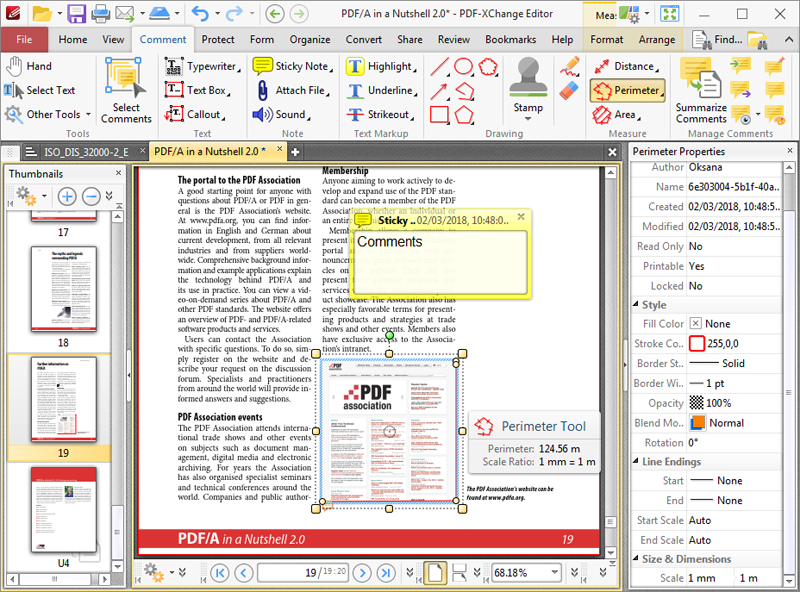
PDF-XChange Editor

Full Page Text Content Editing, Extended OCR options – OCR, Spellchecker, Expanded XFA forms support, Listen/add audio comments, View embedded Multimedia support, Significantly improved rendering and page load speed, New Extended Digital Signature Support, PDF Security Support, Add Comments and Annotations, Add & apply Custom Stamps, Direct Content Editing (Paths & Images), Combine PDFs open/closed pdfs, Import Directly from XPS and other support formats, Bates Numbering, Send PDF files via email, Crop/Insert/Delete Pages, Scan Direct to PDF, Compatible with Windows XP and later, Plug-Ins for both MS IE or Firefox Browser’s