Category Archives: Graphic Apps

Animation Tools, CAD, Converters & Optimizers, Editors, Font Tools, Gallery & Cataloging Tools, Icon Tools, Other, Screen Capture, Viewers

The Creator by Laughingbird Software 7.2.6

Type: Demo
Cost: $37
Size: 33.68 MB
Release date: Oct 06 2016
Platform: Win2000,WinXP,Win7 x32,Win7 x64,Windows 8,Windows 10,WinServer,WinOther,WinVista,WinVista x64
Publisher’s Site:  https://www.laughingbirdsoftware.com
Publisher’s Product Page:  https://www.laughingbirdsoftware.com
Country: United States of America
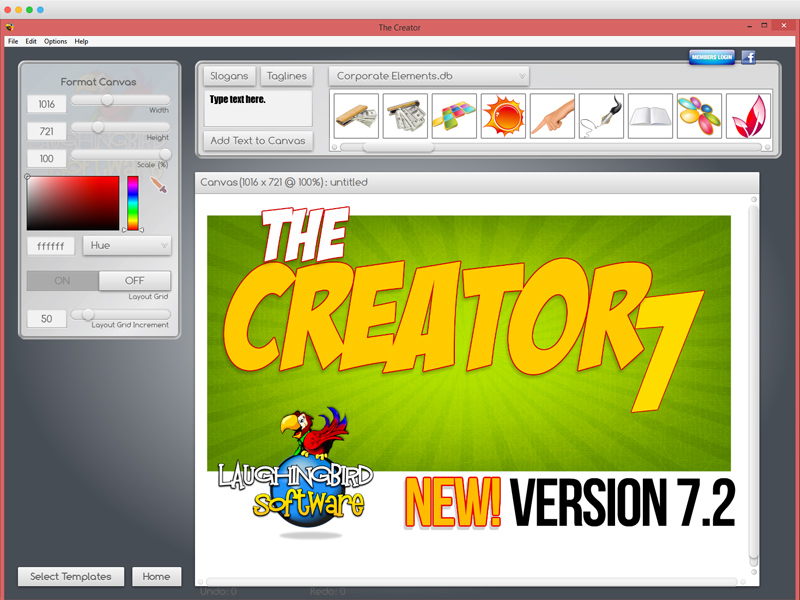

The Creator by Laughingbird Software

The Logo Creator by Laughingbird Software – create logos that look like a Photoshop guru spent hours laboring over!


The Logo Creator starts you off by showing you over 200 creative templates! No extra work on your part.

So now your landing pages, sales pages and membership sites will all look stunning!

Super easy editing tools! You won’t find any complex Photoshop-like icons to confuse you.

Click on the text, you’ll get your text options.
Click on an image, you’ll get your image options!

With Laughingbird’s amazing software, you can stop wasting time and money and start creating (and selling!) professional graphics that will make you proud.

You can ALSO create web graphics, podcast albums, page headers, Facebook timeline images, and all kinds of graphics for your website, blog or social network group.

It’s WAY more than just Logo design software.

Come visit http://www.thelogocreator.com for more logos and special software (like ANiMATED logo creation toos!)

Graphcat<

Super Vectorizer 2 for Mac 2.0.2

Type: Shareware
Cost: $29.99
Size: 2.89 MB
Release date: Oct 13 2016
Platform: Mac OS X
Publisher’s Site:  http://effectmatrix.com/
Publisher’s Product Page:  http://www.effectmatrix.com/mac-appstore/Super-Vectorizer.htm
Country: Hong Kong


Super Vectorizer 2 for Mac

Super Vectorizer 2 for Mac is a professional Mac vector tracing software that automatically converts bitmap image like JPEG, GIF and PNG to clean, scalable vector graphic of Ai, SVG, DXF and PDF on Mac. It supports tracing of color and grayscale, black-and-white, skeletonization and line as well. Super Vectorizer 2 for Mac uses a totally-new image quantization algorithm that produces more natural color after vectorization on Mac. The output vector art works seamlessly with Illustrator, Corel, and others on Mac system.

Key Features of Super Vectorizer 2 for Mac:

– Fully automatic vectorization on Mac.
– Super Vectorizer 2 for Mac supports up to 64 colors now.
– Automatic tracing images of 70+ formats
JPG, BMP, PNG, GIF, PDF, PSD, PNT, RGB, ARW, BMPF, CUR, CRW, CR2, DCR, DNG, EPSF, EPSI
– Segmentation editing capabilities: Trace more clean line borders on Mac that greatly simplifies the information to get more concise vector graphic for the ease of editing. It succesfully avoids a region overlapping.
– Super Vectorizer 2 for Mac has two color modes now.
– Super Vectorizer 2 for Mac vectorizes images on Mac by Edge or Color or Gray Color.
– Options for vectorizing images on Mac by Skeletonization or Line.
– Better Optimization of line-tracing with a new line-tracing engine on Mac: accord more closely with users needs.
– The function of skeletonization will enable conversion from pencil drawing into vector graphic on Mac easily.
– The enhanced pre-processing smoothing function simplify the complex image very well. The smoothing algorithm is four times better than that of Super Vectorizer.
– Better Accuracy: more closely resemble to the input image.
– Ai, SVG, DXF and PDF Mac vector graphic output.
– Powerful preview to inspect the result in detail.
– Super Vectorizer 2 for Mac could vectorize very large images on Mac.
– Transparency support on Super Vectorizer 2 for Mac

PixelStyle Photo Editor for Mac 3.3.5

Type: Shareware
Cost: $29.99
Size: 18.79 MB
Release date: Oct 11 2016
Platform: Mac OS X
Publisher’s Site:  http://effectmatrix.com/
Publisher’s Product Page:  http://www.effectmatrix.com/mac-appstore/mac-photo-editor-pixelstyle.htm
Country: Hong Kong


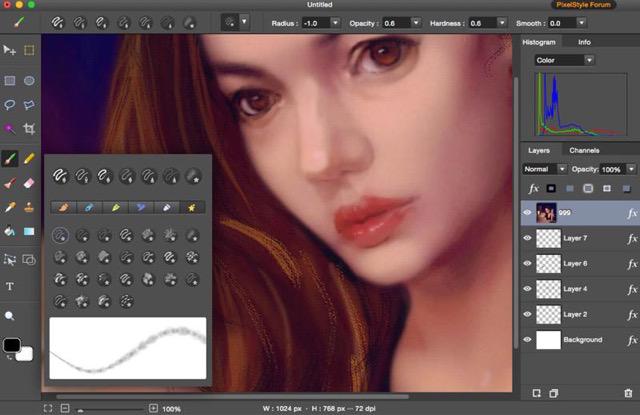
PixelStyle Photo Editor for Mac

PixelStyle Photo Editor for Mac is FREE but full-blown Photo Editor for Mac.

Photo Editing Mac:
– A set of sophisticated but easy-to-use tools.
– Adjust exposure, hue, white balance, shadows and much more.
– Immediately delete unwanted elements and retouch the images.
– 1 min cut out objects from photos and change photo background.
– Quickly select any part of an image and apply special effects.

Top Drawing Tools for Mac:
– More than 100 built-in drawing brushes.
– Create custom brushes with different brush sizes, shapes, hardness…
– Support pixel-drawing.
– Fill in the object with texture and color.
– support for many gradient modes including symmetrical, rotate, clockwise and counter.

Powerful Layer Capabilities on Mac
– Full support for unlimited layers and layer groups.
– Easily add non-destructive layer effects.
– Support over 50 different filter effects and blending mode options.
– Resize layers without any loss of quality. Hide, duplicate and merge layers easily.
– Select several layers at one time and freely align, flip and transform the layers.
– Support channel selection and Alpha channel editing.
– Your file could be saved as a project.
– Work with all popular formats like TIFF, JPEG, PNG, GIF, BMP, etc.

Excellent Text Design Tools on Mac OS X
– Add text layer effects like shadows, strokes, glow or fills.
– Half Circle Text Tool: Easily place and modify your text on a half-circle to create logos and other useful text designs.
– Modify your text with on-canvas controls. Use the baseline sliders to get things looking just right.
– Convert type layers into raster layers.
– Enjoy a full set of advanced typography features like kerning, bold, italic and much more.

Designed exclusively for Mac
– Takes full advantage of the latest OS X technologies.
– Use the Touch trackpad to paint with pressure sensitivity.
– Fully optimized for 64-bit and multi-core processors.
– Support regular, retina and multi-monitor set ups.