Category Archives: Graphic Apps

Animation Tools, CAD, Converters & Optimizers, Editors, Font Tools, Gallery & Cataloging Tools, Icon Tools, Other, Screen Capture, Viewers

Pro Paint for Mac 3.35

Type: Shareware
Cost: $29.99
Size: 17.21 MB
Release date: Oct 11 2016
Platform: Mac OS X
Publisher’s Site:  http://effectmatrix.com/
Publisher’s Product Page:  http://www.effectmatrix.com/mac-appstore/pro-paint-for-mac-tool.htm
Country: Hong Kong

Pro Paint for Mac

Paint for Mac Pro version is the realistic digital Mac paint program that is used to edit image, vector graphic design, free-form transformation, add filters, crop, alpha channel edit and more to paint on Mac.


Pro Paint for Mac app provides high quality image manipulation tools for original artwork creation on Mac.

Paint for Mac Pro program is available for OS X 10.8+, iMac, Macbook Mini, air, Mountain lion, Pro, Yosemite, mavericks, EI Capitan, Sierra.

Pro Paint for Mac is an expressive and intuitive Mac Paint Program with a lot of key features:
– Intuitive Interface: Just pick up the mac paint brush to begin creative journey.
– Unparalleled Mac paint engine: Fast, Smooth and Precise.
– Pixel-drawing for Mac OS X system.
– Texture Painting to paint on Mac.
– Vector Gaphic Design for Mac OS X system.
– 100+ Stunning Paint Brushes: Pencil, Watercolor brush, Airbrush, Charcoal and other effects. Easily customize and create your own new brushes.
– Experience painting in Mac with plotting board with adjustable pressure sensitivity.
– Continuous auto-save – never lose artwork again.
– Paint for Mac Pro is also a Full-Featured Image Editor for Mac:
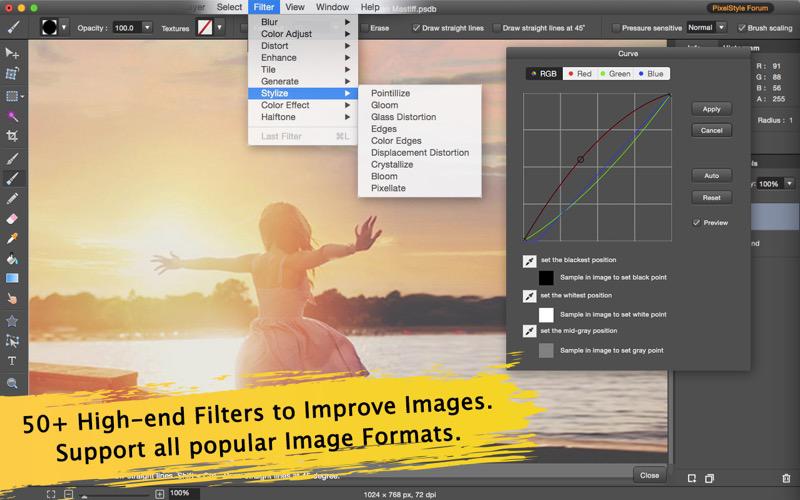
– 50+ high-end Filters built-in the Mac paint program Pro: Blur, Distortion, Tilt-shift…
– Image Editing is also available in mac equivalent of paint program: Gradient Fills, Crop, Paint bucket, Smear …

Pro Paint Mac program is designed to replace the microsoft paint in mac. Paint for Mac Pro enables your works to be showcased just as impressive as what you can create on a physical canvas.
If you need Mac equivalent of Paint, Paint Mac Pro is just here for you. However, Paint Mac Pro is not only the mac version of paint, it has much more features.
Be the Professional, Get Paint for Mac Pro Version.

Graphcat<

Lossless Photo Squeezer for Mac 1.70

Type: Shareware
Cost: $14.99
Size: 8.34 MB
Release date: Oct 10 2016
Platform: Mac OS X
Publisher’s Site:  http://effectmatrix.com/
Publisher’s Product Page:  http://www.effectmatrix.com/mac-appstore/Lossless-Photo-Squeezer.htm
Country: Hong Kong


Lossless Photo Squeezer for Mac

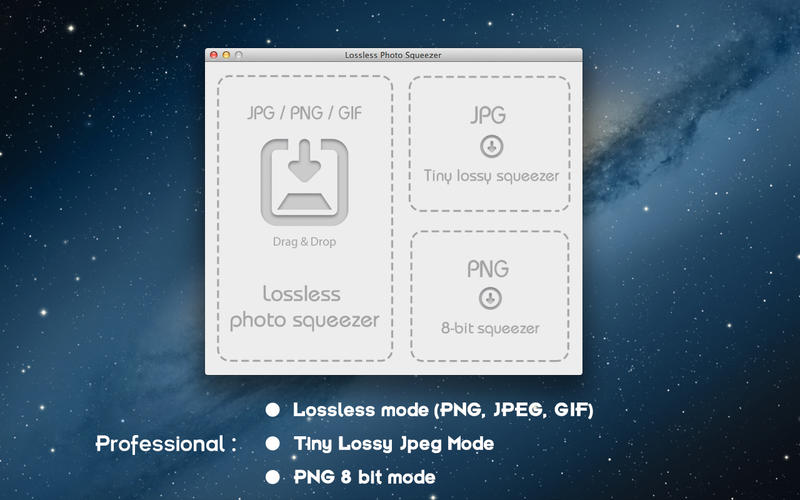
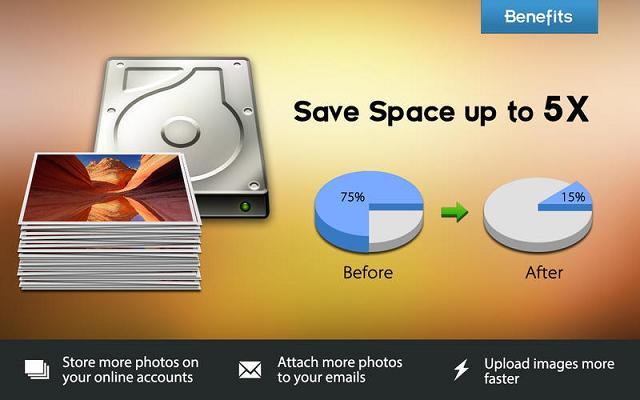
Lossless Photo Squeezer for Mac is a professional image size compressor which will reduce your PNG, JPEG and GIF photos and images size with LOSSLESS quality. You can optimize all your photos to save much hard drive space, web space.
Lossless Photo Squeezer for Mac comes with compression capabilities which compresses and reduces large image size significantly but keep the original resolution, quality for Mac OS X system.

There are three modes for your choice: Lossless mode (png, jpg, gif); Lossy mode (jpg); PNG 8 bit mode.
– Lossless mode will save space > 20% but keep the original resolution
– Lossy mode will save space > 50% with minor quality loss.
– PNG 8 bit mode which converts 24-color png to 256-color png will save space > 60%
Lossless Photo Squeezer for Mac Features:
Easy to use.
Three modes for your choice: Lossless mode (png, jpg, gif); Lossy mode (jpg); PNG 8 bit mode.
Import the entire directory (including sub-directories) and output the images back without changing the original directory structure.
Drag photos, folders onto the app to optimize them.
Maintain the original dimension while shrinking pictures.
Individual or batch processing.
Upload optimized images to the web more faster.

Photo Size Optimizer for Mac 1.71

Type: Shareware
Cost: $19.99
Size: 2.88 MB
Release date: Oct 13 2016
Platform: Mac OS X
Publisher’s Site:  http://effectmatrix.com/
Publisher’s Product Page:  http://www.effectmatrix.com/mac-appstore/image-mini.htm
Country: Hong Kong


Photo Size Optimizer for Mac

Photo Size Optimizer for Mac is a powerful photo resizer and optimizer on mac. Photo Size Optimizer for Mac optimizes all photos by 80% to 20% compared to their originals, while keeping their original resolution and/or quality in a batch on Mac. With Photo Size Optimizer for Mac, you can resize hundreds of photos quickly and save huge space and share full-resolution photos with your friends much faster.

Key features of Photo Size Optimizer for Mac:

– One-click photo size optimization on Mac OS X.
– Easy management: When a folder dragged into the application, Photo Size Optimizer for Mac will work on it immediately.
– Support 70+ image formats:
JPG, BMP, PNG, GIF, PDF, PSD, PNT, RGB, ARW, BMPF, CUR, CRW, CR2, DCR, DNG, EPSF, EPSI, EPI, EPS, EXR, EFX, ERF, FPX, FPIX, FAX, FFF, GIFF, G3, HDR, ICNS, ICO, JP2, JFX, JFAX, JPE, JFIF, JPF, MPO, MAC, MRW, MOS, NRW, NEF, ORF, PICT, PIC, PCT, PS, PNTG, PNGF, PEF, QTIF, QTI, RAW, RAF, RW2, RWL, SR2, SRF, SRW, SGI, TRIC, TIFF, TGA, TARGA, TIF, XBM, 3FR, 8BPSR
– Photo sharing becomes more easier.
– More choices:
– Lossless mode will save space > 20%.
Lossless mode compresses and reduces large image size significantly but keep the original resolution, quality.
– Lossy mode will save space > 50% with minor quality loss.