Category Archives: Graphic Apps

Animation Tools, CAD, Converters & Optimizers, Editors, Font Tools, Gallery & Cataloging Tools, Icon Tools, Other, Screen Capture, Viewers

ACDSee Ultimate 10.0.839

Type: Shareware
Cost: $149.99
Size: 1.26 MB
Release date: Sep 19 2016
Platform: Win2000,WinXP,Win7 x32,Win7 x64,Windows 8,Windows 10,WinServer,WinOther,WinVista,WinVista x64
Publisher’s Site:  http://www.acdsee.com
Publisher’s Product Page:  http://www.acdsee.com/en/products/acdsee-ultimate
Country: United States of America


ACDSee Ultimate

ACDSee Ultimate 10 – As an all-in-one digital asset manager and editor with layers, ACDSee Ultimate 10 boldly proclaims that you no longer need to purchase and run multiple applications to achieve your organizational and image editing goals. Combining GPU-accelerated adjustment layers, RAW editing, hundreds of filters and adjustments, and workflow-expediting tools perfected over decades, ACDSee Ultimate 10 makes it easy to create professional-grade photography, original advertising, innovative graphics, and powerful art imagery.


Features:
As the first digital asset management software with layers, ACDSee Ultimate 10 is perfectly positioned to fulfill an unparalleled number of creative graphic and image composition needs. With the addition of a number of parametric adjustments and effects, targeted brushing and selecting, improved performance, stats at a glance, and much more, ACDSee Ultimate 10 offers the complete flexibility to create the image composites, photo manipulations, and innovative graphics you’ve been envisioning.

Graphcat<

ACDSee 20.0.561

Type: Shareware
Cost: $59.99
Size: 1.25 MB
Release date: Sep 19 2016
Platform: Win2000,WinXP,Win7 x32,Win7 x64,Windows 8,Windows 10,WinServer,WinOther,WinVista,WinVista x64
Publisher’s Site:  http://www.acdsee.com
Publisher’s Product Page:  http://www.acdsee.com/en/products/acdsee
Country: United States of America


ACDSee

ACDSee 20 – Organize, edit, and share your photos with ease.

Overview: As the choice software for the practical amateur, ACDSee 20 is trusted digital asset management paired with photo editing essentials. ACDSee 20 is packed with efficiency-driven tools to help you organize your photos, tweak as needed, and inspire your friends, family and followers.

Now featuring improved performance and stability, increased interface customizability to suit your process, more advanced noise reduction, and much more, ACDSee 20 provides all of the fundamental elements you need for your productivity-motivated photography workflow. With a new mode dedicated to assessing yours stats on the fly, as well as settings to easily identify orphans amidst your library, ACDSee 20 is the perfect solution for your growing photo collection.

Filtering Flexibility
With performance dramatically enhanced, Photos mode now boasts even more ways to filter your viewing experience so that you can target specific areas of your hard drive, your Microsoft OneDrive collection, or your image collection in its entirety. Configure customizable metadata pop-ups and easily pick out orphans displayed in sepia.

The Right Versatility
Right-click to conveniently switch between drawing with foreground and background colors. Or use right-click to quickly erase adjustments made with the Edit brush.

Get Your Fill
Use the Edit Mode Fill tool to select a color to enrich with your chosen background color for speedy enhancements.

Gradients
Apply a radial or linear gradient to gradually progress outward from a center point or subtly across your photo.

Detail Defense
The latest noise reduction technology makes it easy to remove the grainy artefacts from your image while retaining details. You can even specify the level of detail to be preserved.

Skim Your Stats
With the addition of Dashboard mode, you can assess camera, file, and database statistics at a glance.

reaConverter 7.2.55

Type: Shareware
Cost: $49.99
Size: 126.90 MB
Release date: Sep 12 2016
Platform: Win2000,WinXP,Win7 x32,Win7 x64,Windows 8,Windows 10,WinServer,WinOther,WinVista,WinVista x64
Publisher’s Site:  http://reasoft.com
Publisher’s Product Page:  https://www.reaconverter.com/
Country: United States of America


reaConverter

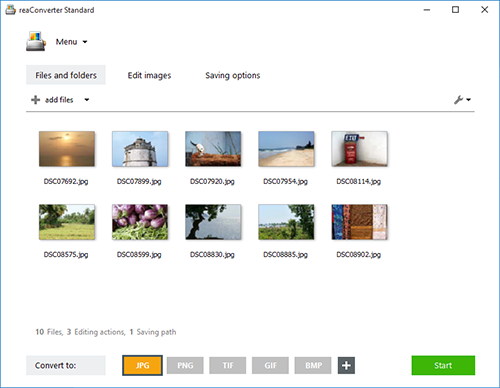
reaConverter is a powerful batch image converter which allows you to convert multiple images between a huge variety of different formats in a single operation. The bulk image converter provides immense support for different formats, so you can use it to open and convert any image of any format you are ever likely to encounter, including both rare and obsolete formats. In total, 545 input image formats are supported as well as 56 output formats.

Supported formats include all of the standard and advanced formats, RAW formats used by professional digital photographers, Microsoft Office Document formats including DOC, DOCX and RTF, CAD and AutoCAD formats and a whole lot more.

In addition to standard bulk image conversion features, you can also edit multiple images in one hit, including resizing, mirroring, applying filters and watermarks and much more. If you are looking for the ultimate batch image converter, then reaConverter is the solution you should be looking for.

The new update of reaConverter 7 lets creative people do what they should – create – taking the most of routine operations upon itself. The feature is called Watch Folders, and that’s what it does: watches folders containing images for new or modified files
and instantly applies predefined actions to them. Working invisibly in the background, reaConverter’s Watch Folders feature allows a user to resize, crop, adjust brightness and colors, add watermarks and otherwise alter images of 400+ supported formats that landed in the specified source folder.

You can find out more at http://www.reaconverter.com and download a trial version or purchase the bulk image converter today.