Category Archives: Graphic Apps

Animation Tools, CAD, Converters & Optimizers, Editors, Font Tools, Gallery & Cataloging Tools, Icon Tools, Other, Screen Capture, Viewers

SeePlus DICOM 9.0.520

Type: Shareware
Cost: $199.99
Size: 1.16 MB
Release date: Jul 28 2016
Platform: Win2000,WinXP,Win7 x32,Win7 x64,Windows 8,Windows 10,WinServer,WinOther,WinVista,WinVista x64
Publisher’s Site:  http://www.acdsee.com
Publisher’s Product Page:  http://www.acdsee.com/en/products/seeplus-dicom
Country: United States of America


SeePlus DICOM

Digital Imaging and Communications in Medicine (DICOM) has become the international standard for conveying information in medical imaging. SeePlus DICOM serves a variety of industries, including insurance, dental, and more, with viewing power for this widely-distributed healthcare messaging format. Compare images, zoom, rotate, invert, tweak brightness and contrast as needed, and save your DICOM files as JPEGs.


As Digital Imaging and Communications in Medicine (DICOM) has become the international standard for conveying information in medical imaging, SeePlus DICOM provides medical professionals with flexibility and control.

Graphcat<

ACDSee Ultimate 9.3.0.674

Type: Shareware
Cost: $149.99
Size: 1.24 MB
Release date: Jul 21 2016
Platform: Win2000,WinXP,Win7 x32,Win7 x64,Windows 8,Windows 10,WinServer,WinOther,WinVista,WinVista x64
Publisher’s Site:  http://www.acdsee.com
Publisher’s Product Page:  http://www.acdsee.com/en/products/acdseeultimate
Country: United States of America


ACDSee Ultimate

ACDSee Ultimate 9 – As the first digital asset management software with layers, ACDSee Ultimate 9 is able to answer an unparalleled number of creative graphic and image composition needs. Armed with a potent list of adjustment layers, working with layers just became non-destructive, giving you the complete flexibility to create the image composites, photo manipulations, and innovative graphics you’ve been envisioning. With new ways to track your adjustments and apply them to batches, development snapshots, extended creative capabilities through Photoshop plugin support, new lighting and skin tone adjustments, additional ways to compartmentalize, even more drawing tools, improved lens correction, high DPI support, and so much more, ACDSee Ultimate 9 packs a valuable punch.

Features:
With an all-in-one digital asset manager and layered editor, theres no need to purchase and run multiple applications to achieve your organizational and image editing goals. ACDSee Ultimate 9 combines layers, image editing and management tools with new GPU-accelerated adjustment layers, support for 4k monitors, improved lens correction, a chronological view of your entire photo collection, tools for tracking and returning to various adjustments, as well as applying them to other sets of images, and much more. Improved drawing tools in combination with adjustment layers make it even easier to create original advertising, innovative graphics, and powerful art imagery.

reaConverter 7.2.23

Type: Shareware
Cost: $49.99
Size: 124.17 MB
Release date: May 18 2016
Platform: Win2000,WinXP,Win7 x32,Win7 x64,Windows 8,Windows 10,WinServer,WinOther,WinVista,WinVista x64
Publisher’s Site:  http://reasoft.com
Publisher’s Product Page:  https://www.reaconverter.com/
Country: United States of America


reaConverter

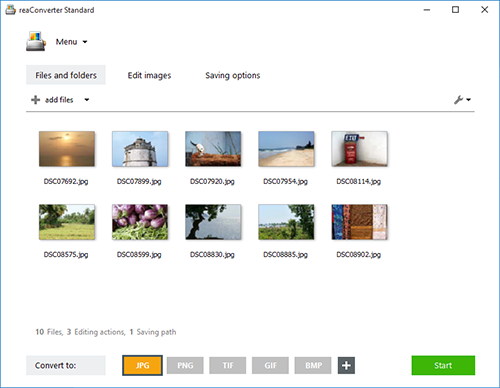
reaConverter is a powerful batch image converter which allows you to convert multiple images between a huge variety of different formats in a single operation. The bulk image converter provides immense support for different formats, so you can use it to open and convert any image of any format you are ever likely to encounter, including both rare and obsolete formats. In total, 545 input image formats are supported as well as 56 output formats.

Supported formats include all of the standard and advanced formats, RAW formats used by professional digital photographers, Microsoft Office Document formats including DOC, DOCX and RTF, CAD and AutoCAD formats and a whole lot more.

In addition to standard bulk image conversion features, you can also edit multiple images in one hit, including resizing, mirroring, applying filters and watermarks and much more. If you are looking for the ultimate batch image converter, then reaConverter is the solution you should be looking for.

The new update of reaConverter 7 lets creative people do what they should – create – taking the most of routine operations upon itself. The feature is called Watch Folders, and that’s what it does: watches folders containing images for new or modified files
and instantly applies predefined actions to them. Working invisibly in the background, reaConverter’s Watch Folders feature allows a user to resize, crop, adjust brightness and colors, add watermarks and otherwise alter images of 400+ supported formats that landed in the specified source folder.

You can find out more at http://www.reaconverter.com and download a trial version or purchase the bulk image converter today.