Category Archives: Graphic Apps

Animation Tools, CAD, Converters & Optimizers, Editors, Font Tools, Gallery & Cataloging Tools, Icon Tools, Other, Screen Capture, Viewers

PixelStyle Photo Editor for Mac 2.95

Type: Shareware
Cost: $29.99
Size: 18.40 MB
Release date: May 25 2016
Platform: Mac OS X
Publisher’s Site:  http://www.effectmatrix.com/
Publisher’s Product Page:  http://www.effectmatrix.com/mac-appstore/mac-photo-editor-pixelstyle.htm
Country: Hong Kong

PixelStyle Photo Editor for Mac

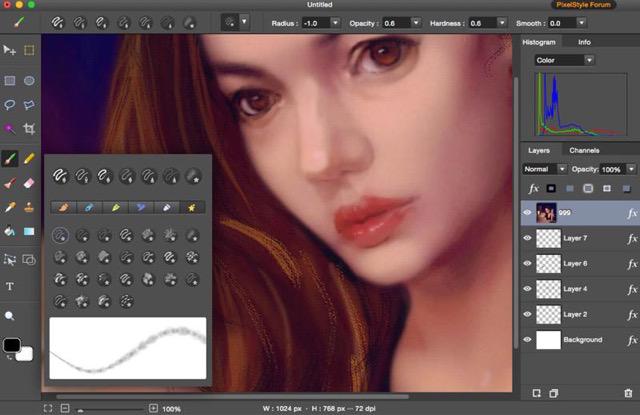
PixelStyle Photo Editor for Mac is FREE but full-blown Photo Editor for Mac.


Photo Editing Mac:
– A set of sophisticated but easy-to-use tools.
– Adjust exposure, hue, white balance, shadows and much more.
– Immediately delete unwanted elements and retouch the images.
– 1 min cut out objects from photos and change photo background.
– Quickly select any part of an image and apply special effects.

Top Drawing Tools for Mac:
– More than 100 built-in drawing brushes.
– Create custom brushes with different brush sizes, shapes, hardness…
– Support pixel-drawing.
– Fill in the object with texture and color.
– support for many gradient modes including symmetrical, rotate, clockwise and counter.

Powerful Layer Capabilities on Mac
– Full support for unlimited layers and layer groups.
– Easily add non-destructive layer effects.
– Support over 50 different filter effects and blending mode options.
– Resize layers without any loss of quality. Hide, duplicate and merge layers easily.
– Select several layers at one time and freely align, flip and transform the layers.
– Support channel selection and Alpha channel editing.
– Your file could be saved as a project.
– Work with all popular formats like TIFF, JPEG, PNG, GIF, BMP, etc.

Excellent Text Design Tools on Mac OS X
– Add text layer effects like shadows, strokes, glow or fills.
– Half Circle Text Tool: Easily place and modify your text on a half-circle to create logos and other useful text designs.
– Modify your text with on-canvas controls. Use the baseline sliders to get things looking just right.
– Convert type layers into raster layers.
– Enjoy a full set of advanced typography features like kerning, bold, italic and much more.

Designed exclusively for Mac
– Takes full advantage of the latest OS X technologies.
– Use the Touch trackpad to paint with pressure sensitivity.
– Fully optimized for 64-bit and multi-core processors.
– Support regular, retina and multi-monitor set ups.

Graphcat<

reaConverter Pro 7.2.48

Type: Shareware
Cost: $99.99
Size: 127.27 MB
Release date: Aug 08 2016
Platform: Win2000,WinXP,Win7 x32,Win7 x64,Windows 8,Windows 10,WinServer,WinOther,WinVista,WinVista x64
Publisher’s Site:  http://reasoft.com
Publisher’s Product Page:  http://www.reaconverter.com/
Country: United States of America


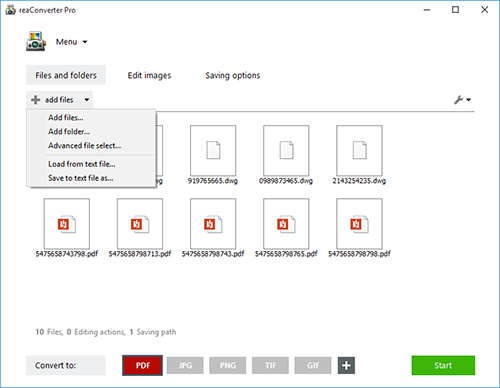
reaConverter Pro

Convert Multiple Images Quickly with a Bulk Image Converter

reaConverter is a bulk image converter providing a quick and convenient way to convert any number of images with just a few clicks. Thanks to its simple and clear interface, the program is understandable immediately even to those who have little or no experience with using such programs. When you need to convert large numbers of images all at once or make simple changes to multiple images, this batch image converter makes things quick and simple. Using this software, you will literally save hours and hours compared to manually converting each individual image.

reaConverter is a highly versatile solution which supports virtually every image format that you are ever likely to encounter. You can easily convert folders containing thousands of images in a single operation, and the process is quick and efficient as well. The program can read a huge variety of different formats, including all of the standard formats such as BMP and JPG. It also support numerous RAW format types used by professional digital cameras as well as other advanced formats, metafiles, CAD/AutoCAD formats, vector formats and even formats which are nowadays extremely rare. In total, reaConverter can read no less than 545 different formats, including 338 rare ones. Most of these rare formats will not open with any standard photo or image viewer application, so using the bulk image converter is a great way to make them more accessible with just a few clicks. In addition, reaConverter supports 55 output formats, allowing you to convert any of the supported read formats into a variety of common, advanced and other formats. In short, reaConverter supports pretty much every conceivable image format that you will ever encounter.

SeePlus 9.0.520

Type: Shareware
Cost: $99.99
Size: 1.16 MB
Release date: Jul 27 2016
Platform: Win2000,WinXP,Win7 x32,Win7 x64,Windows 8,Windows 10,WinServer,WinOther,WinVista,WinVista x64
Publisher’s Site:  http://www.acdsee.com
Publisher’s Product Page:  http://www.acdsee.com/en/products/seeplus
Country: United States of America


SeePlus

The need to manage, organize, view, edit, and preserve mass amounts of digital assets is a priority concern within the corporate environment. SeePlus offers the world’s best-in-class digital asset management and editing capabilities, including high performance, batch processing tools, IPTC support, and comprehensive image editing. From small to medium-sized to Fortune 500 businesses, SeePlus offers companies everything they need to ensure their data is organized, managed, and protected.

SeePlus and SeePlus DICOM offer digital asset management for PDF documents, Microsoft OfficeTM documents, and a variety of media files, along with speedy performance, and world-class photo editing capabilities. As Digital Imaging and Communications in Medicine (DICOM) has become the international standard for conveying information in medical imaging, SeePlus DICOM provides medical professionals with flexibility and control.