Category Archives: Graphic Apps

Animation Tools, CAD, Converters & Optimizers, Editors, Font Tools, Gallery & Cataloging Tools, Icon Tools, Other, Screen Capture, Viewers

Canvas Draw for Mac 3.0.2

Type: Shareware
Cost: $199
Size: 256.38 MB
Release date: Jun 16 2016
Platform: Mac OS X
Publisher’s Site:  http://www.acdsee.com
Publisher’s Product Page:  http://www.canvasgfx.com/en/products/canvas-draw
Country: United States of America


Canvas Draw for Mac

Canvas Draw 3 for Mac is a powerful software specifically designed to make it possible for designers, illustrators, and professionals to advertise and communicate with confidence. Now with a unicode text engine and user interface, text edit improvements, pressure sensitivity support for drawing tablets and more, Canvas Draw is your best choice for creating and sharing personal, business and marketing content.


Features Overview:
Catering to business professionals and creatives alike, Canvas Draw for Mac’s impressive and comprehensive set of vector object illustration and advanced raster image editing tools, along with its unique and integrated design environment, make it easy to conquer your project. Work with and combine all graphical elements and apply high-end effects in a single document.

Complete Versatility
Canvas Draw comes loaded with tools and techniques that allow you to easily create marketing or business materials, as well as creative content, printable drawings, and shareable PDFs. Put Canvas Draw to work designing brochures, collages, business cards, school projects, cover pages, handouts, printable advertisements, reports, graphs, metrics, web content, mock-ups, layouts, logos, scale drawings, floor plans, architectural designs, and other drawings best served with measured precision, placement, and the ability to combine text, images, and objects.

Graphcat<

reaConverter 7.2.38

Type: Shareware
Cost: $49.99
Size: 126.60 MB
Release date: Jul 07 2016
Platform: Win2000,WinXP,Win7 x32,Win7 x64,Windows 8,Windows 10,WinServer,WinOther,WinVista,WinVista x64
Publisher’s Site:  http://reasoft.com
Publisher’s Product Page:  https://www.reaconverter.com/
Country: United States of America


reaConverter

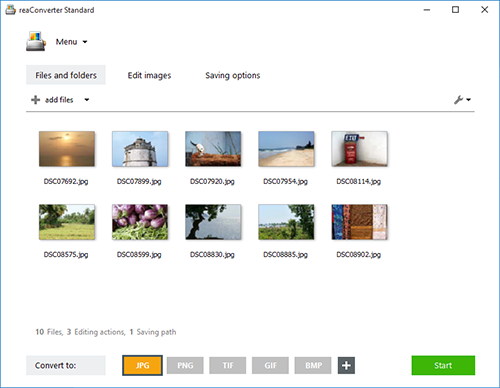
reaConverter is a powerful batch image converter which allows you to convert multiple images between a huge variety of different formats in a single operation. The bulk image converter provides immense support for different formats, so you can use it to open and convert any image of any format you are ever likely to encounter, including both rare and obsolete formats. In total, 545 input image formats are supported as well as 56 output formats.

Supported formats include all of the standard and advanced formats, RAW formats used by professional digital photographers, Microsoft Office Document formats including DOC, DOCX and RTF, CAD and AutoCAD formats and a whole lot more.

In addition to standard bulk image conversion features, you can also edit multiple images in one hit, including resizing, mirroring, applying filters and watermarks and much more. If you are looking for the ultimate batch image converter, then reaConverter is the solution you should be looking for.

The new update of reaConverter 7 lets creative people do what they should – create – taking the most of routine operations upon itself. The feature is called Watch Folders, and that’s what it does: watches folders containing images for new or modified files
and instantly applies predefined actions to them. Working invisibly in the background, reaConverter’s Watch Folders feature allows a user to resize, crop, adjust brightness and colors, add watermarks and otherwise alter images of 400+ supported formats that landed in the specified source folder.

You can find out more at http://www.reaconverter.com and download a trial version or purchase the bulk image converter today.

Q2ID 3.01

Type: Demo
Cost: $199
Size: 46.16 MB
Release date: May 25 2016
Platform: Win2000,WinXP,Win7 x32,Win7 x64,Windows 8,Windows 10,WinServer,WinOther,WinVista,WinVista x64
Publisher’s Site:  http://www.markzware.com
Publisher’s Product Page:  https://markzware.com/products/q2id/
Country: United States of America


Q2ID

Q2ID is an InDesign plugin to quickly convert QuarkXPress documents in Adobe InDesign. No more re-creating documents from scratch. The Q2ID InDesign plugin gives you a big head-start on QuarkXPress to InDesign data conversion.

Our Q2ID Bundle Subscription gives you access to all current Q2ID plugin versions. You will have access to Q2ID for InDesign CC, CS6, CS5.5 and CS5 both Macintosh and Windows platforms with a single purchase and License.

Currently running Adobe InDesign CS5 but thinking of upgrading? You’ll be covered when you decide to upgrade to CS6 or CC.
If Adobe releases a new CC version which breaks compatibility with our current CC plugin, you’ll get the upgraded plugin for free.
What’s that you say? Quark released a new version? You’ll have access to the upgraded plugins which can convert the new Quark documents.
Easy License Management: Never Remember an Activation Code again!

Markzware’s Q2ID data conversion software converts the intricate details of the original QuarkXPress document and instantly re-creates the document within Adobe InDesign. Q2ID works in InDesign CC, CS6, CS5.5 or CS5 on both Macintosh and Windows platforms.

Items that convert from QuarkXPress using the Q2ID QuarkXPress to InDesign plugin include: page positioning, color models, fonts and styles, images, and text attributes, as well as tables, layers, blends, runarounds, linked text boxes, anchored boxes, and pantone colors.

Q2ID converts Quark 4 through Quark 10 documents. That gives you the ability to convert over 15 years worth of documents.

Read more here: https://markzware.com/products/q2id/