Category Archives: Graphic Apps

Animation Tools, CAD, Converters & Optimizers, Editors, Font Tools, Gallery & Cataloging Tools, Icon Tools, Other, Screen Capture, Viewers

Batch JPEG Date Changer 1.0

Type: Shareware
Cost: $12.95
Size: 5.47 MB
Release date: May 24 2016
Platform: Win2000,WinXP,Win7 x32,Win7 x64,Windows 8,Windows 10,WinServer,WinOther,WinVista,WinVista x64
Publisher’s Site:  http://www.batchimage.com
Publisher’s Product Page:  http://www.batchimage.com/product/batch-jpeg-date-changer/
Country: United States of America

Batch JPEG Date Changer

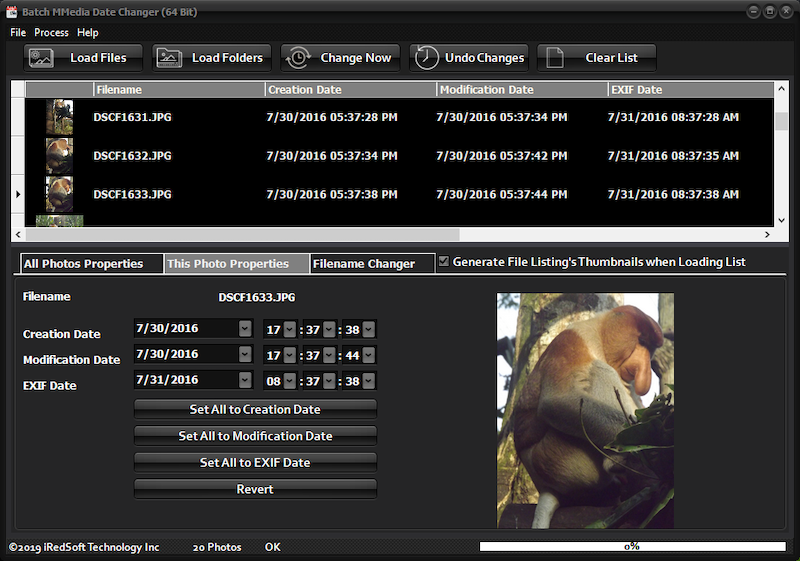
Batch JPEG Date Changer is a batch tool which saves you from those situations when you find your camera date time setting wrong (particularly during a battery change) or when it is set wrongly and finding all your photos with the wrong day or year. Conventional applications can change all the files to the same date and time but that’s not good for photos which are taken at different times.


Batch JPEG Date Changer is here to solve that and relief you from that headache. It not only works on the File Creation and Modification Date, it will change the EXIF Date and time which is embedded in the photos itself.

You can determine if you want to change the date or time or both by setting a fixed date or time or using the Date Maths method by adding or subtracting time and date from the files. It can help you sync all the File Creation Date, Modification Date and EXIF Date too.

Batch JPEG Date Changer comes in two versions, a full 32 Bit and a 64 Bit version for download.

Graphcat<

ACDSee Pro 9.2.0.528

Type: Shareware
Cost: $99.99
Size: 1.24 MB
Release date: May 11 2016
Platform: Win2000,WinXP,Win7 x32,Win7 x64,Windows 8,Windows 10,WinServer,WinOther,WinVista,WinVista x64
Publisher’s Site:  http://www.acdsee.com
Publisher’s Product Page:  http://www.acdsee.com/en/products/acdsee-pro-9
Country: United States of America


ACDSee Pro

ACDSee Pro 9 – Established photo enhancement and management solution, ACDSee Pro 9 not only stands the test of time, but continues to take on an ever-expanding list of improvements and new features designed to give users the stunning results and ease of use they have come to expect from this trusted software. New organizational tools, lens correction, elevated chronological viewing, new ways to track and batch apply any editing adjustment, the freedom to return to any point in development, extended creative capabilities through Photoshop plugin support, new light and skin adjustments, and much more, make ACDSee Pro 9 one of our strongest versions to date.

Features:
ACDSee Pro 9 is the most complete solution for the enhancement and control of your image production. With even more ways to track and replicate your steps, accelerate your workflow, and perfect your photos, youll be blown away by your new process and how fast you’ll be back out behind the lens. Boasting an impressive array of effects, skin tuning, lens correction and white balance improvements, fine tuning for your digital asset management process, development snapshots, support for 4k monitors, a chronological overview of your entire collection, and more resources for precision editing and drawing, ACDSee Pro 9 is a solid addition to the ACDSee family.

Super Refocus for Mac 1.5.2

Type: Shareware
Cost: $14.99
Size: 20.35 MB
Release date: Apr 21 2016
Platform: Mac OS X
Publisher’s Site:  http://www.effectmatrix.com/
Publisher’s Product Page:  http://www.effectmatrix.com/mac-appstore/add-focus-to-photos.htm
Country: Hong Kong


Super Refocus for Mac

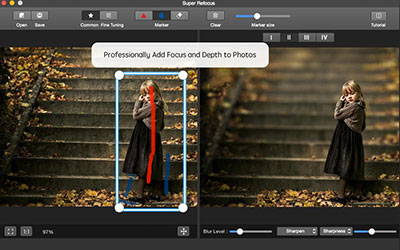
Super Refocus – Easily Add Focus and Depth to Your Photos.

Super Refocus for Mac easily creates selective focus, lens blur, motion blur and tilt-shift effects. With Super Refocus, the amazing tilt-shift photography is easy generated. By simply applying a blurred background and increasing the depth of field, a sense of depth is created to draw attention to the most important objects of an image. Super Refocus extends filter and lens functionality beyond your camera and allows you to make these adjustments after the shot, simplifying your shoot and giving you more control.

Main Features:

1 Automatically determine the target prospects based on the target box with state-of-the-art image segmentation algorithm.

2 Two processing modes: Regular mode and Customized mode. It offers simple tools to quickly start and sophisticated tools to further retouch photographic effects.

3 Adjust the scope of the focus area and the background with drawing stroke.

4 Four Perspective Modes offer different types of natural blurring effect for the background.

5 Determine the blur gradient for any area with customized mode.

6 Complete professional image editing with the advanced focus algorithm.

7 Intuitively control 5 blur levels and precise adjust blur strength.

8 Clear the target prospects with an advanced sharpen algorithm to achieve professional refocusing effect.

9 Live previews and real-time editing.

10 Undo, redo history can be saved so you can always undo, redo your changes with unlimited times.

Accomplish things in your photos more quickly and with less effort.