Category Archives: Graphic Apps

Animation Tools, CAD, Converters & Optimizers, Editors, Font Tools, Gallery & Cataloging Tools, Icon Tools, Other, Screen Capture, Viewers

reaConverter Lite 7.2.03

Type: Freeware
Cost: $0
Size: 10.63 MB
Release date: Mar 08 2016
Platform: Win2000,WinXP,Win7 x32,Win7 x64,Windows 8,Windows 10,WinServer,WinOther,WinVista,WinVista x64
Publisher’s Site:  http://reasoft.com
Publisher’s Product Page:  https://www.reaconverter.com/download/#compare
Country: United States of America

reaConverter Lite

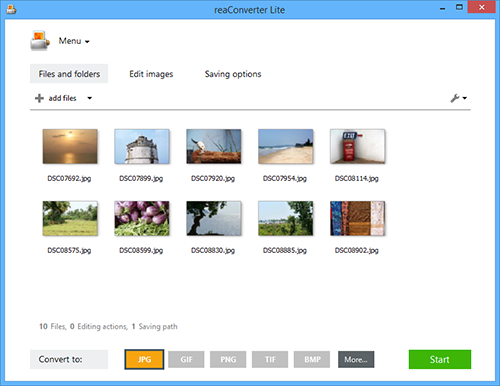
Free batch advanced image converter and image editing application.
reaConverter Lite can handle ultra-fast batch conversions between JPEG, GIF, TIFF, PNG and BMP images with access to lots of advanced picture editing techniques such as:


Alteration and Orientation tools: Resize, Crop, Canvas Size, Rotate, Mirror, Auto Crop, Auto Rotate

Adjustments tools: Brightness/Contrast, Color Balance, Gamma Correction, Hue/Saturation, White Balance, Photo Filter, Black & White, Invert, Color Depth

Creative Retouching tools: Sharpen, Blur, Anti-aliasing, Stylize, Border, Shadow, Noise, Selective Color Change, Background Change, Lens Correction, JPEG Artifacts Remove, Black and White Noise Remove

Watermarking tools: Image Watermark, Text Watermark, Dynamic Watermark, Primitive Drawings

Free version of reaConverter Lite also supports all formats features and tuning like:
Change Color Space (CMYK, RGB, YCbCr, …), Copy Metadata (EXIF, IPTC), Transfer Alfa Channel, Set DPI, Manage ICC Profile, Control Bit Depth, Format-Specific Saving Settings, Alter Multi-Page Settings, Select Transparency Color, Add TIFF Compression (CCITT, LZW, RLE, …), Set Quality.

Additional free features: Process Files from ZIP Folders, Create Thumbnails, Move Original Files, Move Unprocessed Files, Delete Files After Conversion, Set Manual File Date, Keep Path Info and Folders Structure, Name Files with Macros, EXIF and TIFF Tags, Skip Blank Files or Pages.

reaConverter Lite is uber-powerful and free image conversion tool with a great variety of features. It gives advanced solution for image processing and tuning.

Graphcat<

PixelStyle for Mac 2.70

Type: Freeware
Cost: $0
Size: 15.50 MB
Release date: Apr 16 2016
Platform: Mac OS X
Publisher’s Site:  http://www.effectmatrix.com/
Publisher’s Product Page:  http://www.effectmatrix.com/mac-appstore/pixelstyle-graphic-design-software-Mac.htm
Country: Hong Kong


PixelStyle for Mac

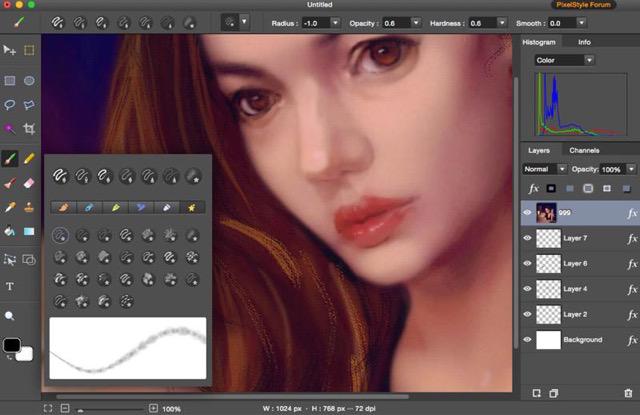
PixelStyle Photo Editor for Mac is FREE but full-blown Photo Editor for Mac.

Photo Editing Mac:
– A set of sophisticated but easy-to-use tools.
– Adjust exposure, hue, white balance, shadows and much more.
– Immediately delete unwanted elements and retouch the images.
– 1 min cut out objects from photos and change photo background.
– Quickly select any part of an image and apply special effects.

Top Drawing Tools for Mac:
– More than 100 built-in drawing brushes.
– Create custom brushes with different brush sizes, shapes, hardness…
– Support pixel-drawing.
– Fill in the object with texture and color.
– support for many gradient modes including symmetrical, rotate, clockwise and counter.

Powerful Layer Capabilities on Mac
– Full support for unlimited layers and layer groups.
– Easily add non-destructive layer effects.
– Support over 50 different filter effects and blending mode options.
– Resize layers without any loss of quality. Hide, duplicate and merge layers easily.
– Select several layers at one time and freely align, flip and transform the layers.
– Support channel selection and Alpha channel editing.
– Your file could be saved as a project.
– Work with all popular formats like TIFF, JPEG, PNG, GIF, BMP, etc.

Excellent Text Design Tools on Mac OS X
– Add text layer effects like shadows, strokes, glow or fills.
– Half Circle Text Tool: Easily place and modify your text on a half-circle to create logos and other useful text designs.
– Modify your text with on-canvas controls. Use the baseline sliders to get things looking just right.
– Convert type layers into raster layers.
– Enjoy a full set of advanced typography features like kerning, bold, italic and much more.

Designed exclusively for Mac
– Takes full advantage of the latest OS X technologies.
– Use the Touch trackpad to paint with pressure sensitivity.
– Fully optimized for 64-bit and multi-core processors.
– Support regular, retina and multi-monitor set ups.

PixelStyle Free for Mac 2.25

Type: Freeware
Cost: $0
Size: 17.35 MB
Release date: Feb 26 2016
Platform: Mac OS X
Publisher’s Site:  http://www.effectmatrix.com
Publisher’s Product Page:  http://www.effectmatrix.com/mac-appstore/pixelstyle-graphic-design-software-Mac.htm
Country: Hong Kong


PixelStyle Free for Mac

PixelStyle is a free but powerful photo graphic design software for Mac!

Professional Image Processing for Mac
– A set of sophisticated but easy-to-use tools.
– Adjust exposure, hue, vibrance, brightness, contrast and much more.
– Immediately delete unwanted things and retouch the images.
– 1 min cut out objects from photos and change its background.
– Quickly select any part of an image; edit and apply special effects to any portion of pictures.
– Open multiple interfaces at the same time.

Top Mac Drawing Tools:
– More than 100 built-in drawing brushes for oil painting, sketch…
– Freely create custom brushes.
– Support pixel-drawing.
– Fill in the object with texture and color.
– support for a variety of gradient modes.

Powerful Layer Capabilities on Mac
– Full support for unlimited layers and layer groups.
– Easily add non-destructive layer effects like shadows, fills,glow or strokes.
– Support over 50 different filter effects and blending mode options.
– Resize layers without any loss of quality. Hide, duplicate and merge layers easily.
– Select several layers at one time and freely align, flip and transform the layers.
– Support channel selection and Alpha channel editing.
– File could be saved as a project – you can edit them next time.
– Work with all popular formats like TIFF, JPEG, PNG, GIF, BMP, etc.

Excellent Mac Font Design Tool
– Add text layer effects like shadows, strokes, glow or fills.
– Reshape the text to irregular shape such as fan-shaped.
– Freely transform the text.
– Convert type layers into raster layers.
– Enjoy a full set of typography features like kerning, bold, italic and more.

Designed exclusively for Mac
– Takes full advantage of the latest OS X technologies including OpenGL, Grand Central Dispatch and Core Graphics.
– Use the Touch trackpad to paint with pressure sensitivity.
– Fully optimized for 64-bit and multi-core processors.
– Support regular, retina and multi-monitor set ups.