Category Archives: Graphic Apps

Animation Tools, CAD, Converters & Optimizers, Editors, Font Tools, Gallery & Cataloging Tools, Icon Tools, Other, Screen Capture, Viewers

PixelStyle Photo Editor 2.70

Type: Freeware
Cost: $0
Size: 15.50 MB
Release date: Apr 13 2016
Platform: Mac OS X
Publisher’s Site:  http://www.effectmatrix.com/
Publisher’s Product Page:  http://www.effectmatrix.com/mac-appstore/pixelstyle-graphic-design-software-Mac.htm
Country: Hong Kong
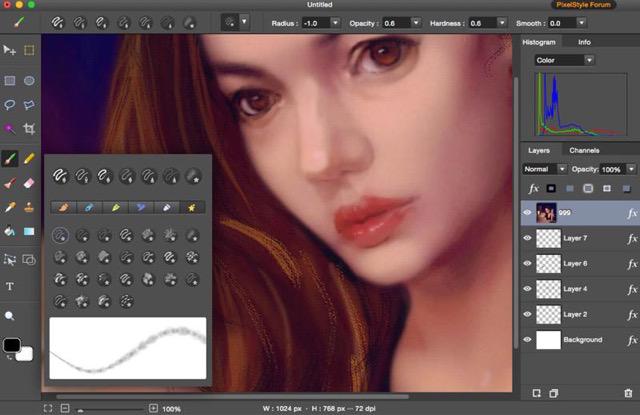

PixelStyle Photo Editor

PixelStyle Photo Editor is FREE but full-blown Photo Editor for Mac.


Photo Editing Mac:
– A set of sophisticated but easy-to-use tools.
– Adjust exposure, hue, white balance, shadows and much more.
– Immediately delete unwanted elements and retouch the images.
– 1 min cut out objects from photos and change photo background.
– Quickly select any part of an image and apply special effects.

Top Drawing Tools for Mac:
– More than 100 built-in drawing brushes.
– Create custom brushes with different brush sizes, shapes, hardness…
– Support pixel-drawing.
– Fill in the object with texture and color.
– support for many gradient modes including symmetrical, rotate, clockwise and counter.

Powerful Layer Capabilities on Mac
– Full support for unlimited layers and layer groups.
– Easily add non-destructive layer effects.
– Support over 50 different filter effects and blending mode options.
– Resize layers without any loss of quality. Hide, duplicate and merge layers easily.
– Select several layers at one time and freely align, flip and transform the layers.
– Support channel selection and Alpha channel editing.
– Your file could be saved as a project.
– Work with all popular formats like TIFF, JPEG, PNG, GIF, BMP, etc.

Excellent Text Design Tools on Mac OS X
– Add text layer effects like shadows, strokes, glow or fills.
– Half Circle Text Tool: Easily place and modify your text on a half-circle to create logos and other useful text designs.
– Modify your text with on-canvas controls. Use the baseline sliders to get things looking just right.
– Convert type layers into raster layers.
– Enjoy a full set of advanced typography features like kerning, bold, italic and much more.

Designed exclusively for Mac
– Takes full advantage of the latest OS X technologies.
– Use the Touch trackpad to paint with pressure sensitivity.
– Fully optimized for 64-bit and multi-core processors.
– Support regular, retina and multi-monitor set ups.

Graphcat<

SHU 2.0.0

Type: Freeware
Cost: $0
Size: 41.02 MB
Release date: Apr 08 2016
Platform: Win2000,WinXP,Win7 x32,Win7 x64,Windows 8,Windows 10,WinServer,WinOther,WinVista,WinVista x64
Publisher’s Site:  https://screenshu.com
Publisher’s Product Page:  https://screenshu.com
Country: Poland


SHU

1. Take a screenshot
While playing, press Ctrl + Shift + F. Your screenshot will be automatically saved in the cloud and a link to it will appear in your clipboard, ready to paste. You can change the key combination any time you want in the settings.

Want to save a great score or explain a new strategy? With SHU, it will only take you 0.3 s!

2. Modify your screenshot using the built-in editor
SHU lets you edit your screenshot in many ways, including adding your own text, colorful frames, arrows and shapes, as well as blurring parts you don’t want to show.

All changes are saved and updated automatically. You only have to send the link to your friends once they will always have access to the latest version of the screenshot.

3. Share your screenshot with your friends
Your screenshot is ready to share in 0.3 s that’s how long it takes to automatically generate the link and save it to the clipboard.

Press Ctrl + V to paste the link anywhere you want or share the screenshot directly on Facebook.

ACDSee 19.1.0.419

Type: Shareware
Cost: $59.99
Size: 1.26 MB
Release date: Nov 04 2015
Platform: Win2000,WinXP,Win7 x32,Win7 x64,Windows 8,Windows 10,WinServer,WinOther,WinVista,WinVista x64
Publisher’s Site:  http://www.acdsee.com
Publisher’s Product Page:  http://www.acdsee.com/en/products/acdsee-19
Country: United States of America


ACDSee

ACDSee 19 – Organize, edit, and share your photos with ease.

Overview: Trusted digital asset management paired with photo editing essentials, ACDSee 19 allows users to execute the fundamental elements of their photography workflow with ease and speed. ACDSee 19 is the efficiency-driven solution for your growing photo collection.

Features:
ACDSee 19 is packed with tools to help you organize your photos, perfect your best, and inspire your friends and family. Now featuring an entire mode for chronologically viewing your entire image collection from a bird’s-eye view, collections, exact color matching, pressure sensitivity for the brush tool designed to keep your edits as precise as possible, high DPI support for crisp viewing on 4K monitors, and much more, ACDSee 19’s new features add even more value to this dependable software.

Collections – NEW:
Group your photos in one place for a simple take on highly complex organizing and easy searching. Create Collections to fast-track the right photos to the right workflow, such as printing, batch editing, sharing to web, developing, or accumulating for a slideshow. Construct Smart Collections containing a search, which you can return to at any time. Utilize an extensive list of search variables, including relative dates, date ranges, metadata, and file properties. Smart Collection’s search will update its findings as files are added to the database zero effort on your part.

Photos Mode – NEW:
Experience the entirety of your photo collection by date. Gain new perspective on your memories by browsing it by year, month, or day. Conveniently locate your place in giant collections thanks to pop-up dates showing you exactly where you are in time. Quickly move from this panoramic chronoscopic view to organizing, viewing individual files, or taking them directly into Edit mode for adjustment.

4K Support – NEW:
View your images on 4k monitors in sharp, uncompromising detail no number of words can describe.